AdvancedCloud & DevOps · Lesson 10 of 14 · Updated ·
Bash Scripting for DevOps — Variables, Exit Codes, Loops, Safe Scripts and Cron Jobs
In the Linux lesson you typed commands one by one. A DevOps engineer types the same commands again and again: take a backup, clean old logs, check that the site is healthy, deploy a release. A bash script is simply those commands saved in a file so they run the same way every time, at 3 a.m. too, without a human. This lesson teaches the parts of bash you will actually use at work.
1. Your first script
A script is a text file. The first line, the shebang, tells Linux which program runs it.
#!/usr/bin/env bash
name="$1"
count=${2:-3}            # second argument, default 3
echo "Hello, $name"
echo "Script: $0, arguments: $#"
for i in $(seq 1 "$count"); do
  echo "  round $i"
done
Save it as greet.sh, make it executable once with chmod +x greet.sh, then run it:
$ ./greet.sh Asha 2
Hello, Asha
Script: ./greet.sh, arguments: 2
  round 1
  round 2
| Syntax | Meaning |
|---|---|
name="Asha" | create a variable (no spaces around =) |
"$name" | use the variable's value |
$1, $2 … | arguments given to the script |
$0 / $# | the script's name / the number of arguments |
${2:-3} | $2 if it was given, otherwise the default 3 |
$(command) | run a command and use its output, e.g. today=$(date +%F) |
2. Exit codes: how scripts talk to each other
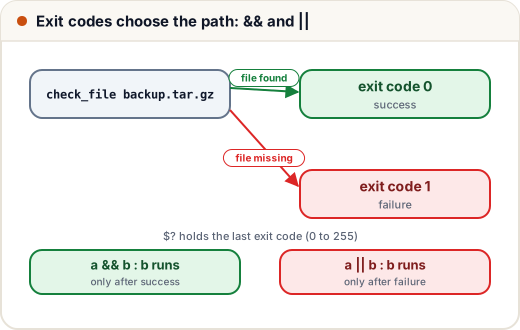
Every command finishes with an exit code: a number from 0 to 255. 0 means success; anything else means failure. The special variable $? holds the exit code of the last command. CI systems, cron and other scripts all decide "did it work?" by looking at this number, not at the text printed.
#!/usr/bin/env bash
check_file() {
  if [ -f "$1" ]; then
    echo "OK: $1 exists"
    return 0
  else
    echo "MISSING: $1"
    return 1
  fi
}
check_file greet.sh
echo "exit code: $?"
check_file backup.tar.gz
echo "exit code: $?"
check_file greet.sh && echo "-> continue deploy"
check_file backup.tar.gz || echo "-> stop: no backup"
$ bash check.sh
OK: greet.sh exists
exit code: 0
MISSING: backup.tar.gz
exit code: 1
OK: greet.sh exists
-> continue deploy
MISSING: backup.tar.gz
-> stop: no backup
a && brunsbonly ifasucceeded. Use it for steps that depend on each other:npm test && npm run build.a || brunsbonly ifafailed. Use it for fallbacks and messages.[ -f file ]is a test: it exits 0 if the file exists. Other common tests:-d(folder exists),-z "$x"(string is empty),"$a" = "$b"(strings equal),"$n" -gt 5(number greater than).
3. Quoting: the bug that deletes the wrong files
Bash splits unquoted values at spaces. A file named exam marks.txt becomes two words:
$ cat $file
cat: exam: No such file or directory
cat: marks.txt: No such file or directory
$ cat "$file"
90
Here it only printed errors, but with rm $file the same bug can delete the wrong files. Always write "$variable" in double quotes. Single quotes '$name' print the text $name literally, without using the variable.
4. Loops and functions
for server in web1 web2 web3; do
  ssh "deploy@$server" "sudo systemctl restart app" && echo "$server restarted"
done

while read -r line; do        # read a file line by line
  echo "user: $line"
done < users.txt
A function groups commands and returns an exit code with return, as check_file did above. Small functions with clear names make a 100-line script readable.
5. Safe scripts: set -euo pipefail
By default, bash keeps going after a command fails. In a deploy script that is dangerous: if the build fails, it may still restart the server with half-built files. Put this line at the top of every script:
#!/usr/bin/env bash
set -euo pipefail
echo "step 1: build"
false_step() { return 3; }
false_step
echo "step 2: deploy (never printed)"
$ bash strict.sh; echo "script exit code: $?"
step 1: build
script exit code: 3
| Option | Effect |
|---|---|
-e | stop the script as soon as a command fails |
-u | treat an unset variable as an error (catches typos like $Nmae) |
-o pipefail | a pipeline a | b fails if any part fails, not only the last |
Also useful: trap 'rm -f /tmp/build.lock' EXIT runs a cleanup command however the script ends, and bash -x script.sh prints each command before running it, which helps when debugging.
6. Scheduling with cron
cron is the Linux service that runs commands on a schedule. Each user has a crontab (edit it with crontab -e). A line has five time fields, then the command:
# min hour day-of-month month day-of-week  command
30 2 * * 1-5  /home/deploy/backup.sh >> /var/log/backup.log 2>&1
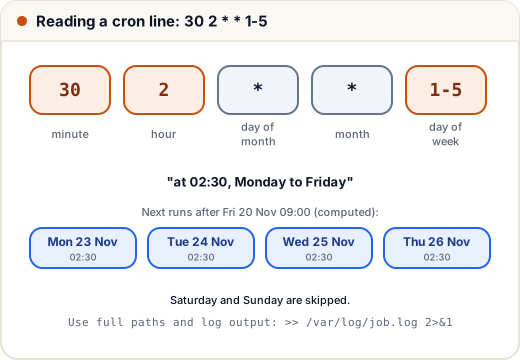
That line means "at 02:30, Monday to Friday". Let's check our reading by expanding the schedule in Python:
from datetime import datetime, timedelta

def next_runs(minute, hour, weekdays, start, n=3):
    t = start.replace(second=0, microsecond=0) + timedelta(minutes=1)
    runs = []
    while len(runs) < n:
        if t.minute == minute and t.hour == hour and t.isoweekday() in weekdays:
            runs.append(t.strftime("%a %d %b %H:%M"))
        t += timedelta(minutes=1)
    return runs

# 30 2 * * 1-5  (cron counts Monday as 1 ... Friday as 5)
print(next_runs(30, 2, range(1, 6), datetime(2026, 11, 20, 9, 0)))
['Mon 23 Nov 02:30', 'Tue 24 Nov 02:30', 'Wed 25 Nov 02:30']
Starting on Friday morning, the next run is on Monday: Saturday and Sunday are skipped. Other patterns: */5 * * * * (every 5 minutes), 0 * * * * (every hour on the hour), 0 9 1 * * (09:00 on the 1st of every month).
Two cron rules that save hours of confusion: cron runs with a very small PATH, so use full paths (/usr/bin/pg_dump), and always redirect output to a log file (>> file.log 2>&1), otherwise errors disappear.
7. Case study: a log health check
The college's quiz site sometimes returns server errors during tests. The team wants a script that reads the nginx access log, counts 5xx errors and fails loudly when there are too many, so cron or a monitoring tool can alert someone.
#!/usr/bin/env bash
set -euo pipefail

LOG="access.log"
LIMIT=2                       # alert if more than 2 server errors

total=$(wc -l < "$LOG")
errors=$(awk '$9 >= 500' "$LOG" | wc -l)
echo "requests: $total, 5xx errors: $errors"

echo "top status codes:"
awk '{print $9}' "$LOG" | sort | uniq -c | sort -rn | head -3

if [ "$errors" -gt "$LIMIT" ]; then
  echo "ALERT: too many 5xx errors"
  exit 1
fi
echo "all good"
Run on a small sample log of 8 requests (in nginx's standard log format, the 9th field is the status code):
$ bash health.sh; echo "exit code: $?"
requests: 8, 5xx errors: 3
top status codes:
      4 200
      2 502
      1 500
ALERT: too many 5xx errors
exit code: 1
The script prints a summary for humans and exits with 1 for machines. A monitoring tool, a CI job or a cron wrapper can now alert on the exit code. The 502 errors point at the app server behind nginx being down or restarting, which is where the investigation starts.
Common mistakes
- Spaces around
=(name = "Asha"runs a command calledname). - Unquoted variables:
rm $filebreaks on spaces; writerm "$file". - No
set -euo pipefail, so a failed step is ignored and the script "succeeds". - Printing "ERROR" but exiting 0, so CI and cron think everything worked.
- Cron jobs with relative paths and no log redirection, then wondering why nothing happened.
Quick recap
- A script = saved commands; start with
#!/usr/bin/env bash, runchmod +xonce. - Variables:
x="value", use as"$x"; arguments$1 $2, count$#, defaults${2:-3}. - Exit code 0 = success;
$?holds it;&&runs on success,||on failure. - Quote every variable; use
set -euo pipefail;trapfor cleanup;bash -xto debug. - cron:
min hour day month weekday command; use full paths and log the output.