Cloud & DevOps · Lesson 8 of 9 · Updated ·
Infrastructure as Code with Terraform — Plan, Apply, State and Reusable Modules
Setting up a server by clicking through the AWS console works once. Doing it again for staging, again for a second region, and remembering in six months exactly which 47 settings you chose — doesn't. Infrastructure as Code (IaC) describes servers, networks and databases in files, stored in Git and applied by a tool.
1. Why IaC?
| Clicking in the console | Infrastructure as Code |
|---|---|
| not repeatable; easy to forget a setting | identical environments every time |
| no history of who changed what | Git history + code review |
| hard to recreate after a disaster | re-run the code |
| "snowflake" servers nobody understands | documented by the code itself |
Declarative tools (Terraform, CloudFormation, Pulumi) describe the end state ("there should be one bucket with versioning on"); the tool works out the steps.
2. Terraform basics
Terraform uses HCL files (.tf). Building blocks:
- provider — which platform (aws, azurerm, google, cloudflare, github…)
- resource — something to create (
aws_s3_bucket,aws_instance) - variable / output — inputs and results
- data — read existing things (e.g. the latest Ubuntu image)
terraform {
  required_providers {
    aws = {
      source  = "hashicorp/aws"
      version = "~> 6.0"
    }
  }
}

provider "aws" {
  region = "ap-south-1"            # Mumbai
}

variable "env" {
  type    = string
  default = "staging"
}

resource "aws_s3_bucket" "uploads" {
  bucket = "skills101-uploads-${var.env}"
  tags = {
    project = "skills101"
    env     = var.env
  }
}

resource "aws_s3_bucket_versioning" "uploads" {
  bucket = aws_s3_bucket.uploads.id
  versioning_configuration {
    status = "Enabled"
  }
}

output "bucket_name" {
  value = aws_s3_bucket.uploads.bucket
}
Notice aws_s3_bucket.uploads.id — one resource references another, and Terraform uses those references to work out the order of creation.
3. The workflow: init → plan → apply
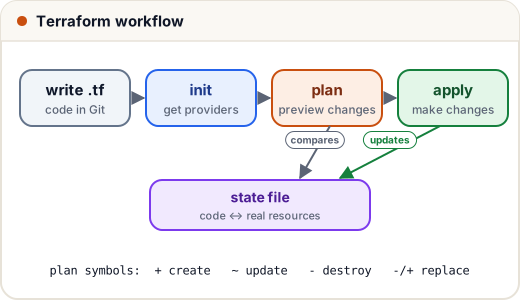
terraform init                         # download providers, set up the backend
terraform fmt && terraform validate    # tidy and check syntax
terraform plan -var="env=staging"      # dry run: what will change?
terraform apply -var="env=staging"     # make it so (asks for confirmation)
terraform destroy -var="env=staging"   # remove everything this code created
plan output uses + (create), ~ (change in place), - (destroy) and -/+ (replace). Always read the plan — a -/+ on a database means data loss. In teams, CI runs plan on every pull request and posts it for review; apply runs after merge.
4. State: how Terraform remembers
Terraform keeps a state file mapping your code to real resources (aws_s3_bucket.uploads ↔ bucket skills101-uploads-staging). Rules:
- For teams, store state in a remote backend (e.g. an S3 bucket with locking, or Terraform Cloud) — never on one laptop.
- State can contain secrets: restrict and encrypt it, never commit it to Git.
- Locking prevents two people applying at the same time.
- If someone changes a resource by hand in the console, the real world no longer matches the code — drift. The next
planshows it; fix the code or let Terraform put things back.
5. Reuse with modules
A module is a folder of Terraform you call with inputs — like a function:
module "staging_network" {
  source     = "./modules/network"
  cidr_block = "10.10.0.0/16"
  env        = "staging"
}

module "prod_network" {
  source     = "./modules/network"
  cidr_block = "10.20.0.0/16"
  env        = "prod"
}
Same tested code → staging and production built identically, differing only in inputs. Public modules (e.g. the community AWS VPC module) save weeks of work.
6. Configuration management and GitOps
Terraform creates infrastructure. Other tools configure what runs on it:
| Tool | Job |
|---|---|
| Ansible | configure servers over SSH with YAML "playbooks" (install nginx, create users, copy configs) — agentless |
| Packer | build pre-configured machine images (AMIs) |
| Docker | package the app itself (lesson 4) |
| Argo CD / Flux | GitOps: the Kubernetes cluster continuously syncs itself to what's in a Git repo |
A small Ansible playbook:
- name: Web servers
  hosts: web
  become: true
  tasks:
    - name: Install nginx
      ansible.builtin.apt:
        name: nginx
        state: present
        update_cache: true
    - name: Make sure nginx is running
      ansible.builtin.service:
        name: nginx
        state: started
        enabled: true
Like Terraform, it's idempotent: run it ten times, and it only changes what isn't already in the desired state.
7. Case study: rebuilding a region in 40 minutes
A company's infrastructure lived in one region, set up by hand over two years. When they needed a second region for a big client, it took three weeks of clicking and comparing screenshots — and the copy still differed in small ways that caused bugs.
They then moved everything to Terraform modules (network, database, app cluster) with remote state and plan-on-PR. The next region took 40 minutes — one new file with different inputs — and every later change was reviewed like normal code.
Common mistakes
- Committing
terraform.tfstateor.tfvarswith secrets to Git. - Applying without reading the plan.
- Making manual console changes to Terraform-managed resources (drift).
- Not pinning provider versions.
- One giant state for everything — split by environment/component to limit the blast radius.
Quick recap
- IaC = infrastructure described in versioned files: repeatable, reviewable, recoverable.
- Terraform: providers, resources, variables, outputs; init → plan → apply (read the plan!).
- State maps code to reality: remote backend, locking, encryption; watch for drift.
- Modules for reuse; Ansible for server configuration; GitOps keeps clusters synced with Git.