Cloud & DevOps · Lesson 7 of 9 · Updated ·
AWS Core Services for Developers — EC2, S3, RDS, IAM, Lambda, CloudFront and Keeping the Bill Under Control
AWS has 200+ services, but a typical web application uses about ten. Learn these well and you can read most architecture diagrams and job descriptions. (Azure and Google Cloud have equivalents for each — see lesson 1.)
1. A typical web app on AWS
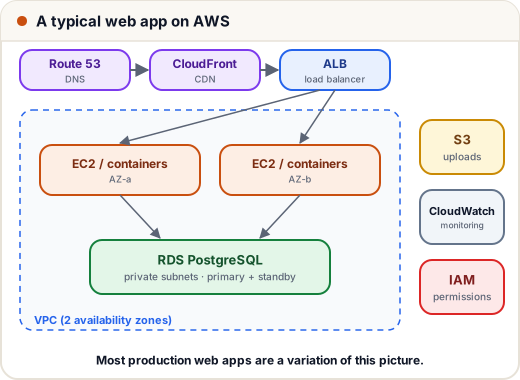
Requests flow: Route 53 (DNS) → CloudFront (CDN cache) → Application Load Balancer → EC2 instances (or containers) in two AZs → RDS database; files in S3; everything watched by CloudWatch and controlled by IAM.
2. The core services
| Service | What it is | Use it for |
|---|---|---|
| EC2 | virtual machines | running your app, workers, anything needing a full server |
| S3 | object storage (files in "buckets") | uploads, images, backups, static websites, data lakes |
| RDS | managed relational databases (PostgreSQL, MySQL, …) | your app's database, with automatic backups and patching |
| IAM | users, roles and permissions | who/what may do what — the security foundation |
| Lambda | run functions without servers, pay per invocation | event handlers, small APIs, scheduled jobs |
| CloudFront | CDN with edge locations worldwide (incl. Indian cities) | fast static content, caching, TLS at the edge |
| Route 53 | DNS + health checks | domain records, failover |
| CloudWatch | metrics, logs, alarms | monitoring and alerting |
| VPC | your private network (lesson 3) | subnets, security groups |
| ECS / EKS | run containers (AWS-native / Kubernetes) | containerised apps |
| SQS / SNS | queues / pub-sub notifications | decoupling services, background jobs |
3. EC2 in practice
- Choose an AMI (OS image, e.g. Ubuntu 24.04), an instance type (
t3.micro,t3.small… letter = family, size = CPU/RAM), a subnet and a security group. - Connect with an SSH key pair (lesson 2) or AWS Systems Manager Session Manager (no open port 22 needed).
- Elastic IP = a fixed public IP. Auto Scaling Group = keeps N instances healthy and scales with load behind a load balancer.
- Instances are cattle, not pets: build them from scripts or images so any one can be replaced.
4. S3 in practice
- Files are objects in buckets, addressed by key:
s3://skills101-uploads/projects/p_91/cover.jpg. - Block Public Access is on by default — keep it on. Serve public files through CloudFront, and give users temporary access with pre-signed URLs (a link that works for, say, 10 minutes).
- Storage classes trade price for access speed (Standard → Infrequent Access → Glacier for archives); lifecycle rules move old files automatically.
- Turn on versioning for important buckets (protects against accidental deletes).
Misconfigured public S3 buckets have leaked millions of records worldwide. "Private by default, share through signed URLs or CloudFront" avoids this.
5. IAM: least privilege
IAM answers who (principal) can do what (action) on which resource.
- Users — people (prefer single sign-on for teams); enable MFA, especially on the root account, and never use root for daily work.
- Roles — temporary credentials for services: an EC2 instance or Lambda assumes a role. No access keys in your code.
- Policies — JSON documents of allowed actions.
A policy letting an app upload and read files in one folder of one bucket — nothing else:
{
  "Version": "2012-10-17",
  "Statement": [
    {
      "Effect": "Allow",
      "Action": ["s3:PutObject", "s3:GetObject"],
      "Resource": "arn:aws:s3:::skills101-uploads/projects/*"
    }
  ]
}
Compare with the lazy version "Action": "s3:*", "Resource": "*" — if the app is hacked, the attacker gets every bucket in the account. Start with nothing and add exactly what's needed.
Let's check a policy like AWS does, for a few requests (a simplified evaluator — real IAM has more rules, but the core is "allow only if a statement matches"):
from fnmatch import fnmatch

policy = [{"Effect": "Allow", "Action": ["s3:PutObject", "s3:GetObject"],
           "Resource": "arn:aws:s3:::skills101-uploads/projects/*"}]

def allowed(action, resource):
    return any(s["Effect"] == "Allow" and action in s["Action"] and fnmatch(resource, s["Resource"])
               for s in policy)

tests = [("s3:PutObject", "arn:aws:s3:::skills101-uploads/projects/p_91/cover.jpg"),
         ("s3:DeleteObject", "arn:aws:s3:::skills101-uploads/projects/p_91/cover.jpg"),
         ("s3:GetObject", "arn:aws:s3:::skills101-uploads/invoices/2026-11.pdf"),
         ("s3:GetObject", "arn:aws:s3:::other-bucket/secret.csv")]
for action, resource in tests:
    print("ALLOW" if allowed(action, resource) else "DENY ", action, resource.split(":::")[1])
ALLOW s3:PutObject skills101-uploads/projects/p_91/cover.jpg
DENY  s3:DeleteObject skills101-uploads/projects/p_91/cover.jpg
DENY  s3:GetObject skills101-uploads/invoices/2026-11.pdf
DENY  s3:GetObject other-bucket/secret.csv
Anything not explicitly allowed is denied — the same "deny by default" idea as security groups and the access-control lesson.
6. Serverless with Lambda
A Lambda function runs your code in response to an event — an HTTP request (via API Gateway or a function URL), a file uploaded to S3, a queue message, a schedule:
def handler(event, context):
    name = event.get("queryStringParameters", {}).get("name", "student")
    return {"statusCode": 200, "body": f"Hello, {name}!"}
Pros: no servers to manage, scales automatically, pay only when it runs. Cons: time limits (max 15 minutes), cold starts after idle periods, and harder local testing. Great for glue code, image resizing on upload, webhooks and scheduled jobs.
7. Keeping the bill under control (read this before creating anything)
- Create a billing alarm / budget (e.g. alert at ₹500) on day one.
- Use the Free Tier carefully — read its current limits; some offers are time-limited and not everything is free.
- Stop or terminate what you don't use; delete unattached EBS volumes, old snapshots and idle Elastic IPs and NAT gateways (classic surprise costs).
- Tag resources (
project=fest-app,owner=asha) so you know what's what. - Prefer smaller instance types and turn dev environments off at night.
8. Case study: a fest website that survived
A college fest site expected 50,000 visitors on registration day. Architecture: static pages (Next.js export) on S3 + CloudFront, registrations via API Gateway + Lambda writing to a managed database, confirmation emails via a queue. Cost for the month: very low; traffic spike: absorbed by CloudFront and Lambda scaling; ops work during the event: zero restarts. The previous year's single-VM site had crashed in the first 10 minutes.
Common mistakes
- Using the root account and long-lived access keys in code (use roles).
"Action": "*"policies.- Public S3 buckets for private data.
- Forgetting a running NAT gateway or large instance and getting a big bill.
- Putting the database in a public subnet.
Quick recap
- Core: EC2 (VMs), S3 (files), RDS (managed DB), IAM (permissions), Lambda (serverless), CloudFront (CDN), Route 53 (DNS), CloudWatch (monitoring).
- IAM: MFA on root, roles for services, least privilege, deny by default.
- S3 private by default; share via pre-signed URLs or CloudFront.
- Set a billing alarm before you build anything.