Cloud & DevOps · Lesson 3 of 9 · Updated ·
Networking for Cloud — IP Addresses, CIDR, DNS, Ports, Load Balancers, VPCs and Security Groups
Most "my app doesn't work in the cloud" problems are networking problems: a closed port, a wrong subnet, a DNS record pointing to the old server. This lesson gives you the mental model to debug them.
1. IP addresses: public and private
An IPv4 address is 4 numbers (0–255): 203.0.113.10. Some ranges are private — usable inside networks but not reachable from the internet:
| Private range | CIDR |
|---|---|
| 10.0.0.0 – 10.255.255.255 | 10.0.0.0/8 |
| 172.16.0.0 – 172.31.255.255 | 172.16.0.0/12 |
| 192.168.0.0 – 192.168.255.255 | 192.168.0.0/16 |
Your home Wi-Fi gives your laptop 192.168.x.x; your router has one public IP and translates (NAT) for everyone inside. Cloud servers are the same: a private IP inside the cloud network, and optionally a public IP.
2. CIDR: describing a block of addresses
10.0.0.0/16 means "the first 16 bits are fixed, the rest can vary". Fewer fixed bits → bigger block. Python's ipaddress module does the maths:
import ipaddress

vpc = ipaddress.ip_network("10.0.0.0/16")
print("VPC addresses:", vpc.num_addresses)

subnets = list(vpc.subnets(new_prefix=24))
print("possible /24 subnets:", len(subnets))
print("first three:", [str(s) for s in subnets[:3]])

public = ipaddress.ip_network("10.0.1.0/24")
print("10.0.1.25 in public subnet?", ipaddress.ip_address("10.0.1.25") in public)
print("10.0.2.25 in public subnet?", ipaddress.ip_address("10.0.2.25") in public)
print("usable hosts in a /24 (minus network & broadcast):", public.num_addresses - 2)
VPC addresses: 65536
possible /24 subnets: 256
first three: ['10.0.0.0/24', '10.0.1.0/24', '10.0.2.0/24']
10.0.1.25 in public subnet? True
10.0.2.25 in public subnet? False
usable hosts in a /24 (minus network & broadcast): 254
| CIDR | Addresses | Typical use |
|---|---|---|
/16 | 65,536 | a whole VPC |
/24 | 256 | one subnet |
/32 | 1 | exactly one IP (e.g. "allow only my office IP") |
/0 | everything | "anywhere on the internet" (0.0.0.0/0) |
(Clouds reserve a few addresses per subnet — AWS keeps 5 — so the usable count is slightly lower.)
3. DNS: names to addresses
People type skills101.in; computers need an IP. DNS is the internet's phone book:
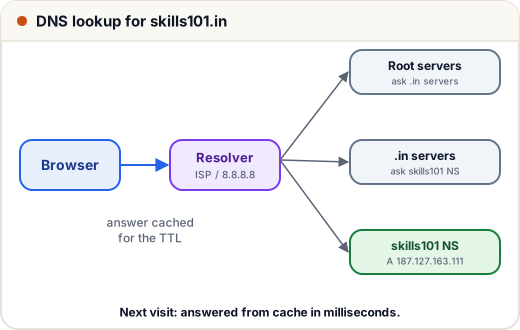
| Record | Points | Example |
|---|---|---|
| A | name → IPv4 | skills101.in → 187.127.163.111 |
| AAAA | name → IPv6 | |
| CNAME | name → another name | www → skills101.in |
| MX | where email for the domain goes | mx1.hostinger.com |
| TXT | text, for verification and email security | Google Search Console verification, SPF |
| NS | which servers are authoritative for the domain |
TTL (time to live) says how long resolvers may cache a record. Before moving a site to a new server, lower the TTL a day earlier so the switch spreads quickly. Debug with nslookup skills101.in or dig skills101.in.
4. Ports and protocols
An IP finds the machine; a port finds the program on it.
| Port | Service |
|---|---|
| 22 | SSH |
| 80 / 443 | HTTP / HTTPS |
| 5432 | PostgreSQL |
| 3306 | MySQL |
| 6379 | Redis |
| 3000, 8080 | common app dev ports |
TCP is reliable and ordered (web, SSH, databases); UDP is fast with no delivery guarantee (DNS queries, video calls, games).
Only ports 22, 80 and 443 should normally be open to the internet — and 22 ideally only from your IP. Databases should never be open to 0.0.0.0/0.
5. Load balancers and reverse proxies
A load balancer spreads incoming traffic across several servers and stops sending to unhealthy ones (via health checks like GET /health).
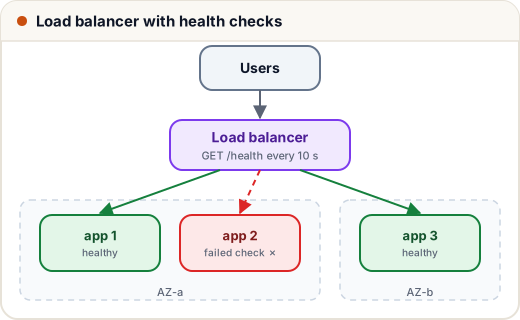
- Layer 7 (HTTP) balancers can route by path or host (
/api→ API servers) and terminate HTTPS — e.g. AWS ALB, nginx. - Layer 4 (TCP) balancers just forward connections — very fast — e.g. AWS NLB.
A reverse proxy like nginx sits in front of your app on the same server: it handles HTTPS certificates, compression, caching and forwards requests to localhost:3000. That's exactly how many Node.js and Python apps are deployed.
6. VPC: your private network in the cloud
A VPC (Virtual Private Cloud) is an isolated network you define with a CIDR block. Inside it you create subnets, usually in at least two AZs:
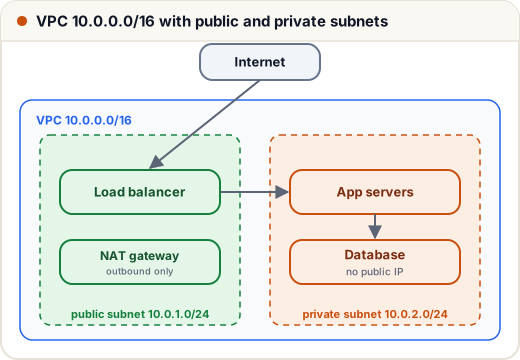
| Subnet | Has a route to the internet gateway? | Put here |
|---|---|---|
| Public | yes | load balancers, bastion host |
| Private | no (outbound only via a NAT gateway) | app servers, databases, caches |
So the database has no public IP at all — the only way in is through your app.
7. Security groups and firewalls
A security group (AWS; "network security group" in Azure, "firewall rules" in GCP) is a firewall attached to each server: who may connect, on which port.
| Rule (inbound) | Source | Why |
|---|---|---|
| 443 | 0.0.0.0/0 | anyone may use the website |
| 22 | 49.36.x.x/32 (your office) | SSH only from you |
| 5432 | the app servers' security group | only the app talks to the database |
Rules are deny by default — anything not allowed is blocked. Referencing another security group (instead of IPs) keeps rules correct when servers scale up and down.
8. Case study: "connection timed out"
A student deploys a Flask app on an EC2 instance; it works on the server (curl localhost:5000) but the browser times out.
Checklist, from the inside out:
- Is the app listening on all interfaces?
0.0.0.0:5000, not127.0.0.1:5000(ss -tlnpshows this). - Is the server's own firewall (
ufw status) allowing the port? - Does the security group allow inbound 5000 (or better, put nginx on 80/443)?
- Is the instance in a public subnet with a public IP?
- Does DNS point to the current IP? (
nslookup)
The fix was #1 and #3 — and the better long-term setup was nginx on 443 with HTTPS, proxying to the app on localhost.
Common mistakes
- Opening databases or Redis to
0.0.0.0/0(bots find them in hours). - Putting everything in a public subnet.
- Forgetting DNS TTL when migrating servers.
- Apps listening only on
127.0.0.1inside containers.
Quick recap
- Private ranges:
10/8,172.16/12,192.168/16; CIDR/n= n fixed bits. - DNS maps names to IPs (A, CNAME, MX, TXT); mind the TTL.
- Open only 80/443 to the world; SSH from your IP; databases private.
- Load balancers spread traffic and health-check; nginx is a common reverse proxy.
- VPC → public subnets (load balancers) + private subnets (apps, DBs); security groups deny by default.