Cloud & DevOps · Lesson 4 of 9 · Updated ·
Docker and Containers — Images, Containers, Dockerfiles, Layers, Volumes and Docker Compose
"It works on my machine" used to be the most common sentence in software. Containers fixed it by packaging an app together with everything it needs — runtime, libraries, config — so it runs the same on a laptop, a test server and production.
1. Containers vs virtual machines
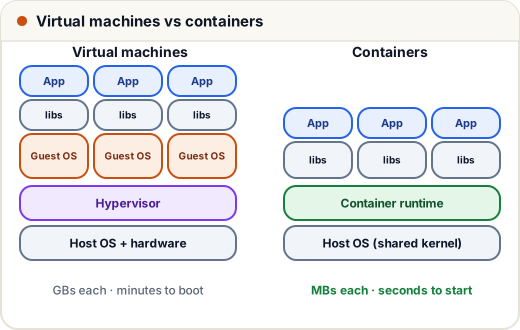
| Virtual machine | Container | |
|---|---|---|
| Contains | a whole OS + app | app + its libraries; shares the host kernel |
| Size | GBs | often tens to hundreds of MBs |
| Start time | minutes | seconds |
| Isolation | strongest | strong enough for most apps (process-level) |
| Use | different OSes, strong isolation | packaging and shipping apps |
2. The three words: image, container, registry
- Image — a read-only template: "Node 20 + my code + my dependencies". Like a class.
- Container — a running instance of an image. Like an object. You can run many from one image.
- Registry — where images are stored and shared: Docker Hub, GitHub Container Registry, AWS ECR.
docker pull nginx:1.27            # download an image
docker run -d -p 8080:80 --name web nginx:1.27   # run it: host port 8080 -> container port 80
docker ps                         # running containers
docker logs -f web                # its output
docker exec -it web sh            # a shell inside it
docker stop web && docker rm web  # stop and remove
docker images                     # local images
-p 8080:80 means "requests to port 8080 on my machine go to port 80 inside the container". -d runs it in the background.
3. Writing a Dockerfile
A Dockerfile is the recipe for an image. For a Node.js app:
# 1. Start from an official, small base image (pin the version)
FROM node:20-alpine

# 2. Work inside /app
WORKDIR /app

# 3. Copy only dependency files first (better caching — see below)
COPY package.json package-lock.json ./
RUN npm ci --omit=dev

# 4. Copy the rest of the source code
COPY . .

# 5. Don't run as root
USER node

# 6. Document the port and set the start command
EXPOSE 3000
CMD ["node", "server.js"]
And for a Python (Flask/FastAPI) app the shape is the same:
FROM python:3.12-slim
WORKDIR /app
COPY requirements.txt .
RUN pip install --no-cache-dir -r requirements.txt
COPY . .
USER nobody
EXPOSE 8000
CMD ["gunicorn", "-b", "0.0.0.0:8000", "app:app"]
Build and run:
docker build -t myapp:1.0 .
docker run -d -p 3000:3000 --env-file .env myapp:1.0
Add a .dockerignore so junk and secrets never enter the image:
node_modules
.git
.env
*.log
4. Layers and caching (why the order matters)
Each instruction creates a layer. Docker reuses unchanged layers on the next build.
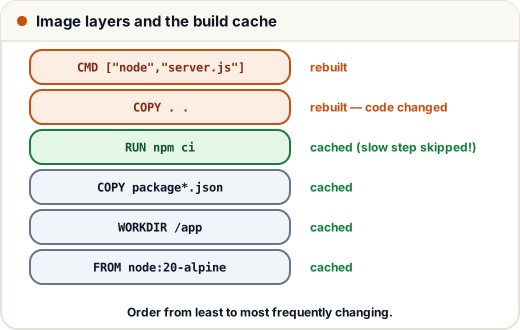
That's why we copy package.json and run npm ci before copying the source: when you change a line of code, Docker reuses the cached install layer and rebuilds in seconds instead of reinstalling every package.
Multi-stage builds keep production images small — build in one stage, copy only the output into a clean runtime image:
FROM node:20-alpine AS build
WORKDIR /app
COPY package*.json ./
RUN npm ci
COPY . .
RUN npm run build

FROM node:20-alpine
WORKDIR /app
COPY package*.json ./
RUN npm ci --omit=dev              # production dependencies only
COPY --from=build /app/dist ./dist # just the built output, no source or dev tools
USER node
CMD ["node", "dist/server.js"]
5. Data and configuration
Containers are disposable — anything written inside is lost when the container is removed. So:
- Volumes keep data outside the container:
docker run -v pgdata:/var/lib/postgresql/data postgres:16. - Environment variables pass configuration and secrets at runtime (
-e,--env-file) — never bake secrets into the image. - Logs go to stdout/stderr; Docker and cloud platforms collect them.
6. Docker Compose: app + database together
Real apps need several services. Compose describes them in one YAML file:
services:
  web:
    build: .
    ports:
      - "3000:3000"
    environment:
      DATABASE_URL: postgres://app:secret@db:5432/appdb
    depends_on:
      - db
  db:
    image: postgres:16
    environment:
      POSTGRES_USER: app
      POSTGRES_PASSWORD: secret
      POSTGRES_DB: appdb
    volumes:
      - pgdata:/var/lib/postgresql/data
volumes:
  pgdata:
docker compose up -d        # build and start everything
docker compose logs -f web
docker compose down         # stop (add -v to also delete the data volume)
Notice @db:5432 in the URL: Compose puts services on a shared network where each service's name is its hostname. (For real deployments, keep the password in an .env file, not in the YAML.)
7. Case study: onboarding in 5 minutes
A college project team had a React frontend, a Spring Boot API and PostgreSQL. New members spent a day installing the right Java, Node and Postgres versions — and still hit "works on my machine" bugs.
They added a Dockerfile for each app and one docker-compose.yml. New setup: install Docker, git clone, docker compose up. The same images later ran in CI tests and on the production server, so "it worked in testing" finally meant it would work in production.
Common mistakes
FROM node:latest— versions change underneath you. Pin versions (node:20-alpine).- Copying the whole project before
npm install— every code change reinstalls dependencies. - Running as root inside the container; putting secrets in the Dockerfile.
- Storing database data inside the container without a volume.
- The app listening on
127.0.0.1inside the container (must be0.0.0.0to be reachable via-p).
Quick recap
- Container = app + dependencies, sharing the host kernel; lighter than VMs.
- Image (template) → container (running instance); images live in registries.
- Dockerfile: small pinned base, copy dependency files first, non-root user,
.dockerignore. - Layers are cached — order instructions from least to most frequently changing; use multi-stage builds.
- Volumes for data, env vars for config, Compose for multi-service apps.