Cloud & DevOps · Lesson 5 of 9 · Updated ·
CI/CD with GitHub Actions — Automatic Tests, Builds and Deployments on Every Push
In a team without CI/CD, someone runs tests "when they remember", builds on their laptop, and copies files to the server by hand at night. In a team with CI/CD, every push is tested automatically within minutes and a merge to main ships to production safely — many times a day.
1. CI, CD and CD
| Term | Means |
|---|---|
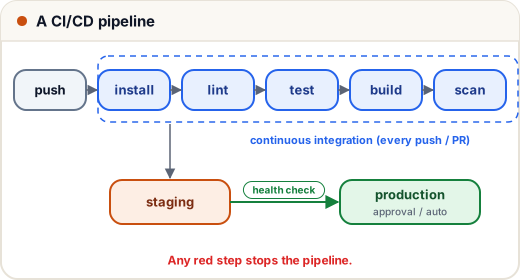
| Continuous Integration (CI) | every push/PR is automatically built and tested, so broken code is caught in minutes |
| Continuous Delivery | every change that passes is ready to release; a person clicks "deploy" |
| Continuous Deployment | every change that passes goes to production automatically |
The pipeline is a gate: if any step fails, nothing after it runs, and the PR shows a red ❌.
2. GitHub Actions in 60 seconds
Workflows are YAML files in .github/workflows/. Key words:
- on — what triggers it (push, pull_request, a schedule, a manual button)
- jobs — groups of steps; run in parallel unless one
needsanother - runs-on — the machine (
ubuntu-latest, provided free for public repos and with free minutes for private ones) - steps — commands (
run:) or reusable actions (uses:)
3. A complete CI workflow
.github/workflows/ci.yml for a Node.js project:
name: CI

on:
  pull_request:
  push:
    branches: [main]

jobs:
  test:
    runs-on: ubuntu-latest
    services:
      postgres:
        image: postgres:16
        env:
          POSTGRES_PASSWORD: test
        ports:
          - 5432:5432
        options: >-
          --health-cmd pg_isready
          --health-interval 5s
          --health-retries 10
    steps:
      - uses: actions/checkout@v4
      - uses: actions/setup-node@v4
        with:
          node-version: 20
          cache: npm
      - run: npm ci
      - run: npm run lint
      - run: npm test
        env:
          DATABASE_URL: postgres://postgres:test@localhost:5432/postgres
      - run: npm audit --audit-level=high
What happens on every pull request: GitHub starts a fresh Ubuntu machine, starts a real PostgreSQL for the tests, installs exact dependency versions from the lockfile, lints, tests and checks for known-vulnerable packages. The result appears on the PR.
4. Adding deployment (CD)
A second job that runs only after tests pass, only on main:
  deploy:
    needs: test
    if: github.ref == 'refs/heads/main'
    runs-on: ubuntu-latest
    environment: production
    steps:
      - uses: actions/checkout@v4
      - name: Build and push image
        run: |
          echo "${{ secrets.REGISTRY_TOKEN }}" | docker login ghcr.io -u ${{ github.actor }} --password-stdin
          docker build -t ghcr.io/${{ github.repository }}:${{ github.sha }} .
          docker push ghcr.io/${{ github.repository }}:${{ github.sha }}
      - name: Deploy over SSH
        run: |
          mkdir -p ~/.ssh
          echo "${{ secrets.DEPLOY_KEY }}" > ~/.ssh/id_ed25519
          chmod 600 ~/.ssh/id_ed25519
          ssh -o StrictHostKeyChecking=accept-new deploy@${{ secrets.SERVER_HOST }} \
            "./deploy.sh ${{ github.sha }}"
(Indent it under the same jobs: key as test.) Points to notice:
needs: test— no deploy unless tests passed.- Tagging with the commit SHA — every image is traceable to exact code, and rolling back means redeploying an older SHA.
environment: production— GitHub can require a manual approval and keeps production secrets separate.- In bigger setups, cloud logins use OIDC (short-lived tokens) instead of long-lived keys stored as secrets.
5. Secrets
Store credentials in Settings → Secrets and variables → Actions and reference them as ${{ secrets.NAME }}. GitHub masks them in logs. Rules:
- never
echoa secret into the log; never commit them; - use least-privilege tokens (deploy key that can only deploy);
- workflows triggered by PRs from forks don't get your secrets — don't weaken that.
6. Protect main
Branch protection rules: require a PR, require CI to pass, require at least one review, block force-pushes. Now nobody — not even you at 2 a.m. — can push untested code straight to production.
7. Deployment strategies
| Strategy | How | Good for |
|---|---|---|
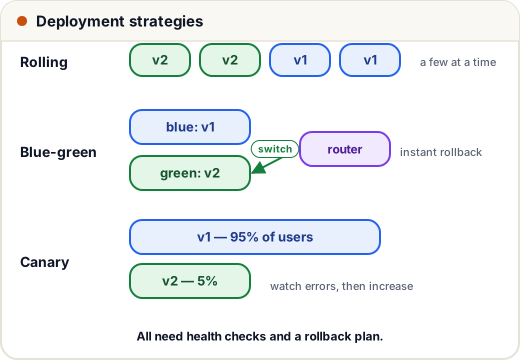
| Recreate | stop old, start new | dev environments (has downtime) |
| Rolling | replace instances a few at a time | default in Kubernetes |
| Blue-green | run new version (green) next to old (blue), switch traffic at once, keep blue for instant rollback | zero-downtime releases with easy rollback |
| Canary | send 5% of traffic to the new version, watch errors, then increase | large user bases, risky changes |
| Feature flags | ship code turned off, enable for some users | decoupling deploy from release |
Whatever you choose: health check after deploy, and automatic rollback if it fails. A simple VPS version of blue-green is: build the new release in a new folder, health-check it, switch a symlink, reload — and switch back if the check fails.
8. Case study: from Friday-night deploys to 20 a day
A 6-person startup deployed weekly by hand; one in four releases broke something, so nobody wanted to deploy on Fridays. After adding CI on every PR, branch protection, a deploy job with health checks and automatic rollback, and SHA-tagged images:
- broken builds were caught on the PR, not in production;
- deploys took 6 minutes instead of an evening;
- they shipped small changes ~20 times a day — and small changes rarely break things, and are easy to roll back when they do.
Common mistakes
- Tests that only run on someone's laptop.
- Deploying from a branch other than the protected
main. latestimage tags in production (you can't tell what's running or roll back cleanly).- No rollback plan; no health check after deploy.
- Secrets printed in logs or committed in workflow files.
Quick recap
- CI = auto build + test every change; CD = auto-ready (delivery) or auto-released (deployment).
- GitHub Actions:
on→jobs→steps;needsorders jobs;secrets.*for credentials. - Protect
main; tag images by commit SHA; require approval for production. - Strategies: rolling, blue-green, canary, feature flags — always with health checks and rollback.