Cloud & DevOps · Lesson 6 of 9 · Updated ·
Kubernetes Basics — Pods, Deployments, Services, Scaling and Self-Healing Explained
Docker runs containers on one machine. But production means many containers on many machines: who restarts a crashed container at 3 a.m., spreads them across servers, rolls out new versions without downtime, and adds more when traffic spikes? That's Kubernetes (often written K8s).
1. What Kubernetes does for you
You declare what you want — "run 3 copies of myapp:2.1, expose them on port 80" — and Kubernetes keeps reality matching that declaration forever:
- Self-healing: a container crashes → it's restarted; a server dies → its containers are recreated elsewhere.
- Scaling: change 3 to 10 (or let an autoscaler do it).
- Rolling updates and rollbacks with no downtime.
- Service discovery and load balancing between containers.
- Config and secrets injected at runtime.
2. Architecture
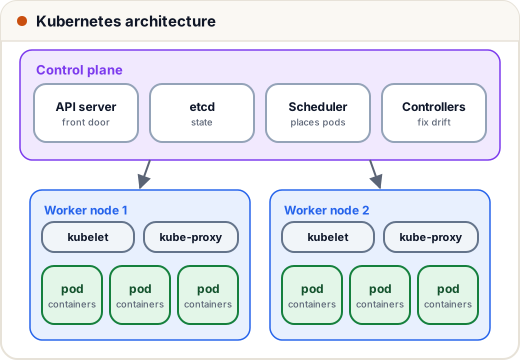
| Part | Role |
|---|---|
| API server | the front door; kubectl and everything else talk to it |
| etcd | the cluster's database of desired and current state |
| Scheduler | picks which node a new pod runs on |
| Controller manager | control loops that fix differences ("3 wanted, 2 running → start 1") |
| Node | a worker machine (VM) |
| kubelet | agent on each node that starts and watches containers |
| kube-proxy | networking rules for Services |
Managed services — EKS (AWS), AKS (Azure), GKE (Google) — run the control plane for you; you manage the workloads. For learning, run a local cluster with minikube or kind.
3. The core objects
| Object | What it is |
|---|---|
| Pod | the smallest unit: one (or a few tightly coupled) containers with a shared IP |
| Deployment | "keep N identical pods of this image running"; handles updates/rollbacks |
| ReplicaSet | created by a Deployment to keep the pod count; you rarely touch it directly |
| Service | a stable name + IP that load-balances to matching pods (pods come and go) |
| Ingress | HTTP routing from outside (api.example.com/ → the API Service), usually with TLS |
| ConfigMap / Secret | configuration and sensitive values, injected as env vars or files |
| Namespace | a folder for objects (dev, staging, prod) |
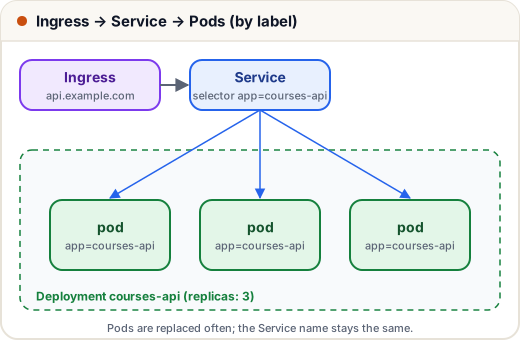
The glue is labels: the Deployment stamps pods with app: courses-api, and the Service sends traffic to every pod with that label.
4. A Deployment and a Service in YAML
apiVersion: apps/v1
kind: Deployment
metadata:
  name: courses-api
spec:
  replicas: 3
  selector:
    matchLabels:
      app: courses-api
  template:
    metadata:
      labels:
        app: courses-api
    spec:
      containers:
        - name: api
          image: ghcr.io/skills101/courses-api:4f2c9e1
          ports:
            - containerPort: 3000
          envFrom:
            - configMapRef:
                name: courses-config
            - secretRef:
                name: courses-secrets
          resources:
            requests: { cpu: 100m, memory: 128Mi }
            limits: { cpu: 500m, memory: 256Mi }
          readinessProbe:
            httpGet: { path: /health, port: 3000 }
            periodSeconds: 5
          livenessProbe:
            httpGet: { path: /health, port: 3000 }
            initialDelaySeconds: 10
---
apiVersion: v1
kind: Service
metadata:
  name: courses-api
spec:
  selector:
    app: courses-api
  ports:
    - port: 80
      targetPort: 3000
- requests = what the scheduler reserves; limits = the maximum (a container over its memory limit is killed and restarted).
- readinessProbe — "ready for traffic?" Pods failing it are removed from the Service (e.g. while warming up).
- livenessProbe — "still alive?" Failing it restarts the container (e.g. stuck in a deadlock).
100mCPU = 0.1 of a core.
Other pods can now call http://courses-api — the Service name is a DNS name inside the cluster.
5. kubectl: the commands you'll use
kubectl apply -f k8s/                     # create/update everything in the folder (declarative)
kubectl get pods -o wide                  # pods and which node they're on
kubectl get deploy,svc                    # deployments and services
kubectl describe pod courses-api-7d9c-x2  # events: why is it Pending/CrashLoopBackOff?
kubectl logs -f deploy/courses-api        # logs
kubectl exec -it courses-api-7d9c-x2 -- sh
kubectl scale deploy/courses-api --replicas=6
kubectl set image deploy/courses-api api=ghcr.io/skills101/courses-api:9a8b7c6
kubectl rollout status deploy/courses-api
kubectl rollout undo deploy/courses-api   # roll back to the previous version
Common pod states while debugging: Pending (no node has room / image pull waiting), ImagePullBackOff (wrong image name or no registry access), CrashLoopBackOff (the app keeps exiting — check logs), OOMKilled (memory limit too low or a leak).
6. Rolling updates and autoscaling
When the image changes, the Deployment starts new pods, waits until they're ready, then removes old ones — a few at a time — so there's no downtime. If the new pods never become ready, the rollout stops and you rollout undo.
A HorizontalPodAutoscaler adds or removes pods based on load:
apiVersion: autoscaling/v2
kind: HorizontalPodAutoscaler
metadata:
  name: courses-api
spec:
  scaleTargetRef:
    apiVersion: apps/v1
    kind: Deployment
    name: courses-api
  minReplicas: 3
  maxReplicas: 20
  metrics:
    - type: Resource
      resource:
        name: cpu
        target:
          type: Utilization
          averageUtilization: 60
When average CPU goes above 60% of the requested CPU, more pods are added (and nodes too, if a cluster autoscaler is set up).
7. Do you even need Kubernetes?
Kubernetes is powerful but complex. A single VPS with Docker Compose or a PaaS is often the right answer for a small product. Kubernetes pays off when you have many services, several teams, frequent deploys and real scaling needs. Interviewers like candidates who know this trade-off.
8. Case study: the 3 a.m. crash that nobody noticed
An exam-prep API had a memory leak that crashed a container every few hours. On a plain server, each crash meant downtime until someone restarted it. On Kubernetes with 3 replicas and a liveness probe, each crashed pod was restarted in seconds while the other two served traffic — users saw nothing. The team still fixed the leak (they saw the restarts in monitoring), but the system healed itself in the meantime.
Common mistakes
- No readiness probe → traffic is sent to pods that aren't ready yet.
- No resource requests/limits → one pod starves the node.
- Secrets in plain ConfigMaps or in Git (Kubernetes Secrets are only base64-encoded; enable encryption at rest or use a secrets manager).
- Using
latesttags, so rollouts and rollbacks are unpredictable. kubectl editin production instead of changing YAML in Git and re-applying.
Quick recap
- Kubernetes keeps the declared state: self-healing, scaling, rolling updates.
- Control plane (API server, etcd, scheduler, controllers) + worker nodes (kubelet, kube-proxy, pods).
- Pod < Deployment (replicas, updates) + Service (stable name, load balancing) + Ingress (HTTP from outside); labels connect them.
- Use readiness/liveness probes, requests/limits, HPA;
kubectl rollout undoto roll back.