AdvancedCloud & DevOps · Lesson 12 of 14 · Updated ·
Backups and Disaster Recovery — RPO, RTO, the 3-2-1 Rule, Point-in-Time Recovery and DR Strategies
Servers fail, disks die, a developer runs DELETE without WHERE, a migration drops the wrong column, ransomware encrypts a drive, or a whole data centre loses power. You cannot prevent all of these. What you can control is how much data you lose and how long you stay down. That is what backups and disaster recovery (DR) are about, and it is a favourite DevOps interview topic.
1. Replication is not a backup
Many teams think: "our database has a replica, so we are safe". A replica copies every change within seconds, including the bad ones. If someone deletes all exam results by mistake, the replica deletes them too.
| Protects against | Replica | Backup |
|---|---|---|
| Server or disk failure | yes | yes (slower) |
| Accidental delete or bad migration | no (copies it) | yes |
| Ransomware on the main server | often no | yes, if a copy is offline or immutable |
| Whole data centre or region lost | only if in another region | yes, if stored elsewhere |
You need both: replicas for availability, backups for going back in time.
2. RPO and RTO: the two numbers that define a plan
- RPO (Recovery Point Objective): how much data you can afford to lose, measured in time. "RPO 1 hour" means after a disaster you may lose at most the last hour of changes.
- RTO (Recovery Time Objective): how long you can afford to be down. "RTO 2 hours" means service must be back within 2 hours.
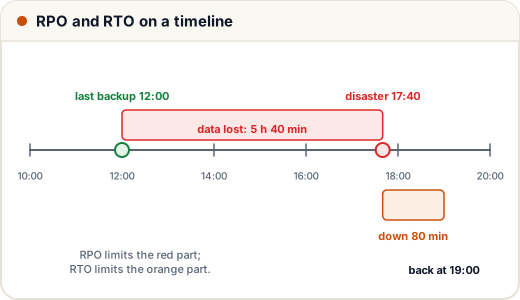
Let's compute them for a coaching institute's database: backups every 6 hours (00:00, 06:00, 12:00, 18:00), a 120 GB database, restore speed of 2 GB per minute, plus 20 minutes to check data and switch the app over.
backup_hours = [0, 6, 12, 18]
failure = 17 * 60 + 40                     # disaster at 17:40, in minutes after midnight

last_backup = max(h * 60 for h in backup_hours if h * 60 <= failure)
lost = failure - last_backup
print(f"last good backup at {last_backup // 60:02d}:00, data lost: {lost // 60} h {lost % 60} min")

size_gb, speed_gb_per_min, checks_min = 120, 2, 20
downtime = size_gb / speed_gb_per_min + checks_min
back_up = failure + downtime
print(f"downtime: {downtime:.0f} min, service back at {int(back_up // 60):02d}:{int(back_up % 60):02d}")
print("worst-case data loss with 6-hourly backups:", 6 * 60, "min")
last good backup at 12:00, data lost: 5 h 40 min
downtime: 80 min, service back at 19:00
worst-case data loss with 6-hourly backups: 360 min
If the business says "we can lose at most 15 minutes of student submissions", 6-hourly backups are not enough, whatever the RTO. The RPO decides how often you back up; the RTO decides how fast your restore must be.
3. Full, incremental and differential backups
- Full: copy everything. Simple to restore, but large and slow.
- Incremental: copy only what changed since the last backup of any kind. Small, but a restore needs the full backup plus every incremental in order.
- Differential: copy what changed since the last full backup. Grows each day, but a restore needs only the full plus the latest differential.
Suppose a 100 GB full backup on Sunday, and about 5 GB of new or changed data each day (assume each day changes different data):
full, change_per_day = 100, 5
days = ["Mon", "Tue", "Wed", "Thu", "Fri", "Sat"]

incremental = [change_per_day for _ in days]
differential = [change_per_day * (i + 1) for i in range(len(days))]

print("incremental sizes :", incremental, "total", full + sum(incremental), "GB")
print("differential sizes:", differential, "total", full + sum(differential), "GB")
print("files to restore Saturday: incremental", 1 + len(days), "| differential", 2)
incremental sizes : [5, 5, 5, 5, 5, 5] total 130 GB
differential sizes: [5, 10, 15, 20, 25, 30] total 205 GB
files to restore Saturday: incremental 7 | differential 2
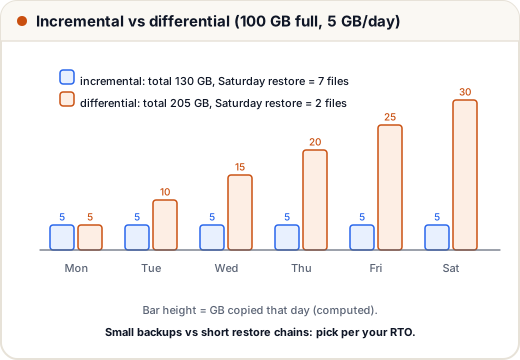
The trade-off: incrementals save storage; differentials make restores simpler and faster. Many tools mix them, for example a weekly full with daily incrementals.
4. The 3-2-1 rule
A simple, widely used rule:
- 3 copies of your data (the live data plus 2 backups),
- on 2 different types of storage (for example the server disk and object storage),
- with 1 copy off-site (another region, another provider or offline).
Modern additions: keep at least one copy immutable (cannot be changed or deleted for a set period, such as S3 Object Lock), so ransomware or a stolen admin password cannot wipe your backups. Encrypt backups, because a backup of the user table is as sensitive as the table itself.
5. Database backups and point-in-time recovery
| Method | What | Good for |
|---|---|---|
Logical dump (pg_dump, mysqldump) | SQL or archive of tables | small and medium databases, moving between versions |
| Physical backup / snapshot | copy of the data files or the disk | large databases, fast restore |
| Continuous log archiving | every change log (PostgreSQL WAL, MySQL binlog) shipped as it is written | point-in-time recovery |
Point-in-time recovery (PITR) restores the last full backup and then replays the change logs up to a chosen moment, for example 14:09:59, one second before a bad command ran at 14:10. With logs shipped every few minutes, your RPO drops from hours to minutes. Managed databases such as Amazon RDS offer PITR as a setting.
6. Disaster recovery strategies
What if the whole region is lost? The four common strategies, from cheapest to most expensive:
| Strategy | What runs in the second region | RTO | RPO | Cost |
|---|---|---|---|---|
| Backup and restore | only backups; build everything after the disaster | hours | hours | lowest |
| Pilot light | the database replica is running; app servers are off | tens of minutes | minutes | low |
| Warm standby | a small copy of the whole system is running | minutes | seconds to minutes | medium |
| Active-active (multi-site) | full capacity serving traffic in both regions | near zero | near zero | highest |
There is no "best" choice: pick the cheapest strategy that meets the RPO and RTO the business actually needs. Infrastructure as Code (lesson 8) makes "rebuild everything" much faster and more reliable.
7. Case study: the migration that dropped a column
At 14:10 on result day, a deployment runs a migration that drops the marks column instead of renaming it. The replica drops it too within a second. The team:
- Stops the damage: puts the site in maintenance mode so no new writes mix with the broken schema.
- Restores to a new server using PITR to 14:09:59, without touching the damaged database (keep it for investigation).
- Checks the data (row counts, a few known students' marks), then points the app at the restored database.
- Re-applies the few valid writes made between 14:10 and maintenance mode, from application logs.
- Writes a blameless postmortem: migrations are now tested against a copy of production data, and destructive migrations need a second reviewer.
They recovered in under an hour because they had practised a restore last month. A backup that has never been restored is only a hope.
Common mistakes
- Treating replication or RAID as a backup.
- Keeping backups on the same server or in the same account as production.
- Never testing a restore, then finding the backups were empty or corrupt.
- Not knowing the RPO and RTO the business needs, so the plan is a guess.
- Unencrypted backups containing personal data.
Quick recap
- Replicas give availability; backups let you go back in time. You need both.
- RPO = how much data you may lose (sets backup frequency); RTO = how long you may be down (sets restore speed).
- Incremental: small, long restore chain. Differential: grows, short chain. Full: simple, large.
- 3-2-1: three copies, two media, one off-site; add an immutable, encrypted copy.
- PITR = full backup + replayed logs to a chosen second. DR strategies trade cost for RTO/RPO. Test restores regularly.