AdvancedCloud & DevOps · Lesson 14 of 14 · Updated ·
DevSecOps — Securing Dependencies, Container Images and the CI/CD Pipeline
A modern app is mostly other people's code. A small Node.js or Python project can pull in hundreds of packages, sits on a base image with a whole Linux system inside, and is built by a pipeline that holds keys to production. Attackers know this, so they target all three: known bugs in libraries, weak container images, and the build pipeline itself. DevSecOps means making security checks a normal, automatic part of the DevOps loop, run on every change, instead of a one-time review before launch.
1. Shift left: a check at every stage
"Shift left" means finding problems earlier in the pipeline (further left on the diagram), when they are cheapest to fix. A vulnerable library caught in a pull request costs one line in a lock file; the same library found after a breach costs far more.
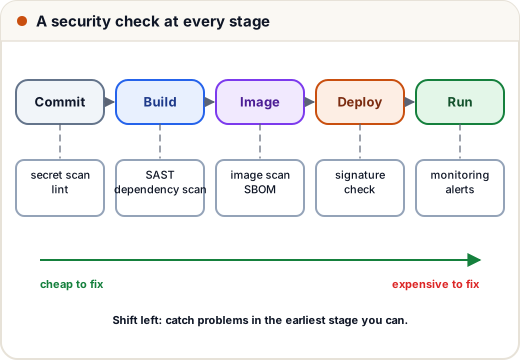
| Check | What it looks at | Example tools |
|---|---|---|
| Secret scanning | keys and passwords in code | gitleaks, GitHub secret scanning |
| SAST (static application security testing) | your source code, for risky patterns like SQL built from strings | Semgrep, CodeQL, SonarQube |
| SCA (software composition analysis) | your dependencies, for known vulnerabilities | Dependabot, npm audit, pip-audit, Snyk |
| Image scanning | packages inside the container image | Trivy, Grype |
| DAST (dynamic testing) | the running app, from outside, like an attacker | OWASP ZAP |
2. Dependencies, CVEs and severity
When a security bug is found in a public library, it usually gets a CVE number (Common Vulnerabilities and Exposures), such as CVE-2021-44228. An advisory lists which versions are affected and which version fixes it. A dependency scanner compares your lock file (the exact versions you install) with advisory databases.
The sketch below shows the idea with a made-up package and advisory:
def parse(version):
    return tuple(int(part) for part in version.split("."))

# a made-up advisory: versions from 2.0.0 up to (not including) 2.17.1 are affected
advisory = {"package": "fastlog", "affected_from": "2.0.0", "fixed_in": "2.17.1"}

installed = {"fastlog": "2.14.0", "webkit-lite": "1.3.2"}

for name, version in installed.items():
    if name == advisory["package"]:
        v = parse(version)
        if parse(advisory["affected_from"]) <= v < parse(advisory["fixed_in"]):
            print(f"{name} {version}: VULNERABLE, upgrade to {advisory['fixed_in']}")
        else:
            print(f"{name} {version}: not affected")
    else:
        print(f"{name} {version}: no advisory")

print("string compare says 2.9.0 > 2.17.1:", "2.9.0" > "2.17.1")
print("tuple compare says 2.9.0 > 2.17.1:", parse("2.9.0") > parse("2.17.1"))
fastlog 2.14.0: VULNERABLE, upgrade to 2.17.1
webkit-lite 1.3.2: no advisory
string compare says 2.9.0 > 2.17.1: True
tuple compare says 2.9.0 > 2.17.1: False
The last two lines show a classic bug: comparing versions as text says 2.9.0 is newer than 2.17.1, because the character "9" comes after "1". Versions must be compared number by number.
Each finding gets a CVSS score from 0 to 10 (Common Vulnerability Scoring System). Version 3 of CVSS names the ranges: Low 0.1–3.9, Medium 4.0–6.9, High 7.0–8.9, Critical 9.0–10.0. Teams set a gate: the build fails on Critical and High, and Medium and Low become tickets.
def severity(score):
    if score >= 9.0:
        return "CRITICAL"
    if score >= 7.0:
        return "HIGH"
    if score >= 4.0:
        return "MEDIUM"
    return "LOW"

findings = [("openssl", 7.5), ("zlib", 9.8), ("curl", 5.3), ("libpng", 3.1), ("expat", 8.1)]

counts = {}
for package, score in findings:
    level = severity(score)
    counts[level] = counts.get(level, 0) + 1
print(counts)

blocking = [p for p, s in findings if severity(s) in ("CRITICAL", "HIGH")]
print("build:", "FAIL" if blocking else "PASS", blocking)
{'HIGH': 2, 'CRITICAL': 1, 'MEDIUM': 1, 'LOW': 1}
build: FAIL ['openssl', 'zlib', 'expat']
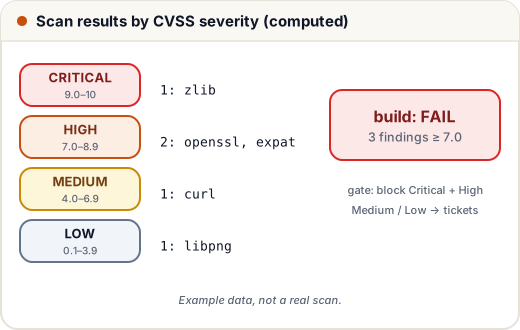
(Package names and scores here are examples, not real scan results.) A score is a starting point: a "High" in a library function you never call may matter less than a "Medium" in your login page. Good teams triage: fix, upgrade, or record why a finding does not apply, with an expiry date.
3. Safer container images
Compare two Dockerfiles for the same Node.js app:
# Risky
FROM node:latest
COPY . .
RUN npm install
ENV PAYMENT_KEY=live_abc123
CMD ["node", "server.js"]
# Safer
FROM node:22-alpine
WORKDIR /app
COPY package.json package-lock.json ./
RUN npm ci --omit=dev
COPY . .
USER node
CMD ["node", "server.js"]
| Risky line | Problem | Safer choice |
|---|---|---|
FROM node:latest | changes without warning; a large image with many packages to patch | a pinned, small base (-alpine, -slim or distroless) |
COPY . . first | copies .env, .git and test files into the image | .dockerignore, copy only what is needed |
npm install | may install different versions than you tested | npm ci uses the lock file exactly |
ENV PAYMENT_KEY=… | the secret is stored in the image layers forever | inject at runtime from a secret manager (lesson 11) |
no USER | the process runs as root inside the container | a non-root user (USER node) |
Smaller images mean fewer packages, so fewer CVEs to patch and faster pulls. Rebuild images regularly, even when your code has not changed, so they pick up base-image security fixes.
4. Protect the pipeline itself
The CI/CD system can deploy to production, so it is a prime target.
- Least-privilege tokens. In GitHub Actions, set
permissions:at the top of the workflow (for examplecontents: read) instead of relying on broad defaults. - No long-lived cloud keys in CI. Use OIDC (OpenID Connect): the pipeline proves its identity to the cloud and receives short-lived credentials for one job.
- Pin third-party actions to a full commit SHA, not a moving tag like
@v3, so a compromised tag cannot change what runs. - Protect
mainwith required reviews and passing checks (lesson 5), so one stolen laptop cannot push straight to production. - Do not run untrusted pull requests from forks with access to secrets.
5. Supply chain: SBOMs and signing
- An SBOM (Software Bill of Materials) is a list of every component and version inside your app or image, in a standard format such as SPDX or CycloneDX. Tools like Syft or Trivy generate it during the build.
- Signing proves an image was built by your pipeline and not changed afterwards. With cosign (from the Sigstore project) the pipeline signs the image, and the cluster checks the signature before running it.
6. Case study: Log4Shell
In December 2021, a critical vulnerability, CVE-2021-44228 ("Log4Shell"), was disclosed in Apache Log4j 2, a very widely used Java logging library. In affected versions, a specially crafted text that the application logged (for example in a username or an HTTP header) could make the server load and run code from an attacker's server. It received the maximum CVSS score of 10.0, and attackers began scanning the internet for vulnerable servers within days.
The hardest question for many companies was simply: where do we use Log4j? It was often not a direct dependency but a library inside another library. Teams with an SBOM for every service and image scanning in their pipelines could search and get a list of affected services quickly; others had to inspect systems one by one. The response that worked:
- Inventory affected services from SBOMs and scans.
- Mitigate quickly where an upgrade was not yet possible (the advisories listed configuration workarounds) and add firewall rules for known attack patterns.
- Upgrade to the fixed versions and rebuild images; the pipeline's dependency gate then stops the old versions from coming back.
Common mistakes
- Running security scans once before launch instead of on every change.
- Ignoring scanner output because there are too many findings, instead of setting a severity gate and triaging.
FROM image:latest, root containers and secrets inENVlines.- Broad CI tokens, long-lived cloud keys in CI secrets, and third-party actions pinned only to tags.
- No inventory (SBOM) of what is inside each service.
Quick recap
- DevSecOps = automatic security checks at every pipeline stage; shift left to fix early and cheaply.
- SAST checks your code, SCA your dependencies, image scanning your containers, DAST the running app.
- CVEs identify vulnerabilities; CVSS scores them (Critical ≥ 9.0, High ≥ 7.0); gate builds on Critical/High and triage the rest.
- Pinned small base images,
npm ci,.dockerignore, non-root user, no secrets in images. - Least-privilege CI tokens, OIDC instead of stored keys, pinned actions, SBOMs and signed images.