AdvancedGit & GitHub · Lesson 11 of 12 · Updated ·
Finding Bugs with Git History — git log Filters, git blame and git bisect
A test that passed last week fails today. There are 200 commits in between. Reading them one by one would take hours. Git can answer the question "which commit broke it?" in a few minutes, and questions like "who wrote this line, and why?" in seconds. This lesson covers the three tools for that job: git log filters, git blame and git bisect.
All outputs come from a small shop project with eight commits by Asha, Ravi and Meena. The test file test_cart.py checks that total([100, 200]) is 300. It passes on the first commit and fails on the last one.
git log --oneline
d773a8c Show paise in prices
6b69d94 Document tests
74569d0 Add money formatter
6045330 Skip header row in totals
dd9f645 Explain how to run
a0a2bc7 Add GST constant
9933fa7 Add README
7f3e62e Add cart total
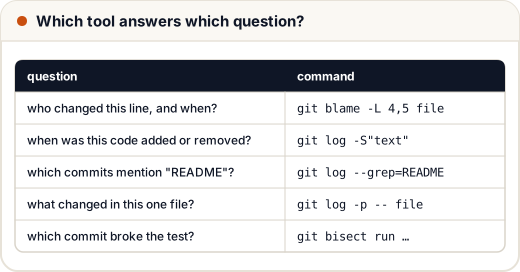
1. Filtering git log
Plain git log shows everything. Filters narrow it down. They can be combined.
| Filter | Shows commits… |
|---|---|
--author=Meena | whose author name or email matches "Meena" |
--grep=README -i | whose message contains "README" (-i ignores case) |
--since=2026-11-06 | made on or after that date (also --until, or --since="2 weeks ago") |
-- README.md | that changed this file (the -- separates file names from options) |
-S"text" | that added or removed this exact text in the code |
-p | with the full diff of each commit |
Some real results:
git log --oneline --author=Meena
git log --oneline -- README.md
d773a8c Show paise in prices
6045330 Skip header row in totals
6b69d94 Document tests
dd9f645 Explain how to run
9933fa7 Add README
The first command printed the first two lines; the second printed the last three.
The pickaxe: git log -S
-S is called the pickaxe because it digs through the code itself, not the messages. It finds commits where the number of times the text appears changed — in other words, where it was added or deleted.
git log --oneline -S"prices[1:]"
6045330 Skip header row in totals
Commit messages can be vague or misleading. The pickaxe looks at what actually changed, so it is often the fastest way to answer "when did this line appear?". A related option, -G"regex", matches any changed line against a regular expression.
Seeing one commit's change
git log -p -1 --format="%h %an %s" -- cart.py
6045330 Meena Skip header row in totals

diff --git a/cart.py b/cart.py
index 7ca5b0e..d54bc22 100644
--- a/cart.py
+++ b/cart.py
@@ -2,4 +2,4 @@ GST = 0.18


 def total(prices):
-    return sum(prices)
+    return sum(prices[1:])
-1 limits the output to one commit, and --format chooses what to print: %h short id, %an author name, %s subject (first line of the message). Now we can see the bug: the new code skips the first price.
git shortlog -sn HEAD counts commits per author, which is handy for a quick summary of who worked on a project:
     3	Asha
     3	Ravi
     2	Meena
2. git blame: who last changed each line?
git blame prints every line of a file with the commit, author and date that last changed it.
git blame cart.py
a0a2bc7e (Asha  2026-11-03 10:00:00 +0530 1) GST = 0.18
a0a2bc7e (Asha  2026-11-03 10:00:00 +0530 2)
a0a2bc7e (Asha  2026-11-03 10:00:00 +0530 3)
^7f3e62e (Asha  2026-11-01 10:00:00 +0530 4) def total(prices):
60453306 (Meena 2026-11-05 10:00:00 +0530 5)     return sum(prices[1:])
^before an id marks a line that has not changed since the very first commit (the "boundary").-L 4,5limits blame to lines 4 to 5, which is useful in long files.git blame -wignores whitespace changes, so a commit that only re-indented code is not blamed.
Blame is for understanding, not for blaming people. The useful next step is git show 6045330, which shows the commit message and the full change. The message often explains why — perhaps the data really did have a header row at that time. Good commit messages make blame valuable.
Most editors (VS Code, IntelliJ) and GitHub's "Blame" button show the same information beside the code.
3. git bisect: binary search through history
git bisect finds the first bad commit — the commit that introduced a bug — using binary search. You tell it one commit that is good and one that is bad. Git checks out the commit halfway between them. You test it and say "good" or "bad", and Git halves the range again.
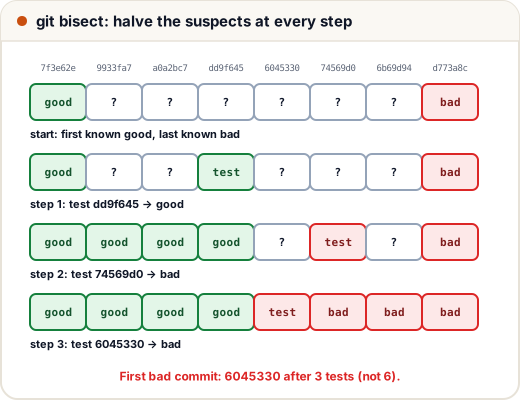
By hand
git bisect start
git bisect bad HEAD          # the current commit is broken
git bisect good 7f3e62e      # this old commit worked
# Git checks out a middle commit. Test it, then type one of:
git bisect good
git bisect bad
# ...repeat until Git prints "is the first bad commit"
git bisect reset             # go back to where you started
Automatically with git bisect run
If a command can tell good from bad — it exits with code 0 for good and a code from 1 to 127 (except 125) for bad — Git can run the whole search for you. Exit code 125 means "this commit cannot be tested, skip it".
git bisect start
git bisect bad HEAD
git bisect good 7f3e62e
git bisect run python test_cart.py
Shortened output:
Bisecting: 3 revisions left to test after this (roughly 2 steps)
[dd9f645c2c1d164ff77dea9e3ba022e589d70300] Explain how to run
running 'python' 'test_cart.py'
ok
Bisecting: 1 revision left to test after this (roughly 1 step)
[74569d079449d103d35de02a1232f4cd5bc74917] Add money formatter
running 'python' 'test_cart.py'
AssertionError
Bisecting: 0 revisions left to test after this (roughly 0 steps)
[6045330620d0884f251e8285e66e1e4a9ee3b895] Skip header row in totals
running 'python' 'test_cart.py'
AssertionError
6045330620d0884f251e8285e66e1e4a9ee3b895 is the first bad commit
Git tested 3 commits instead of 6. Always finish with git bisect reset, otherwise you stay in detached HEAD on an old commit.
Why binary search is so fast
Each test cuts the suspects in half, so the number of tests grows with the logarithm of the number of commits:
import math

for commits in [8, 100, 1000, 100000]:
    print(commits, "commits ->", math.ceil(math.log2(commits)), "tests at most")
8 commits -> 3 tests at most
100 commits -> 7 tests at most
1000 commits -> 10 tests at most
100000 commits -> 17 tests at most
Even with a thousand commits you test about ten. This is the same idea as binary search on a sorted array, which is why interviewers like to connect the two.
4. A practical bug-hunting routine
- Reproduce the bug with a command or a small test script. This is the most important step.
- If you know roughly which code is wrong, use
git log -Sorgit blameon it. - If you have no idea, find a known good commit (an old tag is ideal, for example
v1.2.0) and rungit bisect run. - Read the bad commit with
git show <id>. Fix it with a new commit, orgit revert <id>if the whole change was wrong. - Add the test you used to the project, so the bug cannot come back silently.
Common mistakes
- Forgetting
git bisect resetand then committing in detached HEAD. - A bisect test script that fails for unrelated reasons (missing package, wrong folder), so Git marks good commits as bad. Run the script once by hand first.
- Using
--grepto find code.--grepsearches messages; use-Sor-Gto search code. - Forgetting
--before a file name that looks like a branch name. - Treating blame as a way to criticise teammates instead of a way to find context.
Quick recap
git logfilters:--author,--grep,--since/--until,-- <file>,-S"code",-p.git blame fileshows the last commit, author and date for each line;-Llimits lines,-wignores whitespace.git bisectbinary-searches between a good and a bad commit;git bisect run <cmd>automates it using exit codes.- About log2(n) tests find the culprit among n commits. Finish with
git bisect reset.