Git & GitHub · Lesson 2 of 5 · Updated ·
Git Branching and Merging — Branches, Merge, Conflicts and Rebase
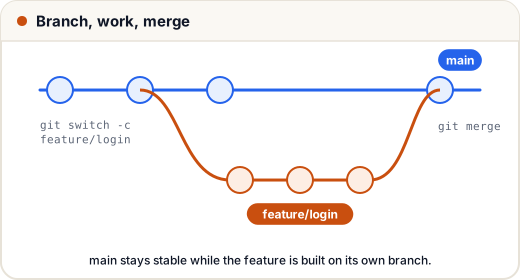
A branch is a separate line of work. You build a feature on its own branch while main stays stable; when it's ready, you merge it back.
1. Branch commands
git branch                       # list branches (* = current)
git switch -c feature/login      # create AND switch to a new branch
# ... edit, add, commit ...
git switch main                  # go back to main
git merge feature/login          # bring the feature into main
git branch -d feature/login      # delete the merged branch
(Older tutorials use git checkout -b — same idea.)
A branch is just a lightweight pointer to a commit, so creating one is instant.
2. Fast-forward vs merge commit
- If
mainhasn't changed since you branched, Git just movesmainforward — a fast-forward. - If both changed, Git creates a merge commit with two parents.
3. Merge conflicts
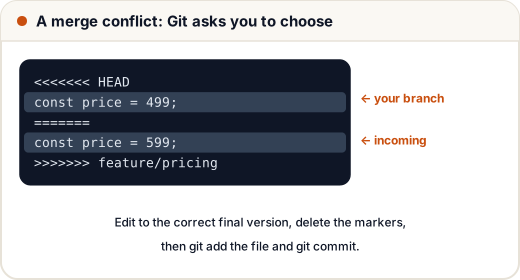
A conflict happens when both branches changed the same lines. Git can't guess which is right, so it asks you.
How to resolve:
git statuslists the conflicted files.- Open each file; find the
<<<<<<<,=======,>>>>>>>markers. - Edit to the correct final code (keep one side, the other, or combine) and delete the markers.
git add file→git commit.
VS Code shows buttons: Accept Current, Accept Incoming, Accept Both.
Pull often and keep branches short-lived — small, frequent merges mean small, easy conflicts.
4. merge vs rebase
git switch feature/login
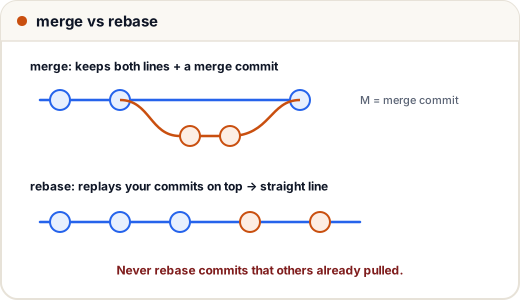
git rebase main          # replay my commits on top of the latest main
| merge | rebase | |
|---|---|---|
| History | true, with merge commits | clean, straight line |
| Rewrites commits? | no | yes (new ids) |
| Safe on shared branches? | yes | no |
Golden rule: never rebase commits that others have already pulled. Rebase only your own local branch.
5. Branch naming
Teams usually use prefixes: feature/payment-upi, fix/login-crash, docs/readme, chore/upgrade-deps.
Common mistakes
- Working directly on
mainfor everything. - Leaving conflict markers in code and committing.
- Rebasing a branch your teammates also use.
Quick recap
git switch -c name→ work →git switch main→git merge name.- Fast-forward when main hasn't moved; otherwise a merge commit.
- Conflicts: edit, remove markers, add, commit.
- Merge = safe true history; rebase = clean line, only on your own branches.