Git & GitHub · Lesson 4 of 5 · Updated ·
Undoing Things in Git — restore, reset, revert, amend and stash
Everyone makes mistakes in Git. The trick is knowing which undo command is safe in which situation.
1. Which undo do I need?
| Situation | Command |
|---|---|
| Throw away edits in a file (not staged) | git restore file |
| Unstage a file (keep the edits) | git restore --staged file |
| Fix the last commit's message or add a forgotten file | git commit --amend |
| Undo local commits that are not pushed | git reset |
| Undo a commit that is already pushed | git revert <commit> |
| Put work aside temporarily | git stash |
| "I lost a commit!" | git reflog |
2. restore and amend
git restore index.html              # discard my changes (careful: they're gone)
git restore --staged index.html     # unstage, keep the changes
git add forgotten.css
git commit --amend -m "Add login page with styles"   # replace the last commit
Only amend commits you haven't pushed yet.
3. reset vs revert
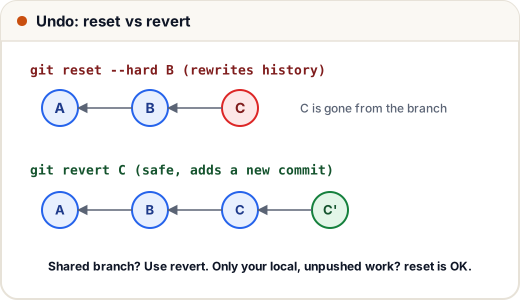
reset — move the branch pointer back (rewrites history)
git reset --soft HEAD~1    # undo the commit, keep changes staged
git reset HEAD~1           # undo the commit, keep changes unstaged (default --mixed)
git reset --hard HEAD~1    # undo the commit AND delete the changes ⚠️
HEAD~1 = one commit before HEAD.
revert — add a new commit that undoes an old one (safe)
git revert 7d6e5f
History stays intact; teammates just pull the new "undo" commit.
Rule: pushed/shared → revert. Local only → reset is fine.
4. stash: save work without committing
You're halfway through a feature and need to fix an urgent bug on main:
git stash                  # put my unfinished changes aside
git switch main            # clean working directory
# ... fix the bug, commit, push ...
git switch feature/login
git stash pop              # bring my changes back
git stash list             # see all stashes
5. reflog: the safety net
Git remembers where HEAD has been, even after a bad reset --hard:
git reflog                 # list of recent HEAD positions
git reset --hard HEAD@{2}  # go back to where you were two moves ago
Commits are rarely truly lost for about 30 days.
Common mistakes
git reset --hardwith uncommitted work you wanted (it deletes it).- Resetting or amending commits that teammates already pulled.
- Forgetting a stash exists (
git stash listregularly).
Quick recap
- restore = discard/unstage file changes.
- amend = fix the latest (unpushed) commit.
- reset rewrites local history (
--soft, mixed,--hard); revert safely undoes pushed commits. - stash to park work; reflog to recover.