Git & GitHub · Lesson 5 of 5 · Updated ·
Professional Git Workflow and Git Interview Questions
You know the commands. This lesson shows how they fit together in a real team — and how to answer Git questions in interviews.
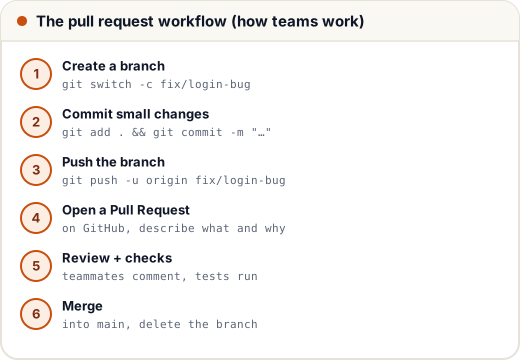
1. A day at work with Git
git switch main && git pull                 # start from the latest main
git switch -c fix/upi-timeout               # one branch per task
# ... code, test ...
git add -p                                  # review and stage hunk by hunk
git commit -m "Retry UPI status check on timeout"
git pull --rebase origin main               # update your branch with main (your own branch only)
git push -u origin fix/upi-timeout
# open a PR, address review comments, push more commits, merge
Team rules you'll see
- main is protected — no direct pushes; changes arrive through PRs.
- CI (GitHub Actions) runs tests on every PR.
- Code review — at least one approval.
- Squash merge — a PR becomes one clean commit on main.
- Tags mark releases:
git tag v1.4.0 && git push --tags.
2. Cheat sheet
| Task | Command |
|---|---|
| Start / copy a repo | git init · git clone URL |
| See state | git status · git log --oneline --graph · git diff |
| Save work | git add . · git commit -m "msg" |
| Branches | git switch -c name · git switch name · git branch -d name |
| Combine | git merge name · git rebase main |
| Sync | git pull · git push · git fetch |
| Undo | git restore · git reset · git revert · git stash |
| Investigate | git blame file · git show id · git bisect |
3. Git interview questions
- Git vs GitHub? Git is the version control tool; GitHub is a website that hosts Git repositories and adds collaboration (PRs, issues, Actions).
- What is a commit? A snapshot of the staged changes with an id, author, time, message and parent.
- What is the staging area? Where you choose which changes go into the next commit.
- git pull vs git fetch? fetch downloads; pull downloads and merges.
- merge vs rebase? Merge keeps history with a merge commit; rebase replays commits for a linear history (don't rebase shared branches).
- reset vs revert? reset moves the branch back (rewrites history); revert adds an undo commit (safe for shared branches).
- What is a merge conflict and how do you resolve it? Both branches changed the same lines; edit the file, remove the markers, add, commit.
- What is HEAD? A pointer to the commit/branch you're currently on.
- What does git stash do? Saves uncommitted changes aside and cleans the working directory.
- What is .gitignore? A list of files and patterns Git shouldn't track (dependencies, builds, secrets).
- What is a detached HEAD? You've checked out a commit directly, not a branch; new commits aren't on any branch unless you create one.
- What is git bisect? Binary search through history to find the commit that introduced a bug.
- What is cherry-pick? Apply one specific commit from another branch onto the current branch.
Common mistakes
- Long-lived branches that drift far from main.
- Mixing unrelated changes in one commit or PR.
- Not reading
git statusbefore committing.
Quick recap
- Pull main → branch → small commits → push → PR → review → merge.
- Protected main, CI checks, squash merges, release tags.
- Know the 13 interview answers above.