AdvancedGit & GitHub · Lesson 9 of 9 · Updated ·
Git Tags, GitHub Releases and Semantic Versioning (v1.4.2 Explained)
A customer says "the invoice page broke after Tuesday's update". Which code was running on Tuesday? If your team tags every release, the answer takes one command. This lesson covers Git tags, how to number versions with semantic versioning, and how to publish a release on GitHub.
1. What is a tag?
A branch is a label that moves forward with every new commit. A tag is a label that never moves: it permanently names one commit, such as "this is version 1.1.0".
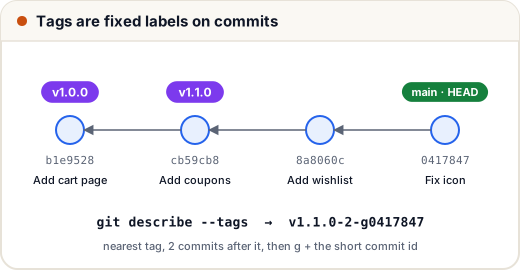
| Branch | Tag | |
|---|---|---|
| Moves when you commit? | yes | no |
| Typical name | main, fix/login | v1.4.0 |
| Used for | ongoing work | marking releases and milestones |
2. Lightweight vs annotated tags
Git has two kinds of tags:
git tag v1.0.0 b1e9528                       # lightweight: just a name for a commit
git tag -a v1.1.0 -m "Release 1.1.0: coupons"  # annotated: a full tag object
An annotated tag is stored as its own object with the tagger's name, date and a message. You can check the type:
git cat-file -t v1.0.0
git cat-file -t v1.1.0
commit
tag
The lightweight tag points straight at a commit; the annotated tag is a tag object. git show v1.1.0 --no-patch starts with the tag details, followed by the commit it points to:
tag v1.1.0
Tagger: Asha <a@e.com>
Date:   Tue Nov 17 22:39:36 2026 +0530

Release 1.1.0: coupons
Use annotated tags for releases. They record who made the release and when, and many tools (including git describe without --tags) only look at annotated tags. Lightweight tags are fine for private bookmarks.
3. Working with tags
| Task | Command |
|---|---|
| List tags | git tag |
| List matching tags | git tag -l "v1.*" |
| Tag an older commit | git tag -a v0.9.0 <commit> -m "…" |
| Push one tag | git push origin v1.1.0 |
| Push all tags | git push origin --tags |
| Delete a local tag | git tag -d v1.1.0 |
| Delete a tag on GitHub | git push origin --delete v1.1.0 |
| Look at the code of a release | git switch --detach v1.0.0 |
| Start a fix branch from a release | git switch -c hotfix/1.0.1 v1.0.0 |
Important: git push does not push tags by default. Forgetting to push them is the most common tag mistake.
Checking out a tag puts you in detached HEAD — you are on a commit, not a branch. That is fine for looking around. If you want to make changes, create a branch from the tag first (last row of the table).
4. Which version am I running? git describe
git describe --tags
v1.1.0-2-g0417847
Read it in three parts:
v1.1.0— the nearest tag behind the current commit2— the current commit is 2 commits after that tagg0417847—g(for Git) plus the short id of the current commit
Many teams print this string in the app's footer or a /version endpoint, so a bug report can say exactly which build it came from. If the current commit is itself tagged, git describe prints just the tag name.
5. Semantic versioning: MAJOR.MINOR.PATCH
Semantic versioning (semver, defined at semver.org) gives each part of a version number a meaning:
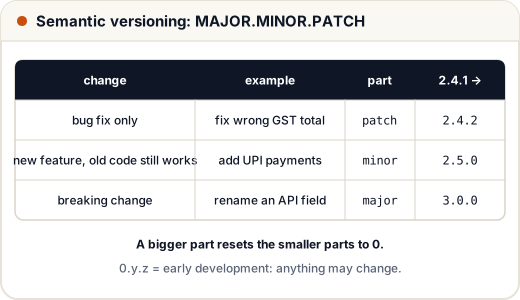
| Part | Increase it when | Example change |
|---|---|---|
| MAJOR | you make a breaking change: old code using your API stops working | renaming an API field |
| MINOR | you add a feature that keeps old code working | adding UPI as a payment option |
| PATCH | you only fix bugs, without changing behaviour that users depend on | fixing a wrong GST total |
Rules worth remembering:
- Increasing one part resets the smaller parts to 0:
2.4.1→2.5.0, not2.5.1. - Versions starting with
0(like0.7.3) mean early development: anything may change at any time. - Extra labels mark pre-releases:
3.0.0-beta.1comes before3.0.0. - Git tags usually add a
v: tagv2.5.0for version2.5.0.
Here is the bump rule as code:
function bump(version, part) {
  let [major, minor, patch] = version.split(".").map(Number);
  if (part === "major") return `${major + 1}.0.0`;
  if (part === "minor") return `${major}.${minor + 1}.0`;
  return `${major}.${minor}.${patch + 1}`;
}

console.log(bump("2.4.1", "patch"));
console.log(bump("2.4.1", "minor"));
console.log(bump("2.4.1", "major"));
2.4.2
2.5.0
3.0.0
Why this matters in practice
In package.json, "express": "^4.18.2" means "any version from 4.18.2 up to, but not including, 5.0.0". npm trusts that minor and patch updates do not break your code. When a library breaks semver, thousands of projects break at once — which is why getting the version number right is a real responsibility.
Versions are numbers, not text
Sorting tags as plain text gives the wrong order, because "1" < "2" character by character:
const tags = ["v1.10.0", "v1.2.0", "v1.9.3"];
console.log([...tags].sort());
const asNumbers = (t) => t.slice(1).split(".").map(Number);
console.log([...tags].sort((a, b) => {
  const x = asNumbers(a), y = asNumbers(b);
  return x[0] - y[0] || x[1] - y[1] || x[2] - y[2];
}));
[ 'v1.10.0', 'v1.2.0', 'v1.9.3' ]
[ 'v1.2.0', 'v1.9.3', 'v1.10.0' ]
Git has the same problem: plain git tag sorts as text. Use git tag --sort=v:refname to sort by version.
6. GitHub releases and changelogs
A tag is a Git feature. A release is a GitHub page built on a tag, with:
- a title and release notes (what changed, in plain words)
- downloadable files (for example a built
.apkor.zip) - automatic source-code archives
To create one: repository → Releases → Draft a new release → choose or create a tag → write notes → Publish. GitHub can also generate release notes from the merged pull requests since the previous tag.
Many projects also keep a CHANGELOG.md with sections per version:
## 2.5.0
### Added
- UPI payments at checkout
### Fixed
- GST total rounded wrongly on invoices
7. A simple release routine
git switch main && git pull
# make sure tests pass and the version number in package.json is updated
git tag -a v2.5.0 -m "Release 2.5.0: UPI payments"
git push origin main
git push origin v2.5.0
# then create the GitHub release from tag v2.5.0
Automated pipelines (for example GitHub Actions) are often set to deploy whenever a tag starting with v is pushed, so the tag itself becomes the "ship it" button.
Common mistakes
- Creating a tag but never pushing it (
git pushskips tags). - Moving or re-using a tag that others already fetched — create a new version instead.
- Bumping PATCH for a breaking change, so users' code breaks on a "safe" update.
- Making changes in detached HEAD after checking out a tag, then losing them; create a branch first.
Quick recap
- A tag is a fixed label on a commit; branches move, tags do not.
- Use annotated tags (
git tag -a v1.2.0 -m "…") for releases; push them explicitly. git describe --tags→ nearest tag, commits since it, and the current short id.- Semver: MAJOR (breaking) . MINOR (new, compatible) . PATCH (fixes); bigger bumps reset smaller parts to 0.
- A GitHub release = a tag + notes + files; keep a changelog.