AdvancedGit & GitHub · Lesson 8 of 9 · Updated ·
Rebase vs Merge and Clean Git History — Squash, Fast-Forward, Cherry-Pick
In an earlier lesson you saw that merge keeps two lines of history and rebase makes a straight line. This lesson goes deeper: what rebase actually does to your commits, the different ways a pull request can be merged, and how professionals keep main readable. All outputs below come from running the commands for real; your commit ids will be different.
1. Why history quality matters
git log is the project's diary. Six months later, someone asks "why did the cart total change?" A history like this helps:
Add coupon codes at checkout (#42)
Fix GST rounding on invoices (#41)
Add cart page (#40)
A history like this does not:
wip
fix
fix again
asdf
final final
Clean history also makes git bisect (finding the commit that introduced a bug), git revert and code review much easier.
2. Our starting point
main has two commits. You branch feature/cart and add two commits. Meanwhile a teammate adds "Fix typo in footer" to main.
git log --oneline --graph --all
* f4f9a02 Fix typo in footer
| * 92adf28 Add cart page
| * 5686c50 Add cart model
|/
* f59f455 Add footer
* 4eb3f13 Add home page
You now have two choices for bringing your work up to date.
3. Option A: merge main into your branch
git switch feature/cart
git merge main
This creates a merge commit with two parents. Nothing existing is changed. It is always safe, even on a branch other people use, but if you do it often your branch fills with "Merge branch 'main' into feature/cart" commits.
4. Option B: rebase your branch onto main
git switch feature/cart
git rebase main
git log --oneline --graph --all
Successfully rebased and updated refs/heads/feature/cart.
* b1e9528 Add cart page
* 2d43900 Add cart model
* f4f9a02 Fix typo in footer
* f59f455 Add footer
* 4eb3f13 Add home page
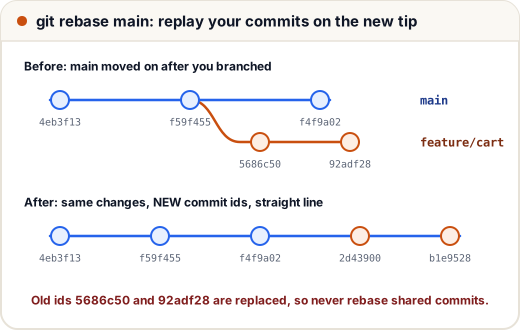
Look closely at the ids. "Add cart model" was 5686c50; now it is 2d43900. Rebase does not move commits — it creates new ones:
- Find the commits on your branch that are not on
main(5686c50,92adf28). - Temporarily set them aside.
- Move your branch to the tip of
main(f4f9a02). - Re-apply each change, one at a time, as a new commit with a new parent — and therefore a new id.
A commit's id is calculated from its content and its parent. A new parent means a new id, even if the code change is identical.
The golden rule
Never rebase commits that other people already have.
If a teammate built on top of 5686c50 and you replace it with 2d43900, their history and yours now disagree, and they get confusing duplicate commits. Rebase your own local or personal branch; merge shared branches.
5. Fast-forward merges
After the rebase, main is a direct ancestor of feature/cart. Merging needs no merge commit — Git just slides the main label forward:
git switch main
git merge --ff-only feature/cart
Updating f4f9a02..b1e9528
Fast-forward
 cart.txt | 2 ++
 1 file changed, 2 insertions(+)
 create mode 100644 cart.txt
--ff-only means "merge only if it can be a fast-forward; otherwise refuse". Teams that want a perfectly linear main use it as a safety check.
6. Squash merges
Your branch often contains commits like "WIP", "fix typo" and "address review". Nobody needs those on main. A squash merge combines all the branch's changes into one new commit:
git switch main
git merge --squash fix/coupon
git commit -m "Add coupon codes at checkout (#42)"
git log --oneline -3
cb59cb8 Add coupon codes at checkout (#42)
b1e9528 Add cart page
2d43900 Add cart model
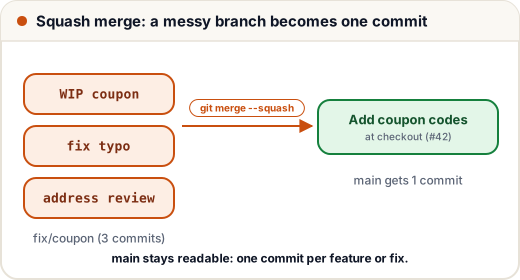
git merge --squash stages the combined changes but does not commit — you write one clear message yourself.
7. The three GitHub merge buttons
On a pull request, GitHub offers three ways to merge:
| Button | What lands on main | History |
|---|---|---|
| Create a merge commit | all branch commits + a merge commit | full detail, not linear |
| Squash and merge | one new commit with all changes | linear, one commit per PR |
| Rebase and merge | each branch commit re-created on top of main | linear, every commit kept |
Many teams choose squash and merge: each pull request becomes one tidy, revertable commit. Others prefer merge commits so the full story is kept. Ask what your team uses — both are reasonable.
8. Tidying your own commits before a pull request
Before you open a PR, you may want to clean your own, not-yet-shared commits:
- Fix the last commit (message or a forgotten file):
git commit --amend. - Fold a small fix into an earlier commit:
git commit --fixup <commit>, then latergit rebase -i --autosquash maincombines it automatically. - Reorder, combine or reword several commits:
git rebase -i mainopens a list of your commits where you changepicktosquash,rewordordrop. (This interactive mode opens an editor; it is worth practising on a test repository first.)
If you already pushed the branch, rewriting it means you must force-push. Use the safer form:
git push --force-with-lease
Plain --force overwrites whatever is on the remote. --force-with-lease refuses if someone else pushed to the branch since you last fetched, so you cannot silently delete their work.
9. cherry-pick: copy one commit
Sometimes you need one commit from another branch — for example, a bug fix from develop that must go to main today:
git switch main
git cherry-pick 6a74bae
Git re-applies that commit's change on your branch as a new commit (new id, same change). Use it for occasional fixes, not as a replacement for merging whole branches.
10. Merge or rebase? A quick guide
| Situation | Use |
|---|---|
| Update your own feature branch with the latest main | rebase (or merge, if you prefer) |
| A branch that others also push to | merge |
| Bring a finished feature into main | the team's PR setting (often squash) |
| Need just one fix from another branch | cherry-pick |
| Already pushed and someone may have pulled it | never rebase; use merge or revert |
Common mistakes
- Rebasing a shared branch, then force-pushing over teammates' commits.
- Using
git push --forcewhen--force-with-leasewould protect others' work. - Thinking rebase "moves" commits — it creates new ones, so the old ids disappear from the branch.
- Squashing a huge branch that mixed unrelated changes; split it into separate PRs instead.
Quick recap
- Merge keeps history and adds a merge commit; always safe.
- Rebase re-creates your commits on a new base: new ids, straight line. Never rebase commits others have.
--ff-onlymerges only when no merge commit is needed.- Squash merge turns a whole branch into one clean commit on main.
- Clean your own commits with amend, fixup and interactive rebase; push with
--force-with-lease. cherry-pickcopies a single commit.