AdvancedGit & GitHub · Lesson 6 of 9 · Updated ·
Git Branching Strategies — Git Flow, GitHub Flow and Trunk-Based Development
You already know how to create and merge a branch. But when ten people work on one project, they need shared rules: which branches exist, where new work starts, and how code reaches users. These rules are called a branching strategy (or branching model). Interviewers often ask "Which branching strategy did your team use, and why?"
1. Why a team needs rules
Imagine a college project team of four building a canteen-ordering app. Without rules:
- Ravi pushes half-finished code to
mainand the demo breaks. - Neha fixes a bug on her own branch, but nobody knows which branch the teacher should test.
- Two people work for three weeks on separate branches, then spend a whole day fixing merge conflicts.
A branching strategy answers three questions:
- Which branch holds released (or deployable) code?
- Where does new work start, and how long may a branch live?
- How does an urgent fix reach users?
There is no single "correct" strategy. The three below are the ones you will meet most often.
2. Git Flow: planned, versioned releases
Git Flow was described by Vincent Driessen in 2010. It uses two long-lived branches and three kinds of short-lived ones.
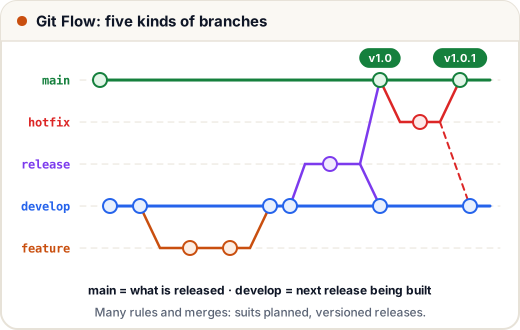
| Branch | Lives | Starts from | Merges into | Purpose |
|---|---|---|---|---|
main | forever | — | — | only released code, each release tagged |
develop | forever | main | — | the next release being built |
feature/* | days–weeks | develop | develop | one new feature |
release/* | days | develop | main and develop | final testing, version number, small fixes only |
hotfix/* | hours | main | main and develop | urgent fix to the live version |
A release looks like this:
git switch develop
git switch -c release/1.4.0      # freeze features; only bug fixes from now
# ... test, fix small bugs, update the version number ...
git switch main
git merge --no-ff release/1.4.0
git tag -a v1.4.0 -m "Release 1.4.0"
git switch develop
git merge --no-ff release/1.4.0  # bring the release fixes back to develop
git branch -d release/1.4.0
--no-ff ("no fast-forward") forces a merge commit, so the history clearly shows where the release branch joined.
Good for: software shipped as versions that users install (mobile apps, desktop software, libraries), or projects that must support an old version while building a new one.
Weak points: many branches and double merges. Branches live longer, so conflicts grow. For a website that deploys many times a day, it is too heavy.
3. GitHub Flow: one main branch plus pull requests
GitHub Flow keeps only one long-lived branch: main, which must always be deployable.
- Create a short branch from
main(fix/login-otp). - Commit, push, open a pull request.
- Automated tests run; a teammate reviews.
- Merge into
mainand deploy.
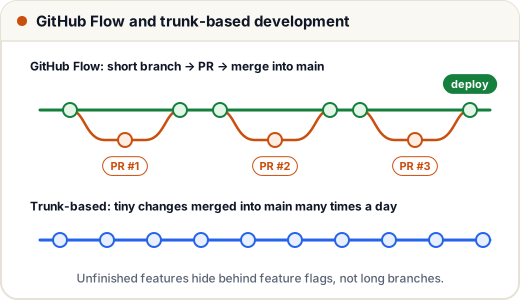
Good for: web apps and APIs that deploy continuously, small teams, student projects. It is simple enough to learn in one day.
Rule that makes it work: branches are small and short — ideally merged within a day or two.
4. Trunk-based development
In trunk-based development, everyone integrates into the main branch (the "trunk") at least once a day. Branches, if used at all, last a few hours.
But what if a feature takes three weeks? You merge the unfinished code anyway, switched off by a feature flag:
// The new checkout is merged into main but hidden until it is ready
const flags = { newCheckout: false };

function checkoutPage(user) {
  if (flags.newCheckout || user.isTester) {
    return "new checkout";
  }
  return "old checkout";
}

console.log(checkoutPage({ isTester: false }));
console.log(checkoutPage({ isTester: true }));
old checkout
new checkout
Testers see the new page; everyone else sees the old one. When the feature is ready, the team flips the flag — no big merge needed.
Good for: experienced teams with strong automated tests and continuous integration (CI). Needs: discipline, fast tests and a way to manage flags (and to delete old ones).
5. Comparing the three
| Git Flow | GitHub Flow | Trunk-based | |
|---|---|---|---|
| Long-lived branches | main + develop | main | main |
| Branch life | days to weeks | hours to a few days | hours |
| Release style | planned versions | deploy after each merge | deploy very often |
| Unfinished work | stays on its branch | stays on its branch | merged, hidden by a flag |
| Complexity | high | low | low rules, high discipline |
| Typical user | versioned products | web teams, startups | large teams with strong CI |
A simple way to choose:
- Do you ship numbered versions and must patch old ones? → Git Flow.
- Do you deploy a website or API whenever code is ready? → GitHub Flow.
- Does your team merge many times a day with good test coverage? → Trunk-based.
For your own portfolio projects and internships, GitHub Flow is the best default.
6. Rules that support any strategy
- Protect the main branch (GitHub → Settings → Branches → branch protection rules): no direct pushes, at least one approval, required status checks (tests must pass).
- Naming conventions:
feature/…,fix/…,hotfix/…,release/…,chore/…. Some teams add the ticket number:feature/SK-142-upi-refunds. - Short branches: the longer a branch lives, the bigger its merge conflicts.
- Delete merged branches so the branch list stays readable.
- Tag releases (
v1.4.0) so you can always find exactly what was shipped.
Common mistakes
- Choosing Git Flow for a small web project and drowning in
develop/releasemerges. - Forgetting to merge a hotfix back into
developin Git Flow, so the bug returns in the next release. - Calling it "GitHub Flow" but keeping branches open for weeks.
- Using feature flags but never removing old ones, so the code fills with dead
ifstatements.
Quick recap
- A branching strategy is a team agreement about branches, merging and releasing.
- Git Flow:
main+develop, plus feature, release and hotfix branches; suits versioned releases. - GitHub Flow: only
main, short branches, pull requests, deploy after merge. - Trunk-based: everyone merges into main daily; unfinished work hides behind feature flags.
- Protect
main, name branches clearly, keep them short and tag releases.