AdvancedGit & GitHub · Lesson 10 of 12 · Updated ·
How Git Works Inside — Blobs, Trees, Commits, Refs and HEAD
Most people learn Git as a list of commands. Interviewers often ask the next question: "What is a commit, really?" or "Why is creating a branch so fast?" This lesson opens the .git folder and shows the answer. Once you see how Git stores data, commands like reset, rebase and branch stop feeling like magic.
We use a tiny project called shop with two files, hello.txt and src/app.py, and two commits. Every output below was produced by running these commands on that project.
1. Git is a key–value store
At its core, Git is a simple database. You give it some content; it stores the content and gives back a key. The key is a 40-character SHA-1 hash of the content. A hash is a fixed-length fingerprint computed from data: the same data always gives the same hash, and a tiny change gives a completely different one.
printf 'Hello, Git!\n' > hello.txt
git hash-object hello.txt
670a245535fe6316eb2316c1103b1a88bb519334
This id depends only on the content. Anyone, on any computer, who stores a file containing exactly Hello, Git! and a newline gets the same id. (On Windows, Git may convert line endings, which changes the content and so the id.)
How the id is computed
Git adds a small header — the object type, a space, the size in bytes and a zero byte — and hashes the result. You can do the same in Python:
import hashlib

content = b"Hello, Git!\n"
header = f"blob {len(content)}\0".encode()
print(len(content))
print(hashlib.sha1(header + content).hexdigest())
12
670a245535fe6316eb2316c1103b1a88bb519334
The Python answer matches git hash-object exactly. Git is not hiding anything clever here.
2. The four object types
Everything Git saves is one of four object types, stored in .git/objects/:
| Object | What it stores | Like… |
|---|---|---|
| blob | the contents of one file (no name, no date) | the text of a page |
| tree | a list of names, each pointing to a blob or another tree | a folder |
| commit | one root tree, parent commit(s), author, date and message | a labelled photo of the whole project |
| tag | an annotated tag: a name, tagger, message and the commit it marks | a sticky note on a photo |
Notice that a blob has no file name. The name lives in the tree that points to it. That is why renaming a file without changing it creates no new blob.
3. Looking at real objects
git cat-file prints any object. -t shows the type and -p pretty-prints the content.
git cat-file -t HEAD
git cat-file -p HEAD
commit
tree 323a35551446dae86a446192bc97154b015998fe
parent 14b89050123d9a2ca7115484f3ff670e39c4fd86
author Asha <asha@example.com> 1795152600 +0530
committer Asha <asha@example.com> 1795152600 +0530

Raise price to 599
A commit is just a short piece of text. The number 1795152600 is the time in seconds since 1 January 1970 (a Unix timestamp), followed by the time zone. Now follow the tree line:
git cat-file -p 323a355
100644 blob 670a245535fe6316eb2316c1103b1a88bb519334	hello.txt
040000 tree 15974c401f757ce9b21415a81502f86668430e2b	src
Each line is a mode (100644 = normal file, 040000 = folder), a type, an id and a name. The src folder is another tree, and inside it is the blob for app.py. Short ids like 323a355 work as long as no other object starts with the same characters.
4. A commit is a snapshot, not a diff
Here are both commits drawn as objects. The second commit only changed src/app.py (price 499 to 599).
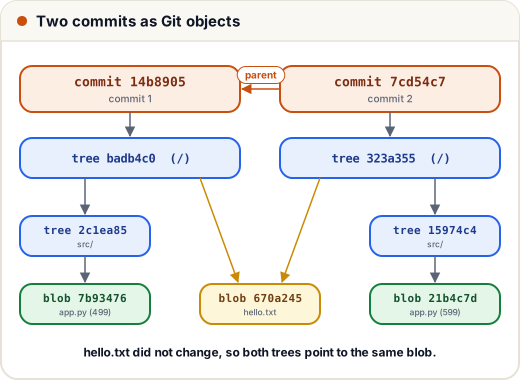
Three things to notice:
- Each commit points to a complete tree of the project — a full snapshot, not a list of changes.
git diffandgit showcompute changes on the fly by comparing two trees. hello.txtdid not change, so both trees point to the same blob. Git never stores the same content twice. Snapshots are cheap because unchanged files are shared.- Changing one file creates a new blob, a new tree for every folder above it (
src/and the root), and a new commit. The second commit added exactly 4 objects, whichgit count-objectsconfirms (5 objects after the first commit, 9 after the second).
Because a commit's text includes its parent's id, and the parent includes its parent, changing any old commit would change every id after it. This chain is why Git history is very hard to tamper with silently — and why rebase and commit --amend always produce new commit ids.
5. Refs: branches are tiny files
If objects are stored by hash, how does Git know where main is? With a ref (reference): a small file that holds a commit id.
cat .git/refs/heads/main
cat .git/HEAD
7cd54c721ada4b6666dc7935b3497ea039eeac8f
ref: refs/heads/main
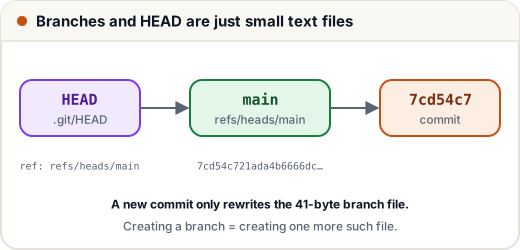
- A branch is a file in
.git/refs/heads/containing one commit id (41 bytes with the newline). Creating a branch writes one small file, which is why it is instant even in a huge project. - HEAD usually says "I am on this branch":
ref: refs/heads/main. When you commit, Git creates the commit object and then moves the branch that HEAD names. - In detached HEAD state,
.git/HEADcontains a commit id directly instead of a branch name. New commits then belong to no branch. - Remote-tracking branches such as
origin/mainlive in.git/refs/remotes/. Tags live in.git/refs/tags/. (Git may also pack many refs into one file,.git/packed-refs.)
After git switch -c feature/upi, the new file .git/refs/heads/feature/upi holds the same id, 7cd54c7…, and HEAD changes to ref: refs/heads/feature/upi. No files were copied.
6. What common commands really do
| Command | Effect inside .git |
|---|---|
git add file | stores the file as a blob and records it in the index (staging area, the file .git/index) |
git commit | builds trees from the index, writes a commit object, moves the current branch |
git branch x | writes refs/heads/x with the current commit id |
git switch x | changes HEAD and updates your files to match x's tree |
git reset --hard <id> | moves the current branch to <id> and resets the index and files |
git gc | packs loose objects into compressed pack files and deletes old unreachable ones |
Objects that no branch, tag or reflog entry can reach are unreachable. Git keeps them for a while (which is how git reflog can rescue "lost" commits) and git gc removes them later.
Common mistakes
- Thinking a commit stores only the changes. It stores a full snapshot; sharing unchanged blobs keeps it small.
- Thinking a branch is a copy of the code. It is a 41-byte pointer to one commit.
- Expecting a rewritten commit (
--amend,rebase) to keep its id. New content means a new hash. - Editing files inside
.gitby hand. Reading them is a great way to learn; changing them can corrupt the repository.
Quick recap
- Git stores objects by the SHA-1 hash of
type + size + \0 + content. - blob = file content, tree = folder listing, commit = tree + parent(s) + author + message, tag = annotated label.
- Commits are snapshots; identical content is stored once and shared.
- Branches are small files holding a commit id; HEAD names the current branch (or a commit, when detached).
git cat-file -t/-p,git hash-objectandgit count-objectslet you look inside.