AdvancedGit & GitHub · Lesson 12 of 12 · Updated ·
Setting Up Git Properly — Config Levels, Aliases, .gitignore Patterns, Line Endings and Hooks
Two students clone the same project. On one laptop, every file shows as "modified" even though nobody touched it. On the other, a .env file with a payment key gets pushed to GitHub. Both problems come from Git setup, not from the commands you use every day. This lesson covers the settings and files that prevent them: config levels, aliases, .gitignore, line endings and hooks.
1. Config levels: system, global and local
git config stores settings at three levels. When the same key is set at more than one level, the most specific level wins.
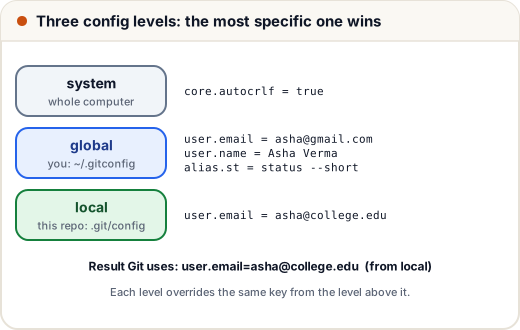
| Level | Applies to | File | Option |
|---|---|---|---|
| system | every user on the computer | in Git's install folder | --system |
| global | you, in every repository | ~/.gitconfig | --global |
| local | this one repository | .git/config | --local (the default) |
A common use: your personal email globally, and your college or company email for one project.
git config user.email "asha@college.edu"      # local: only this repo
git config --show-scope --get user.email
local asha@college.edu
--show-scope tells you which level a value came from, and --show-origin shows the exact file. Use them when Git behaves differently from what you expect. git config --list prints every setting Git can see.
Useful settings to know:
| Setting | What it does |
|---|---|
init.defaultBranch main | new repositories start on main |
pull.rebase true | git pull rebases your local commits instead of creating merge commits |
core.editor "code --wait" | opens VS Code for commit messages |
merge.conflictStyle diff3 | shows the common ancestor in conflicts |
push.autoSetupRemote true | the first git push of a new branch sets its upstream automatically |
2. Aliases: your own short commands
An alias is a short name for a longer command:
git config --global alias.st "status --short"
git config --global alias.lg "log --oneline --graph --all"
git lg
* abcc6b8 Stop tracking .env
* 8d19e28 Oops, add .env
* c7d9a68 Initial
Aliases are stored in the config file like any setting (git config --get alias.lg prints log --oneline --graph --all). Learn the full commands first; aliases are for saving keystrokes, not for skipping understanding.
3. .gitignore patterns that really work
The basics lesson introduced .gitignore. Here are the rules that cause most confusion:
# dependencies and builds
node_modules/
dist/
*.log
# secrets
.env
.env.*
!.env.example
# only the top-level config.local.json
/config.local.json
| Pattern | Meaning |
|---|---|
node_modules/ | a trailing / matches folders only, at any depth |
*.log | any file ending in .log, in any folder |
.env.* | .env.production, .env.local and so on |
!.env.example | ! un-ignores a file that an earlier pattern ignored |
/config.local.json | a leading / matches only at the top level, not src/config.local.json |
**/temp | temp in any folder (two stars match any number of folders) |
The order matters: the last matching pattern wins, so !.env.example must come after .env.*.
Why is this file ignored? git check-ignore
git check-ignore -v error.log .env.production .env.example src/config.local.json src/logs/debug.log
.gitignore:4:*.log	error.log
.gitignore:7:.env.*	.env.production
.gitignore:8:!.env.example	.env.example
.gitignore:4:*.log	src/logs/debug.log
Each line shows the file, line number and pattern that matched. .env.example matched the ! rule, so it is not ignored. src/config.local.json printed nothing: no pattern ignores it, because /config.local.json only matches at the top.
.gitignore does not untrack files already committed
.gitignore only affects untracked files. If .env was committed before you added the rule, Git keeps tracking it. Remove it from the index but keep it on disk:
git rm --cached .env
git commit -m "Stop tracking .env"
rm '.env'
The file stays on your laptop, but the next commit no longer contains it. Important: the old commit still contains the secret, and anyone who cloned the repository has it. If a real key was pushed, change (rotate) the key immediately. Removing it from history needs special tools and does not undo the leak.
For files you want to ignore only on your own machine (such as editor settings), use .git/info/exclude or a global ignore file instead of the shared .gitignore.
4. Line endings: CRLF vs LF
Text files end each line with an invisible character:
- LF (
\n) on Linux and macOS - CRLF (
\r\n) on Windows
If Windows and Linux users commit the same file with different endings, Git sees every line as changed, and diffs become useless. Git can convert endings for you. On Windows you will often see this warning:
warning: in the working copy of 'src/app.js', LF will be replaced by CRLF the next time Git touches it
This means Git stores the file with LF but will write it with CRLF in your working folder. It is a notice, not an error.
The reliable fix is a .gitattributes file committed to the repository, so every teammate gets the same rules:
* text=auto eol=lf
*.bat text eol=crlf
*.png binary
text=autolets Git detect text files and normalise them to LF in the repository.eol=lfalso writes LF in the working folder (shell scripts break with CRLF).binarytells Git never to convert or diff the file.
After adding .gitattributes to an existing project, run git add --renormalize . and commit once to fix files already stored with the wrong endings. The older per-person setting core.autocrlf still works, but .gitattributes is better because it travels with the repository.
5. Hooks: scripts that run at Git events
A hook is a script in .git/hooks/ that Git runs at a certain moment. If the script exits with a non-zero code, Git stops the action.
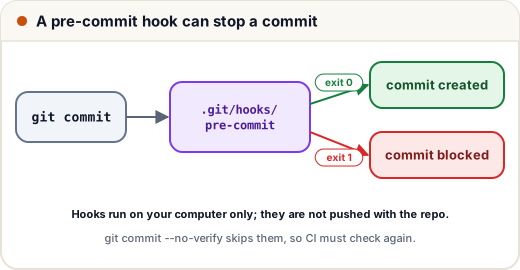
| Hook | Runs | Typical use |
|---|---|---|
pre-commit | before a commit is created | block secrets, run a formatter or linter |
commit-msg | after you write the message | enforce a message format |
pre-push | before pushing | run the quick tests |
Here is a pre-commit hook that blocks a staged line containing API_KEY=:
#!/bin/sh
# .git/hooks/pre-commit  (make it executable: chmod +x .git/hooks/pre-commit)
if git diff --cached -U0 | grep -q '^+.*API_KEY='; then
  echo "pre-commit: possible secret (API_KEY=) in staged changes. Commit blocked."
  exit 1
fi
pre-commit: possible secret (API_KEY=) in staged changes. Commit blocked.
git diff --cached shows the staged changes, and lines starting with + are added lines.
Hooks can be written in any language. This is the check a Python commit-msg hook could use to enforce Conventional Commits style (type(scope): summary):
import re

PATTERN = re.compile(r"^(feat|fix|docs|test|refactor|chore)(\([a-z-]+\))?: .{3,72}$")

def check(message):
    first_line = message.splitlines()[0] if message else ""
    return bool(PATTERN.match(first_line))

for msg in ["feat(cart): add UPI payment", "fix: GST rounding on invoices", "changes", "Fix: login bug"]:
    print("OK " if check(msg) else "BAD", msg)
OK  feat(cart): add UPI payment
OK  fix: GST rounding on invoices
BAD changes
BAD Fix: login bug
Fix: login bug fails because the pattern expects a lowercase type.
Two limits to remember:
.git/hooks/is not pushed or cloned, so each developer must install hooks. Teams share them with a tracked folder plusgit config core.hooksPath .githooks, or with tools such as Husky (JavaScript) or pre-commit (Python).- Anyone can skip hooks with
git commit --no-verify. Hooks are a convenience; the same checks must also run in CI on every pull request.
Common mistakes
- Adding a file to
.gitignoreand expecting Git to stop tracking it — usegit rm --cached. - Putting
!important.logbefore*.log; the later rule wins. - Deleting a leaked key from the repository but not rotating it.
- Each developer fixing line endings differently instead of committing one
.gitattributes. - Relying on hooks as the only protection; they can be skipped.
Quick recap
- Config levels: system < global < local; the most specific wins.
--show-scopeand--show-originexplain where a value came from. - Aliases shorten commands:
git config --global alias.lg "log --oneline --graph --all". .gitignore: trailing/= folders, leading/= top level only,!= un-ignore, last match wins;git check-ignore -vexplains matches.git rm --cached fileuntracks a committed file; rotate any leaked secret.- Commit a
.gitattributes(* text=auto eol=lf) to end CRLF/LF noise. - Hooks (
pre-commit,commit-msg,pre-push) run locally and can block actions; CI must repeat the checks.