AdvancedDBMS & SQL · Lesson 18 of 25 · Updated ·
Window Frames in SQL — Moving Averages, ROWS vs RANGE, FIRST_VALUE, NTILE and Percentiles
The window functions lesson covered ranking, LAG/LEAD and running totals. All of those quietly depend on something called the frame: the exact set of rows the function looks at for the current row. Once you control the frame, you can compute moving averages, "best so far", "compare with the first day" and more — questions that come up in data analyst and backend interviews.
CREATE TABLE daily_sales (day DATE PRIMARY KEY, amount INT);
INSERT INTO daily_sales VALUES ('2026-03-01', 100), ('2026-03-02', 140), ('2026-03-03', 90), ('2026-03-04', 200), ('2026-03-05', 160), ('2026-03-06', 120), ('2026-03-07', 180);
1. Partition, order, frame
A full window has three parts:
function() OVER (PARTITION BY … ORDER BY … frame)
- PARTITION BY — which group the row belongs to.
- ORDER BY — the order inside the group.
- Frame — which rows around the current row are used, for example
ROWS BETWEEN 2 PRECEDING AND CURRENT ROW.
Frame boundaries you can use:
| Boundary | Meaning |
|---|---|
UNBOUNDED PRECEDING | the first row of the partition |
n PRECEDING | n rows before the current row |
CURRENT ROW | the current row |
n FOLLOWING | n rows after the current row |
UNBOUNDED FOLLOWING | the last row of the partition |
2. Moving average (sliding window)
A 3-day moving average smooths out daily ups and downs. For each day, average that day and the two days before it.
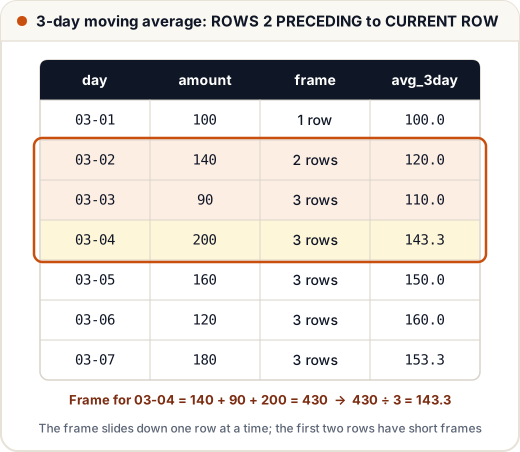
SELECT day, amount,
       ROUND(AVG(amount) OVER (ORDER BY day ROWS BETWEEN 2 PRECEDING AND CURRENT ROW), 1) AS avg_3day
FROM daily_sales ORDER BY day;
day | amount | avg_3day
2026-03-01 | 100 | 100.0
2026-03-02 | 140 | 120.0
2026-03-03 | 90 | 110.0
2026-03-04 | 200 | 143.3
2026-03-05 | 160 | 150.0
2026-03-06 | 120 | 160.0
2026-03-07 | 180 | 153.3
The first two rows have fewer than three rows in their frame, so their averages use only 1 and 2 values. If your report should show only "full" windows, filter them out in an outer query (for example with ROW_NUMBER ≥ 3).
A centred window looks both ways — ROWS BETWEEN 1 PRECEDING AND 1 FOLLOWING:
SELECT day, amount,
       SUM(amount) OVER (ORDER BY day ROWS BETWEEN 1 PRECEDING AND 1 FOLLOWING) AS three_day_sum
FROM daily_sales ORDER BY day;
day | amount | three_day_sum
2026-03-01 | 100 | 240
2026-03-02 | 140 | 330
2026-03-03 | 90 | 430
2026-03-04 | 200 | 450
2026-03-05 | 160 | 480
2026-03-06 | 120 | 460
2026-03-07 | 180 | 300
3. The default frame, and the LAST_VALUE trap
When you write ORDER BY inside OVER and no frame, the default is:
RANGE BETWEEN UNBOUNDED PRECEDING AND CURRENT ROW
That is why SUM() OVER (ORDER BY day) gives a running total. But it surprises people with LAST_VALUE:
SELECT day, amount,
       FIRST_VALUE(amount) OVER (ORDER BY day) AS first_day,
       LAST_VALUE(amount) OVER (ORDER BY day) AS last_wrong,
       LAST_VALUE(amount) OVER (ORDER BY day ROWS BETWEEN UNBOUNDED PRECEDING AND UNBOUNDED FOLLOWING) AS last_right
FROM daily_sales ORDER BY day;
day | amount | first_day | last_wrong | last_right
2026-03-01 | 100 | 100 | 100 | 180
2026-03-02 | 140 | 100 | 140 | 180
2026-03-03 | 90 | 100 | 90 | 180
2026-03-04 | 200 | 100 | 200 | 180
2026-03-05 | 160 | 100 | 160 | 180
2026-03-06 | 120 | 100 | 120 | 180
2026-03-07 | 180 | 100 | 180 | 180
last_wrong just repeats the current amount, because the default frame ends at the current row — the current row is the last row of its frame. To see the true last value, extend the frame to UNBOUNDED FOLLOWING. FIRST_VALUE works with the default frame because the frame always starts at the first row.
Best so far uses the default running frame on purpose:
SELECT day, amount, MAX(amount) OVER (ORDER BY day) AS best_so_far
FROM daily_sales ORDER BY day;
day | amount | best_so_far
2026-03-01 | 100 | 100
2026-03-02 | 140 | 140
2026-03-03 | 90 | 140
2026-03-04 | 200 | 200
2026-03-05 | 160 | 200
2026-03-06 | 120 | 200
2026-03-07 | 180 | 200
4. ROWS vs RANGE: what happens on ties
- ROWS counts physical rows.
- RANGE groups rows with the same ORDER BY value together: all ties ("peers") are in or out of the frame together.
CREATE TABLE marks (name VARCHAR(20), score INT);
INSERT INTO marks VALUES ('Asha', 70), ('Ravi', 80), ('Neha', 80), ('Kabir', 90);

SELECT name, score,
       SUM(score) OVER (ORDER BY score, name ROWS BETWEEN UNBOUNDED PRECEDING AND CURRENT ROW) AS rows_total,
       SUM(score) OVER (ORDER BY score RANGE BETWEEN UNBOUNDED PRECEDING AND CURRENT ROW) AS range_total
FROM marks ORDER BY score, name;
name | score | rows_total | range_total
Asha | 70 | 70 | 70
Neha | 80 | 150 | 230
Ravi | 80 | 230 | 230
Kabir | 90 | 320 | 320
Neha and Ravi both scored 80. With ROWS, each sees a different number of rows (150, then 230). With RANGE, both see all rows up to and including every 80, so both get 230. This is why a running total over a non-unique column can look like it "jumps".
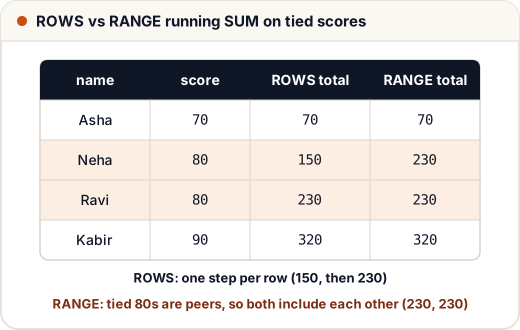 Add a tie-breaker column or use ROWS when you want one step per row.
5. NTILE, PERCENT_RANK and CUME_DIST
NTILE(n) splits the ordered rows into n nearly equal buckets — useful for quartiles ("top 25% of students") or for dividing work into batches.
CREATE TABLE results (name VARCHAR(20), marks INT);
INSERT INTO results VALUES ('Asha', 92), ('Ravi', 85), ('Neha', 78), ('Kabir', 71), ('Om', 66), ('Meera', 59), ('Arjun', 48);

SELECT name, marks,
       NTILE(3) OVER (ORDER BY marks DESC) AS band,
       ROUND(PERCENT_RANK() OVER (ORDER BY marks), 2) AS pct_rank,
       ROUND(CUME_DIST() OVER (ORDER BY marks), 2) AS cume_dist
FROM results ORDER BY marks DESC;
name | marks | band | pct_rank | cume_dist
Asha | 92 | 1 | 1.0 | 1.0
Ravi | 85 | 1 | 0.83 | 0.86
Neha | 78 | 1 | 0.67 | 0.71
Kabir | 71 | 2 | 0.5 | 0.57
Om | 66 | 2 | 0.33 | 0.43
Meera | 59 | 3 | 0.17 | 0.29
Arjun | 48 | 3 | 0.0 | 0.14
- 7 rows into 3 bands: sizes 3, 2, 2. When rows do not divide evenly, the first buckets get one extra row.
- PERCENT_RANK = (rank − 1) / (rows − 1). The lowest is 0, the highest 1.
- CUME_DIST = (rows with a value ≤ this one) / (all rows). Kabir: 4 of 7 rows have marks ≤ 71, so 0.57.
6. Naming a window
When several functions use the same window, name it once with the WINDOW clause (PostgreSQL, MySQL 8+, SQLite):
SELECT day, amount,
       MIN(amount) OVER w AS low_3day,
       MAX(amount) OVER w AS high_3day
FROM daily_sales
WINDOW w AS (ORDER BY day ROWS BETWEEN 2 PRECEDING AND CURRENT ROW)
ORDER BY day;
day | amount | low_3day | high_3day
2026-03-01 | 100 | 100 | 100
2026-03-02 | 140 | 100 | 140
2026-03-03 | 90 | 90 | 140
2026-03-04 | 200 | 90 | 200
2026-03-05 | 160 | 90 | 200
2026-03-06 | 120 | 120 | 200
2026-03-07 | 180 | 120 | 180
Common mistakes
- Using
LAST_VALUEwithoutROWS BETWEEN UNBOUNDED PRECEDING AND UNBOUNDED FOLLOWING. - Forgetting that the default frame is RANGE, so ties in ORDER BY are treated as one step.
- Calling the first rows of a moving average "3-day averages" when they contain only 1 or 2 days.
- Writing a frame without ORDER BY. "2 PRECEDING" has no meaning if the rows have no order.
- Expecting NTILE buckets to follow value ranges. NTILE splits by row count, not by marks.
Quick recap
- Frame = which rows around the current row the function uses:
ROWS BETWEEN … AND …. - Moving average:
AVG() OVER (ORDER BY d ROWS BETWEEN 2 PRECEDING AND CURRENT ROW). - Default frame with ORDER BY = RANGE from the start to the current row (and its ties).
- LAST_VALUE needs the frame extended to UNBOUNDED FOLLOWING.
- NTILE(n) makes n buckets by row count; PERCENT_RANK and CUME_DIST give relative positions.