DBMS & SQL · Lesson 10 of 13 · Updated ·
SQL Window Functions — ROW_NUMBER, RANK, DENSE_RANK, LAG and Running Totals
GROUP BY collapses rows into one row per group. Window functions calculate across a set of rows but keep every row — perfect for rankings, "top N per group" and running totals. They are now a favourite in data and backend interviews.
CREATE TABLE employees (emp_id INT PRIMARY KEY, name VARCHAR(30), dept_id INT, salary INT, city VARCHAR(20), manager_id INT, joined DATE);
INSERT INTO employees VALUES
 (1, 'Asha', 10, 95000, 'Jaipur', NULL, '2019-04-01'), (2, 'Ravi', 10, 72000, 'Pune', 1, '2021-07-15'),
 (3, 'Neha', 20, 58000, 'Jaipur', 1, '2020-01-10'), (4, 'Kabir', 20, 58000, 'Delhi', 3, '2022-03-01'),
 (5, 'Om', 30, 45000, 'Pune', 1, '2023-06-20'), (6, 'Meera', 10, 88000, 'Bengaluru', 1, '2018-11-05'),
 (7, 'Arjun', NULL, 40000, 'Delhi', 3, '2024-02-12');
1. The OVER clause
function() OVER (PARTITION BY … ORDER BY …)
- PARTITION BY splits rows into groups (like GROUP BY, but rows stay).
- ORDER BY sets the order inside each group.
SELECT name, dept_id, salary,
       ROUND(AVG(salary) OVER (PARTITION BY dept_id), 0) AS dept_avg
FROM employees WHERE dept_id IS NOT NULL
ORDER BY dept_id, salary DESC;
name | dept_id | salary | dept_avg
Asha | 10 | 95000 | 85000.0
Meera | 10 | 88000 | 85000.0
Ravi | 10 | 72000 | 85000.0
Neha | 20 | 58000 | 58000.0
Kabir | 20 | 58000 | 58000.0
Om | 30 | 45000 | 45000.0
Every employee row is kept and shows their department average.
2. ROW_NUMBER vs RANK vs DENSE_RANK
SELECT name, salary,
       ROW_NUMBER() OVER (ORDER BY salary DESC, name) AS row_num,
       RANK()       OVER (ORDER BY salary DESC) AS rnk,
       DENSE_RANK() OVER (ORDER BY salary DESC) AS dense
FROM employees ORDER BY salary DESC, name;
name | salary | row_num | rnk | dense
Asha | 95000 | 1 | 1 | 1
Meera | 88000 | 2 | 2 | 2
Ravi | 72000 | 3 | 3 | 3
Kabir | 58000 | 4 | 4 | 4
Neha | 58000 | 5 | 4 | 4
Om | 45000 | 6 | 6 | 5
Arjun | 40000 | 7 | 7 | 6
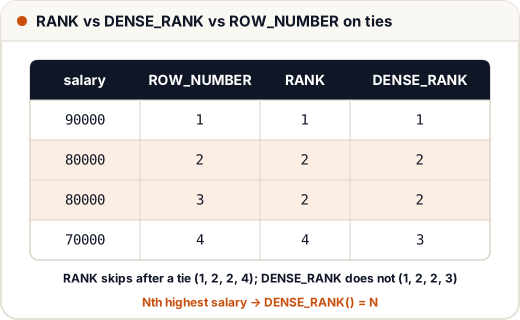
- ROW_NUMBER: always unique. On ties the order is arbitrary unless you add a tie-breaker — that's why we wrote
ORDER BY salary DESC, name. Without it, Kabir and Neha could swap between runs. - RANK: ties share a rank, then skips (4, 4, 6).
- DENSE_RANK: ties share a rank, no gaps (4, 4, 5).
3. Nth highest salary (the most asked SQL question)
Third highest distinct salary:
SELECT DISTINCT salary FROM (
    SELECT salary, DENSE_RANK() OVER (ORDER BY salary DESC) AS r FROM employees
) t
WHERE r = 3;
salary
72000
Use DENSE_RANK so ties don't create gaps.
4. Top N per group
Highest-paid employee in each department:
SELECT name, dept_id, salary FROM (
    SELECT name, dept_id, salary,
           ROW_NUMBER() OVER (PARTITION BY dept_id ORDER BY salary DESC, name) AS rn
    FROM employees WHERE dept_id IS NOT NULL
) t
WHERE rn = 1
ORDER BY dept_id;
name | dept_id | salary
Asha | 10 | 95000
Kabir | 20 | 58000
Om | 30 | 45000
5. LAG and LEAD: compare with neighbours
SELECT name, joined, salary,
       LAG(salary) OVER (ORDER BY joined) AS prev_joiner_salary
FROM employees ORDER BY joined;
name | joined | salary | prev_joiner_salary
Meera | 2018-11-05 | 88000 | NULL
Asha | 2019-04-01 | 95000 | 88000
Neha | 2020-01-10 | 58000 | 95000
Ravi | 2021-07-15 | 72000 | 58000
Kabir | 2022-03-01 | 58000 | 72000
Om | 2023-06-20 | 45000 | 58000
Arjun | 2024-02-12 | 40000 | 45000
LAG looks at the previous row, LEAD at the next — great for "change since last month".
6. Running total
SELECT name, joined, salary,
       SUM(salary) OVER (ORDER BY joined) AS running_payroll
FROM employees ORDER BY joined;
name | joined | salary | running_payroll
Meera | 2018-11-05 | 88000 | 88000
Asha | 2019-04-01 | 95000 | 183000
Neha | 2020-01-10 | 58000 | 241000
Ravi | 2021-07-15 | 72000 | 313000
Kabir | 2022-03-01 | 58000 | 371000
Om | 2023-06-20 | 45000 | 416000
Arjun | 2024-02-12 | 40000 | 456000
Common mistakes
- Using a window function in WHERE (not allowed — wrap it in a subquery or CTE, as above).
- Using RANK for "Nth highest" when ties exist — use DENSE_RANK.
- Forgetting PARTITION BY when you want "per group".
Quick recap
f() OVER (PARTITION BY … ORDER BY …)keeps all rows.- ROW_NUMBER unique; RANK skips after ties; DENSE_RANK doesn't skip.
- Nth highest → DENSE_RANK = N; top per group → ROW_NUMBER with PARTITION BY.
- LAG/LEAD for neighbours; SUM() OVER (ORDER BY) for running totals.