DBMS & SQL · Lesson 7 of 13 · Updated ·
SQL Aggregate Functions, GROUP BY and HAVING
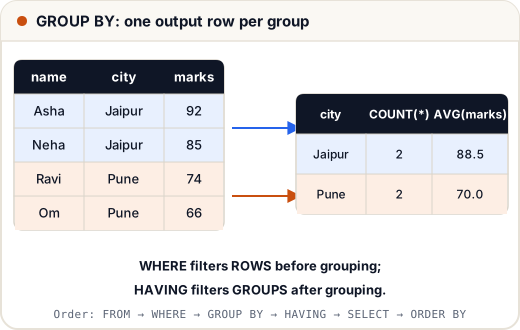
Aggregate functions turn many rows into one value. GROUP BY makes them work per group: "average salary per department", "number of students per city".
(Sample tables — the same company database as the previous lesson.)
CREATE TABLE departments (dept_id INT PRIMARY KEY, dept_name VARCHAR(30));
INSERT INTO departments VALUES (10, 'Engineering'), (20, 'Sales'), (30, 'HR'), (40, 'Marketing');
CREATE TABLE employees (emp_id INT PRIMARY KEY, name VARCHAR(30), dept_id INT, salary INT, city VARCHAR(20), manager_id INT, joined DATE);
INSERT INTO employees VALUES
 (1, 'Asha', 10, 95000, 'Jaipur', NULL, '2019-04-01'), (2, 'Ravi', 10, 72000, 'Pune', 1, '2021-07-15'),
 (3, 'Neha', 20, 58000, 'Jaipur', 1, '2020-01-10'), (4, 'Kabir', 20, 58000, 'Delhi', 3, '2022-03-01'),
 (5, 'Om', 30, 45000, 'Pune', 1, '2023-06-20'), (6, 'Meera', 10, 88000, 'Bengaluru', 1, '2018-11-05'),
 (7, 'Arjun', NULL, 40000, 'Delhi', 3, '2024-02-12');
1. Aggregate functions
SELECT COUNT(*) AS people, COUNT(dept_id) AS with_dept, SUM(salary) AS total,
       MIN(salary) AS lowest, MAX(salary) AS highest, ROUND(AVG(salary), 2) AS average
FROM employees;
people | with_dept | total | lowest | highest | average
7 | 6 | 456000 | 40000 | 95000 | 65142.86
COUNT(*)counts rows;COUNT(column)counts non-NULL values (Arjun has no dept → 6).- All aggregates except
COUNT(*)ignore NULLs.
2. GROUP BY
SELECT dept_id, COUNT(*) AS staff, MAX(salary) AS top_salary
FROM employees
WHERE dept_id IS NOT NULL
GROUP BY dept_id
ORDER BY dept_id;
dept_id | staff | top_salary
10 | 3 | 95000
20 | 2 | 58000
30 | 1 | 45000
Rule: every column in SELECT must either be in GROUP BY or be inside an aggregate.
SELECT name, COUNT(*) … GROUP BY dept_idis wrong — which name would it show?
3. HAVING: filter groups
SELECT city, COUNT(*) AS people, AVG(salary) AS avg_salary
FROM employees
GROUP BY city
HAVING COUNT(*) >= 2
ORDER BY avg_salary DESC;
city | people | avg_salary
Jaipur | 2 | 76500.0
Pune | 2 | 58500.0
Delhi | 2 | 49000.0
4. WHERE vs HAVING
| WHERE | HAVING |
|---|---|
| filters rows | filters groups |
| runs before GROUP BY | runs after GROUP BY |
| can't use aggregates | uses aggregates (COUNT(*) > 1) |
Use both together: WHERE removes rows first, then HAVING removes groups.
SELECT dept_id, COUNT(*) AS juniors
FROM employees
WHERE salary < 80000
GROUP BY dept_id
HAVING COUNT(*) > 1;
dept_id | juniors
20 | 2
5. The order SQL runs your query
You write SELECT first, but the database runs it in this order:
FROM → WHERE → GROUP BY → HAVING → SELECT → ORDER BY → LIMIT
That's why you can't use a SELECT alias inside WHERE (WHERE runs before SELECT), but you can use it in ORDER BY.
6. Grouping by two columns
SELECT dept_id, city, COUNT(*) AS n
FROM employees
WHERE dept_id IS NOT NULL
GROUP BY dept_id, city
ORDER BY dept_id, city;
dept_id | city | n
10 | Bengaluru | 1
10 | Jaipur | 1
10 | Pune | 1
20 | Delhi | 1
20 | Jaipur | 1
30 | Pune | 1
Common mistakes
- Using an aggregate in WHERE (
WHERE COUNT(*) > 2) — use HAVING. - Selecting non-grouped columns.
- Forgetting that
COUNT(column)skips NULLs.
Quick recap
- COUNT, SUM, AVG, MIN, MAX; aggregates ignore NULLs (except COUNT(*)).
- GROUP BY makes one row per group.
- WHERE filters rows before grouping; HAVING filters groups after.
- Logical order: FROM, WHERE, GROUP BY, HAVING, SELECT, ORDER BY, LIMIT.