DBMS & SQL · Lesson 1 of 13 · Updated ·
Introduction to DBMS — Databases, Tables and Why Not Just Files?
A database is an organised collection of data. A DBMS (Database Management System) is the software that stores it, keeps it correct and lets many people use it safely at the same time. MySQL, PostgreSQL, Oracle and SQL Server are popular DBMSs.
1. Why not just use files or Excel?
Imagine a college keeping student records in separate Excel files for each department.
| Problem with files | How a DBMS solves it |
|---|---|
| Redundancy — the same student's address in 5 files | store each fact once and link it |
| Inconsistency — address updated in one file, not others | one copy → always consistent |
| Hard to search — "students from Jaipur with CGPA > 8" | one SQL query |
| No concurrency control — two people edit at once, one loses work | transactions and locks |
| No security — anyone with the file sees everything | users, roles and permissions |
| No recovery — laptop crash = data gone | backups, logs, crash recovery |
2. Relational databases: everything is a table
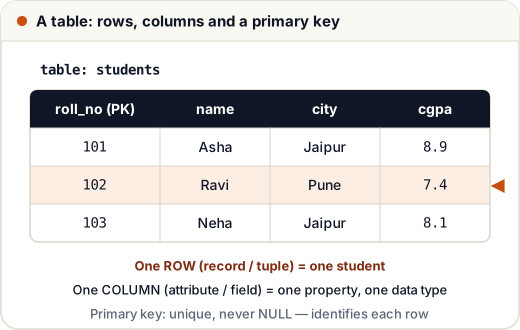
In a relational database (RDBMS), data lives in tables (also called relations):
| Word | Also called | Means |
|---|---|---|
| Table | relation | a set of rows about one kind of thing |
| Row | record, tuple | one item (one student) |
| Column | field, attribute | one property (name, city) |
| Domain | — | allowed values of a column (e.g. CGPA 0–10) |
| Degree | — | number of columns |
| Cardinality | — | number of rows |
| Schema | — | the structure: tables, columns, types, keys |
Tables are linked through keys (lesson 3), and we talk to them using SQL (lesson 5 onwards).
3. Levels of a DBMS (three-schema architecture)
- External / view level — what each user sees (a student sees only their own marks).
- Logical / conceptual level — the full set of tables and relationships.
- Physical / internal level — how data is stored on disk (files, indexes).
This separation gives data independence: you can change storage without changing applications.
4. Who uses a DBMS?
- End users — use apps (your banking app).
- Developers — write SQL in applications.
- DBA (Database Administrator) — manages performance, backups, security.
5. SQL vs NoSQL in one table
| SQL (relational) | NoSQL | |
|---|---|---|
| Structure | fixed tables and schema | flexible: documents, key-value, graphs |
| Examples | MySQL, PostgreSQL, Oracle | MongoDB, Redis, Cassandra |
| Strength | consistency, joins, transactions | scale, flexible data |
| Typical use | banking, orders, college records | caching, catalogues, chat, analytics |
Most freshers' jobs use SQL databases — that's what this subject teaches.
Common mistakes
- Saying "DBMS and database are the same". The database is the data; the DBMS is the software.
- Mixing up degree (columns) and cardinality (rows).
Quick recap
- DBMS = software that stores data safely and lets many users query it.
- Files cause redundancy, inconsistency and no security; a DBMS fixes these.
- Relational model: tables (relations), rows (tuples), columns (attributes).
- Three levels: view, logical, physical → data independence.