DBMS & SQL · Lesson 8 of 13 · Updated ·
SQL Joins — INNER, LEFT, RIGHT, FULL, SELF and CROSS JOIN
Data is split across tables (that's normalization). Joins put it back together: "show each employee with their department name".
CREATE TABLE departments (dept_id INT PRIMARY KEY, dept_name VARCHAR(30));
INSERT INTO departments VALUES (10, 'Engineering'), (20, 'Sales'), (30, 'HR'), (40, 'Marketing');
CREATE TABLE employees (emp_id INT PRIMARY KEY, name VARCHAR(30), dept_id INT, salary INT, city VARCHAR(20), manager_id INT, joined DATE);
INSERT INTO employees VALUES
 (1, 'Asha', 10, 95000, 'Jaipur', NULL, '2019-04-01'), (2, 'Ravi', 10, 72000, 'Pune', 1, '2021-07-15'),
 (3, 'Neha', 20, 58000, 'Jaipur', 1, '2020-01-10'), (4, 'Kabir', 20, 58000, 'Delhi', 3, '2022-03-01'),
 (5, 'Om', 30, 45000, 'Pune', 1, '2023-06-20'), (6, 'Meera', 10, 88000, 'Bengaluru', 1, '2018-11-05'),
 (7, 'Arjun', NULL, 40000, 'Delhi', 3, '2024-02-12');
Notice: Arjun has no department, and Marketing (40) has no employees. These two rows show the difference between join types.
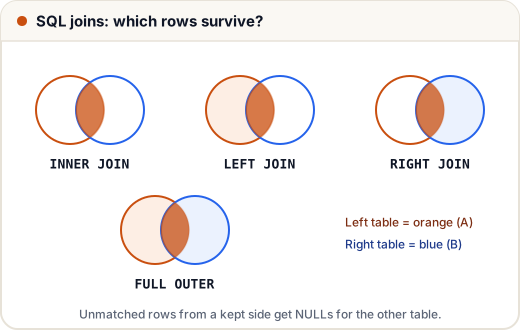
1. INNER JOIN — only matches
SELECT e.name, d.dept_name
FROM employees e
INNER JOIN departments d ON e.dept_id = d.dept_id
ORDER BY e.emp_id;
name | dept_name
Asha | Engineering
Ravi | Engineering
Neha | Sales
Kabir | Sales
Om | HR
Meera | Engineering
Arjun (no dept) and Marketing (no staff) are both missing. e and d are table aliases — short names.
2. LEFT JOIN — all rows from the left table
SELECT e.name, d.dept_name
FROM employees e
LEFT JOIN departments d ON e.dept_id = d.dept_id
WHERE e.salary < 50000
ORDER BY e.emp_id;
name | dept_name
Om | HR
Arjun | NULL
Arjun appears, with NULL for the department.
Find rows with NO match (very common question)
Which departments have no employees?
SELECT d.dept_name
FROM departments d
LEFT JOIN employees e ON e.dept_id = d.dept_id
WHERE e.emp_id IS NULL;
dept_name
Marketing
3. RIGHT JOIN and FULL OUTER JOIN
- RIGHT JOIN = LEFT JOIN with the tables swapped (keeps all rows of the right table). Most people just write LEFT JOIN.
- FULL OUTER JOIN keeps unmatched rows from both sides.
SELECT e.name, d.dept_name
FROM employees e
FULL OUTER JOIN departments d ON e.dept_id = d.dept_id
WHERE e.emp_id IS NULL OR d.dept_id IS NULL;
name | dept_name
Arjun | NULL
NULL | Marketing
(MySQL has no FULL OUTER JOIN — combine a LEFT JOIN and a RIGHT JOIN with UNION.)
4. SELF JOIN — a table joined to itself
Show each employee with their manager's name. The manager is also in the employees table.
SELECT e.name AS employee, m.name AS manager
FROM employees e
LEFT JOIN employees m ON e.manager_id = m.emp_id
ORDER BY e.emp_id;
employee | manager
Asha | NULL
Ravi | Asha
Neha | Asha
Kabir | Neha
Om | Asha
Meera | Asha
Arjun | Neha
Employees who earn more than their manager
SELECT e.name, e.salary, m.name AS manager, m.salary AS manager_salary
FROM employees e
JOIN employees m ON e.manager_id = m.emp_id
WHERE e.salary > m.salary;
name | salary | manager | manager_salary
(No rows — in this company, nobody earns more than their manager. An empty result is a valid answer!)
5. CROSS JOIN — every combination
SELECT * FROM a CROSS JOIN b pairs every row of a with every row of b: 7 employees × 4 departments = 28 rows. Useful for generating combinations (sizes × colours), dangerous by accident.
6. Joining three tables
CREATE TABLE projects (project_id INT PRIMARY KEY, title VARCHAR(30), lead_id INT);
INSERT INTO projects VALUES (100, 'Payments App', 2), (101, 'CRM Revamp', 3);
SELECT p.title, e.name AS lead, d.dept_name
FROM projects p
JOIN employees e ON p.lead_id = e.emp_id
JOIN departments d ON e.dept_id = d.dept_id
ORDER BY p.project_id;
title | lead | dept_name
Payments App | Ravi | Engineering
CRM Revamp | Neha | Sales
Common mistakes
- Forgetting the ON condition → an accidental cross join (huge results).
- Putting a filter on the right table in WHERE after a LEFT JOIN, which turns it back into an inner join. Put such conditions in the ON clause.
- Ambiguous columns: write
e.dept_id, not justdept_id, when both tables have it.
Quick recap
- INNER = matches only; LEFT = all left + matches; RIGHT = all right + matches; FULL = everything.
- Unmatched sides become NULL. "No match" questions → LEFT JOIN … WHERE right.key IS NULL.
- SELF JOIN for hierarchies (employee → manager). CROSS JOIN = all combinations.