DBMS & SQL · Lesson 9 of 13 · Updated ·
Subqueries, Correlated Subqueries, EXISTS, CTEs and Views
A subquery is a SELECT inside another SQL statement. It lets you answer questions in steps: "employees who earn more than the average".
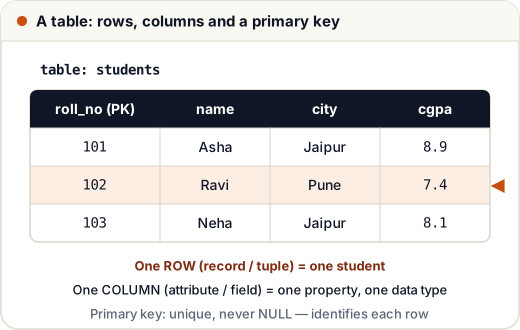
CREATE TABLE departments (dept_id INT PRIMARY KEY, dept_name VARCHAR(30));
INSERT INTO departments VALUES (10, 'Engineering'), (20, 'Sales'), (30, 'HR'), (40, 'Marketing');
CREATE TABLE employees (emp_id INT PRIMARY KEY, name VARCHAR(30), dept_id INT, salary INT, city VARCHAR(20), manager_id INT, joined DATE);
INSERT INTO employees VALUES
 (1, 'Asha', 10, 95000, 'Jaipur', NULL, '2019-04-01'), (2, 'Ravi', 10, 72000, 'Pune', 1, '2021-07-15'),
 (3, 'Neha', 20, 58000, 'Jaipur', 1, '2020-01-10'), (4, 'Kabir', 20, 58000, 'Delhi', 3, '2022-03-01'),
 (5, 'Om', 30, 45000, 'Pune', 1, '2023-06-20'), (6, 'Meera', 10, 88000, 'Bengaluru', 1, '2018-11-05'),
 (7, 'Arjun', NULL, 40000, 'Delhi', 3, '2024-02-12');
1. Single-value subquery
SELECT name, salary FROM employees
WHERE salary > (SELECT AVG(salary) FROM employees)
ORDER BY salary DESC;
name | salary
Asha | 95000
Meera | 88000
Ravi | 72000
The inner query runs first (average = 65142.86), then the outer query uses it.
2. Multi-row subquery with IN
SELECT name FROM employees
WHERE dept_id IN (SELECT dept_id FROM departments WHERE dept_name IN ('Sales', 'HR'))
ORDER BY name;
name
Kabir
Neha
Om
3. Subquery in FROM (a derived table)
SELECT dept_id, avg_sal FROM (
    SELECT dept_id, AVG(salary) AS avg_sal FROM employees WHERE dept_id IS NOT NULL GROUP BY dept_id
) AS t
WHERE avg_sal > 50000
ORDER BY avg_sal DESC;
dept_id | avg_sal
10 | 85000.0
20 | 58000.0
4. Correlated subquery
A correlated subquery uses a value from the outer row, so it runs once per outer row.
Employees who earn more than the average of their own department:
SELECT e.name, e.dept_id, e.salary
FROM employees e
WHERE e.salary > (SELECT AVG(salary) FROM employees x WHERE x.dept_id = e.dept_id)
ORDER BY e.emp_id;
name | dept_id | salary
Asha | 10 | 95000
Meera | 10 | 88000
5. EXISTS vs IN
EXISTS is true if the subquery returns at least one row. It stops at the first match.
SELECT d.dept_name FROM departments d
WHERE NOT EXISTS (SELECT 1 FROM employees e WHERE e.dept_id = d.dept_id);
dept_name
Marketing
NOT IN trap:
WHERE dept_id NOT IN (SELECT dept_id FROM employees)returns nothing here, because the subquery contains a NULL (Arjun) and any comparison with NULL is unknown.NOT EXISTSdoesn't have this problem.
6. WITH (Common Table Expression) — readable steps
WITH dept_avg AS (
    SELECT dept_id, AVG(salary) AS avg_sal FROM employees GROUP BY dept_id
)
SELECT d.dept_name, a.avg_sal
FROM dept_avg a JOIN departments d ON a.dept_id = d.dept_id
ORDER BY a.avg_sal DESC;
dept_name | avg_sal
Engineering | 85000.0
Sales | 58000.0
HR | 45000.0
A CTE is a named subquery. It makes long queries read top to bottom like steps.
7. UNION vs UNION ALL
Stack results of two queries with the same columns:
UNIONremoves duplicates.UNION ALLkeeps them (faster).
SELECT city FROM employees WHERE dept_id = 10
UNION
SELECT city FROM employees WHERE salary < 50000
ORDER BY city;
city
Bengaluru
Delhi
Jaipur
Pune
8. Views
A view is a saved query that behaves like a table.
CREATE VIEW engineering_team AS
SELECT name, salary FROM employees WHERE dept_id = 10;
SELECT * FROM engineering_team WHERE salary > 80000 ORDER BY name;
name | salary
Asha | 95000
Meera | 88000
Views simplify complex queries and restrict access (show some columns, hide salaries…). A normal view stores no data; a materialized view stores the result for speed.
Common mistakes
- Using
=with a subquery that can return many rows (useIN). NOT INwith a subquery that may contain NULL.- Writing deeply nested subqueries when a CTE or a JOIN would be clearer.
Quick recap
- Subqueries in WHERE (single value or IN list) and FROM (derived tables).
- Correlated subqueries run per outer row.
- Prefer NOT EXISTS over NOT IN when NULLs are possible.
- WITH (CTE) for readability; UNION removes duplicates, UNION ALL doesn't; views are saved queries.