AdvancedDBMS & SQL · Lesson 20 of 25 · Updated ·
Views, Triggers and Stored Procedures — Logic That Lives Inside the Database
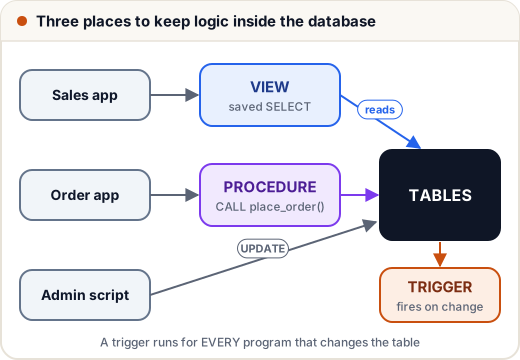
Most application logic lives in Java, Python or JavaScript code. But some rules are safer inside the database, where no program can skip them: "every price change must be logged", "stock can never go below zero", "the support team must never see salaries". Three tools do this: views, triggers and stored procedures. Interviewers like asking about the differences between them.
We use a small shop database:
CREATE TABLE products (id INT PRIMARY KEY, name VARCHAR(30), price INT, cost INT, stock INT);
INSERT INTO products VALUES (1, 'Notebook', 60, 35, 100), (2, 'Pen pack', 40, 22, 250), (3, 'Calculator', 900, 640, 12), (4, 'Geometry box', 150, 95, 0);
CREATE TABLE order_items (order_id INT, product_id INT REFERENCES products(id), qty INT);
CREATE TABLE price_log (product_id INT, old_price INT, new_price INT);
1. Views for security and simplicity
A view is a stored SELECT with a name. It stores no data — each time you query it, its SELECT runs on the current tables.
The sales team should see prices and stock, but not the cost (which reveals the profit margin):
CREATE VIEW catalogue AS
SELECT id, name, price, CASE WHEN stock > 0 THEN 'in stock' ELSE 'out of stock' END AS availability
FROM products;
SELECT * FROM catalogue ORDER BY id;
id | name | price | availability
1 | Notebook | 60 | in stock
2 | Pen pack | 40 | in stock
3 | Calculator | 900 | in stock
4 | Geometry box | 150 | out of stock
In a database with user accounts (MySQL, PostgreSQL, Oracle), you then GRANT SELECT ON catalogue to the sales role and give them no rights on products. The view becomes a security boundary.
Views always show fresh data. Change the base table and the view follows:
UPDATE products SET stock = 20 WHERE id = 4;
SELECT name, availability FROM catalogue WHERE id = 4;
name | availability
Geometry box | in stock
Can you INSERT or UPDATE through a view?
A view is updatable when each of its rows maps to exactly one row of one base table: one table, no GROUP BY, no DISTINCT, no aggregates. MySQL, PostgreSQL and SQL Server allow updates through such simple views. WITH CHECK OPTION then rejects changes that would make a row disappear from the view. Views with joins or GROUP BY are usually read-only. (SQLite makes every view read-only unless you add an INSTEAD OF trigger.)
Materialized views
A materialized view (PostgreSQL, Oracle) stores the result like a table. Reading it is fast, but it shows data as of the last refresh — for example REFRESH MATERIALIZED VIEW monthly_sales; every night. Use it for heavy reports where data that is a few hours old is acceptable.
| View | Materialized view | |
|---|---|---|
| Stores data? | no | yes |
| Always current? | yes | only after refresh |
| Read speed | same as its query | fast, like a table |
2. Triggers: code that runs automatically
A trigger is attached to a table and fires on INSERT, UPDATE or DELETE, either BEFORE or AFTER the change, once for each row affected. Inside it, NEW is the row after the change and OLD the row before.
An audit log
Every price change must be recorded, whichever program makes it:
CREATE TRIGGER log_price_change
AFTER UPDATE OF price ON products
FOR EACH ROW WHEN OLD.price <> NEW.price
BEGIN INSERT INTO price_log VALUES (OLD.id, OLD.price, NEW.price); END;
UPDATE products SET price = 950 WHERE id = 3;
UPDATE products SET price = 45 WHERE id = 2;
UPDATE products SET stock = 99 WHERE id = 1;
SELECT * FROM price_log;
product_id | old_price | new_price
3 | 900 | 950
2 | 40 | 45
Two rows: the stock change did not fire the trigger, because it is limited to UPDATE OF price.
Keeping stock in sync
When an order item is inserted, reduce the stock:
CREATE TRIGGER reduce_stock
AFTER INSERT ON order_items
FOR EACH ROW
BEGIN UPDATE products SET stock = stock - NEW.qty WHERE id = NEW.product_id; END;
INSERT INTO order_items VALUES (501, 1, 10), (501, 2, 30);
SELECT id, name, stock FROM products WHERE id IN (1, 2) ORDER BY id;
id | name | stock
1 | Notebook | 89
2 | Pen pack | 220
Notebook went from 99 to 89 and the pen pack from 250 to 220.
Rejecting bad data (BEFORE trigger)
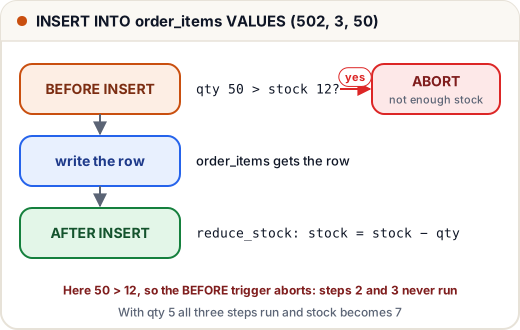
A BEFORE trigger can stop a change. Here, an order larger than the stock is refused (SQLite uses RAISE(ABORT, …); MySQL uses SIGNAL SQLSTATE '45000'; PostgreSQL uses RAISE EXCEPTION):
CREATE TRIGGER check_stock
BEFORE INSERT ON order_items
FOR EACH ROW WHEN NEW.qty > (SELECT stock FROM products WHERE id = NEW.product_id)
BEGIN SELECT RAISE(ABORT, 'not enough stock'); END;
SELECT stock FROM products WHERE id = 3;
stock
12
Now INSERT INTO order_items VALUES (502, 3, 50); fails with not enough stock, because only 12 calculators exist. The row is not inserted and the stock is not touched.
3. Stored procedures and functions
A stored procedure is a named program saved in the database. It can take parameters, run several statements, use IF and loops, and be called with one line. SQLite does not have stored procedures, so this example is MySQL syntax (not run here):
DELIMITER //
CREATE PROCEDURE place_order(IN p_order INT, IN p_product INT, IN p_qty INT)
BEGIN
    START TRANSACTION;
    INSERT INTO order_items VALUES (p_order, p_product, p_qty);
    UPDATE products SET stock = stock - p_qty WHERE id = p_product;
    COMMIT;
END //
DELIMITER ;

CALL place_order(503, 1, 5);
DELIMITER is a MySQL client command: it lets the ; inside the body pass through without ending the CREATE statement.
A stored function returns one value and can be used inside a query, like SELECT name, margin(price, cost) FROM products.
| Stored procedure | Stored function | Trigger | |
|---|---|---|---|
| How it runs | CALL proc(...) | inside a SELECT or expression | automatically on INSERT/UPDATE/DELETE |
| Returns | nothing, or OUT parameters / result sets | exactly one value | nothing |
| Can manage transactions? | yes (in most databases) | usually no | no — it runs inside the statement's transaction |
| Typical use | a multi-step business action | a reusable calculation | audit, validation, keeping data in sync |
4. Should logic live in the database?
| For | Against |
|---|---|
| Rules apply to every program, script and admin query | Logic is split between the app and the database, which makes it harder to follow |
| Fewer round trips: one CALL instead of many queries | Harder to version, test and debug than normal code |
| Views give clean, fine-grained access control | Database-specific syntax ties you to one vendor |
| Triggers cannot be "forgotten" by a developer | Hidden triggers surprise people ("why did stock change?") |
A common, balanced practice: use views for access control and reporting, constraints (CHECK, FOREIGN KEY) for simple rules, triggers sparingly for audit logs, and keep most business logic in the application.
Common mistakes
- Thinking a normal view stores data. It stores only the query; a materialized view stores data.
- Writing a trigger that updates the same table it is attached to, which can fire itself again. Many databases block or limit this.
- Using a trigger where a simple CHECK constraint would do (
CHECK (stock >= 0)). - Forgetting that a statement updating 1,000 rows fires a FOR EACH ROW trigger 1,000 times.
- Calling a function with CALL, or a procedure inside SELECT.
Quick recap
- View = named SELECT; hides columns and rows, simplifies queries, stores no data.
- Simple single-table views can be updatable; materialized views store results and need refresh.
- Trigger = automatic code on INSERT/UPDATE/DELETE, BEFORE or AFTER, with OLD and NEW rows.
- Procedure = called with CALL, multi-step; function = returns one value, used in queries.
- Keep database logic for rules that every program must follow.