AdvancedDBMS & SQL · Lesson 14 of 17 · Updated ·
Relational Algebra — Selection, Projection, Joins and Division with SQL Equivalents
SQL tells the database what you want. Inside, the database turns your query into a plan of small steps — and those steps are the operators of relational algebra. University exams ask you to write queries in relational algebra, and knowing it makes SQL joins and subqueries much easier to reason about.
Relational algebra is a procedural query language: each operator takes one or two relations (tables) as input and returns a new relation as output. Because the output is again a table, operators can be chained — this property is called closure.
We will use three small tables. Every SQL block below runs on them, in order.
CREATE TABLE students (roll_no INT PRIMARY KEY, name VARCHAR(20), city VARCHAR(20), cgpa REAL);
INSERT INTO students VALUES (1, 'Asha', 'Jaipur', 8.9), (2, 'Ravi', 'Pune', 7.4), (3, 'Neha', 'Jaipur', 8.1), (4, 'Kabir', 'Delhi', 6.8);
CREATE TABLE courses (code VARCHAR(5) PRIMARY KEY, title VARCHAR(30));
INSERT INTO courses VALUES ('DB', 'Databases'), ('OS', 'Operating Systems');
CREATE TABLE enrolled (roll_no INT, code VARCHAR(5), PRIMARY KEY (roll_no, code));
INSERT INTO enrolled VALUES (1, 'DB'), (1, 'OS'), (2, 'DB'), (3, 'OS'), (3, 'DB'), (4, 'OS');
1. The operators at a glance
| Operator | Symbol | What it does | SQL idea |
|---|---|---|---|
| Selection | σ (sigma) | keeps the rows that satisfy a condition | WHERE |
| Projection | π (pi) | keeps only some columns, removes duplicate rows | SELECT DISTINCT cols |
| Union | ∪ | rows in either relation | UNION |
| Set difference | − | rows in the first but not the second | EXCEPT |
| Cartesian product | × | every row paired with every row | CROSS JOIN |
| Rename | ρ (rho) | gives a relation or column a new name | AS |
| Intersection | ∩ | rows in both | INTERSECT |
| Natural join | ⋈ | product + keep rows where common columns match | NATURAL JOIN / JOIN … ON |
| Division | ÷ | "related to all of …" | NOT EXISTS or GROUP BY … HAVING |
The first six are the basic operators. Intersection, join and division are derived — they can be written using the basic ones, but they are so common that they get their own symbols.
2. Selection (σ) picks rows, projection (π) picks columns
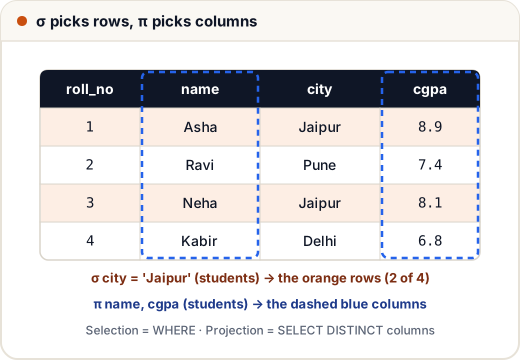
σ city = 'Jaipur' (students) — the condition goes in the subscript:
SELECT * FROM students WHERE city = 'Jaipur';
roll_no | name | city | cgpa
1 | Asha | Jaipur | 8.9
3 | Neha | Jaipur | 8.1
π city (students) — only the city column. Relational algebra works with sets, so duplicate rows disappear. Plain SQL keeps duplicates, so you need DISTINCT to match:
SELECT DISTINCT city FROM students ORDER BY city;
city
Delhi
Jaipur
Pune
Four students but only 3 rows, because "Jaipur" appears once in a set.
Conditions can use comparison operators (=, ≠, <, >, ≤, ≥) joined by ∧ (AND), ∨ (OR) and ¬ (NOT): σ cgpa > 7 ∧ city = 'Jaipur' (students).
3. Set operations: ∪, −, ∩
Set operations need union-compatible relations: the same number of columns, with matching data types, in the same order.
Let DB = π roll_no (σ code='DB' (enrolled)) and OS = π roll_no (σ code='OS' (enrolled)).
- DB = {1, 2, 3}, OS = {1, 3, 4}
- DB ∪ OS = {1, 2, 3, 4}
- DB ∩ OS = {1, 3} — students taking both
- DB − OS = {2} — taking Databases but not OS
SELECT roll_no FROM enrolled WHERE code = 'DB'
EXCEPT
SELECT roll_no FROM enrolled WHERE code = 'OS';
roll_no
2
Note that R − S is not the same as S − R. Here OS − DB = {4}. Intersection can be built from difference: R ∩ S = R − (R − S).
4. Cartesian product (×) and joins (⋈)
students × courses pairs each of the 4 students with each of the 2 courses — 4 × 2 = 8 rows, most of them meaningless. On its own the product is rarely useful; it becomes useful once you select the matching pairs.
SELECT COUNT(*) AS pairs FROM students CROSS JOIN courses;
pairs
8
A theta join R ⋈θ S is simply σθ(R × S). When θ uses only = it is an equi-join. The natural join R ⋈ S matches on all columns with the same name, and keeps that common column only once:
SELECT name, code FROM students NATURAL JOIN enrolled WHERE code = 'OS' ORDER BY name;
name | code
Asha | OS
Kabir | OS
Neha | OS
Outer joins (⟕ left, ⟖ right, ⟗ full) also exist in extended relational algebra. They keep unmatched rows and fill the missing side with NULL, just like LEFT JOIN in SQL.
5. Division (÷): the "for all" operator
Questions with the word all — "students enrolled in all courses", "suppliers who supply every part" — are division.
enrolled (roll_no, code) ÷ π code (courses) returns the roll numbers that are paired with every code in the courses table.
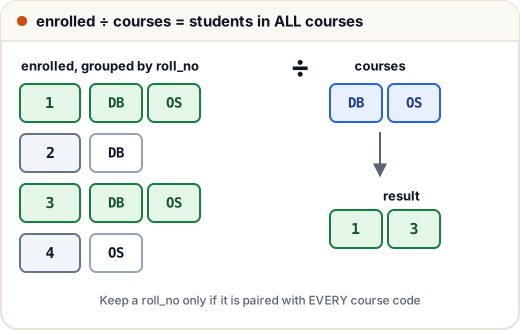
SQL has no division operator. Two standard ways to write it:
(a) Count method — a student qualifies if the number of their courses equals the total number of courses:
SELECT roll_no FROM enrolled
GROUP BY roll_no
HAVING COUNT(DISTINCT code) = (SELECT COUNT(*) FROM courses);
roll_no
1
3
(b) Double NOT EXISTS — "there is no course that this student is not enrolled in":
SELECT s.name FROM students s
WHERE NOT EXISTS (
    SELECT * FROM courses c
    WHERE NOT EXISTS (
        SELECT * FROM enrolled e WHERE e.roll_no = s.roll_no AND e.code = c.code
    )
)
ORDER BY s.name;
name
Asha
Neha
The count method is easier to read, but it assumes enrolled only contains codes that exist in courses (a foreign key guarantees this). The double NOT EXISTS version is the exact translation of the algebra.
6. Writing a full expression
Names of Jaipur students enrolled in DB:
π name (σ city = 'Jaipur' ∧ code = 'DB' (students ⋈ enrolled))
Read it from the inside out: join, then select rows, then project the column. The same query in SQL:
SELECT s.name FROM students s JOIN enrolled e ON s.roll_no = e.roll_no
WHERE s.city = 'Jaipur' AND e.code = 'DB' ORDER BY s.name;
name
Asha
Neha
An equivalent, cheaper expression applies the selections before the join, so fewer rows are joined:
π name (σ city='Jaipur' (students) ⋈ σ code='DB' (enrolled))
Query optimizers do exactly this — "push selections down" — which is why the algebra matters for performance too. A diagram of such an expression, with operators as nodes and tables as leaves, is called a query tree.
Rename (ρ) is needed when a table is used twice, as in a self join: ρ S2 (students) gives a second copy named S2.
Common mistakes
- Forgetting that projection removes duplicates — π city (students) has 3 rows here, not 4.
- Using ∪ or − on relations with different columns. They must be union-compatible.
- Writing division as a plain join. A join finds students in any course; division finds students in all courses.
- Thinking R − S = S − R. Difference is not symmetric.
- Mixing up σ (rows) and π (columns). Memory trick: Sigma Selects rows; Pi Picks columns.
Quick recap
- Relational algebra is procedural; each operator returns a relation, so operators chain.
- Basic: σ, π, ∪, −, ×, ρ. Derived: ∩, ⋈, ÷.
- σ = WHERE, π = SELECT DISTINCT, × = CROSS JOIN, ⋈ = JOIN, ∪/−/∩ = UNION/EXCEPT/INTERSECT.
- "All" questions are division; in SQL use the count method or double NOT EXISTS.
- Optimizers push selections below joins to reduce work.