AdvancedDBMS & SQL · Lesson 16 of 17 · Updated ·
ER Diagram to Tables — A College Database Designed Step by Step
A common exam question and a common first task at work: "Here is an ER diagram. Write the tables." The ER model lesson covered the symbols. This lesson designs one complete database for a college and converts it to tables with a fixed set of rules, so you never have to guess.
1. The requirements
The college wants to store:
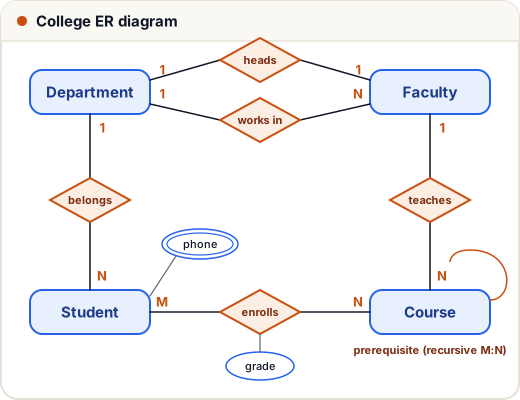
- Departments with a code and name. Each department has one head (a faculty member).
- Faculty with an id, name and the department they work in.
- Students with a roll number, a name (first and last), date of birth and one or more phone numbers. Each student belongs to one department.
- Courses with a code, title and credits. Each course is taught by one faculty member; a faculty member can teach several courses.
- Students enroll in many courses, and each course has many students. For each enrollment we store the grade.
- A course can have prerequisites, which are other courses.
From the nouns we get entities; from the verbs ("belongs to", "teaches", "enrolls", "heads") we get relationships.
2. The mapping rules
| ER construct | Becomes |
|---|---|
| 1. Strong entity | a table; simple attributes become columns; the key becomes the primary key |
| 2. Composite attribute | one column per part (first_name, last_name) |
| 3. Multivalued attribute | a separate table: (owner key, value), both together as the primary key |
| 4. Derived attribute | usually not stored — compute it in queries (age from date of birth) |
| 5. 1:N relationship | a foreign key on the N side |
| 6. 1:1 relationship | a foreign key on either side — prefer the side with total participation, and make it UNIQUE |
| 7. M:N relationship | a new table with both keys as foreign keys; together they form the primary key; relationship attributes go here |
| Weak entity | a table whose primary key = owner's key + partial key, with ON DELETE CASCADE |
| Recursive relationship | foreign key(s) that point to the same table |
3. Applying the rules
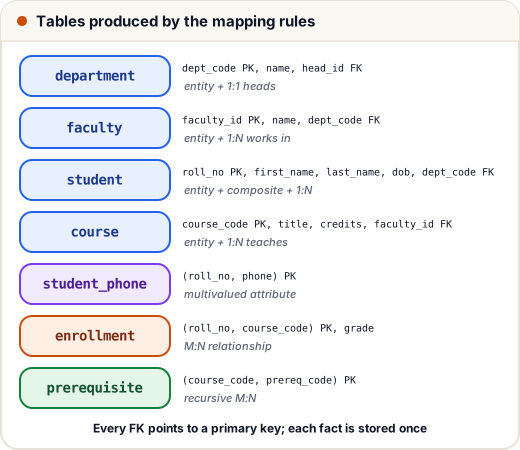
Rule 1 — strong entities: department, faculty, student, course each become a table.
Rule 2 — composite name: student name → first_name, last_name.
Rule 4 — derived age: we store dob, not age. Age changes every year; date of birth never does.
Rule 5 — 1:N relationships:
- Department–Student (1:N) →
student.dept_codereferences department. - Department–Faculty (1:N, "works in") →
faculty.dept_code. - Faculty–Course (1:N, "teaches") →
course.faculty_id.
Rule 6 — 1:1 "heads": every department must have a head (total participation), but most faculty are not heads. So put the foreign key on the department side: department.head_id, marked UNIQUE so one person cannot head two departments. Putting it in faculty would leave the column NULL for almost everyone.
Rule 3 — multivalued phone: table student_phone(roll_no, phone).
Rule 7 — M:N enrolls: table enrollment(roll_no, course_code, grade) with primary key (roll_no, course_code).
Recursive M:N prerequisite: a course can have many prerequisites and be a prerequisite of many courses, so it is M:N on the same entity → table prerequisite(course_code, prereq_code), both referencing course.
4. The tables in SQL
There is a chicken-and-egg problem: department.head_id needs faculty, and faculty.dept_code needs departments. We create department first with head_id allowed to be NULL, then fill the head in later. (SQLite checks foreign keys only when PRAGMA foreign_keys = ON; most other databases check them always.)
PRAGMA foreign_keys = ON;
CREATE TABLE department (dept_code VARCHAR(5) PRIMARY KEY, name VARCHAR(40) NOT NULL, head_id INT UNIQUE REFERENCES faculty(faculty_id));
CREATE TABLE faculty (faculty_id INT PRIMARY KEY, name VARCHAR(30) NOT NULL, dept_code VARCHAR(5) NOT NULL REFERENCES department(dept_code));
CREATE TABLE student (roll_no INT PRIMARY KEY, first_name VARCHAR(20) NOT NULL, last_name VARCHAR(20), dob DATE, dept_code VARCHAR(5) NOT NULL REFERENCES department(dept_code));
CREATE TABLE student_phone (roll_no INT REFERENCES student(roll_no) ON DELETE CASCADE, phone VARCHAR(15), PRIMARY KEY (roll_no, phone));
CREATE TABLE course (course_code VARCHAR(8) PRIMARY KEY, title VARCHAR(40) NOT NULL, credits INT CHECK (credits BETWEEN 1 AND 6), faculty_id INT REFERENCES faculty(faculty_id));
CREATE TABLE enrollment (roll_no INT REFERENCES student(roll_no), course_code VARCHAR(8) REFERENCES course(course_code), grade CHAR(2), PRIMARY KEY (roll_no, course_code));
CREATE TABLE prerequisite (course_code VARCHAR(8) REFERENCES course(course_code), prereq_code VARCHAR(8) REFERENCES course(course_code), PRIMARY KEY (course_code, prereq_code));
Now some data:
INSERT INTO department (dept_code, name) VALUES ('CSE', 'Computer Science'), ('ECE', 'Electronics');
INSERT INTO faculty VALUES (101, 'Dr. Mehta', 'CSE'), (102, 'Dr. Iyer', 'CSE'), (201, 'Dr. Khan', 'ECE');
UPDATE department SET head_id = 101 WHERE dept_code = 'CSE';
UPDATE department SET head_id = 201 WHERE dept_code = 'ECE';
INSERT INTO student VALUES (1, 'Asha', 'Verma', '2005-03-14', 'CSE'), (2, 'Ravi', 'Kumar', '2004-11-02', 'CSE'), (3, 'Neha', NULL, '2005-07-21', 'ECE');
INSERT INTO student_phone VALUES (1, '9876500001'), (1, '9876500002'), (2, '9876500003');
INSERT INTO course VALUES ('CS101', 'Programming in C', 4, 102), ('CS201', 'Data Structures', 4, 102), ('CS301', 'DBMS', 3, 101), ('EC101', 'Circuits', 4, 201);
INSERT INTO enrollment VALUES (1, 'CS101', 'A'), (1, 'CS201', 'B+'), (2, 'CS101', 'B'), (3, 'EC101', 'A'), (3, 'CS101', 'A+');
INSERT INTO prerequisite VALUES ('CS201', 'CS101'), ('CS301', 'CS201');
5. Does the design answer real questions?
A design is good if the questions the college asks are easy to answer. Each department with its head:
SELECT d.name AS department, f.name AS head
FROM department d JOIN faculty f ON d.head_id = f.faculty_id ORDER BY d.name;
department | head
Computer Science | Dr. Mehta
Electronics | Dr. Khan
Students with how many phone numbers they gave (LEFT JOIN so a student with none still appears):
SELECT s.first_name, COUNT(p.phone) AS phones
FROM student s LEFT JOIN student_phone p ON s.roll_no = p.roll_no
GROUP BY s.roll_no ORDER BY s.roll_no;
first_name | phones
Asha | 2
Ravi | 1
Neha | 0
Each course with its prerequisite's title — the recursive relationship needs the course table twice:
SELECT c.title AS course, pre.title AS needs
FROM prerequisite p
JOIN course c ON p.course_code = c.course_code
JOIN course pre ON p.prereq_code = pre.course_code
ORDER BY c.course_code;
course | needs
Data Structures | Programming in C
DBMS | Data Structures
The constraints protect the data. An enrollment for a course that does not exist is rejected:
SELECT COUNT(*) AS enrollments FROM enrollment;
enrollments
5
If you try INSERT INTO enrollment VALUES (2, 'XX999', 'A'); the database answers FOREIGN KEY constraint failed, and the count stays 5. That check came for free from rule 7.
Age is derived when needed (here as on 1 Jan 2026, to keep the result fixed):
SELECT first_name, (strftime('%Y', '2026-01-01') - strftime('%Y', dob)) - (strftime('%m-%d', '2026-01-01') < strftime('%m-%d', dob)) AS age
FROM student ORDER BY roll_no;
first_name | age
Asha | 20
Ravi | 21
Neha | 20
6. Why not one big table?
Imagine one table with columns roll_no, name, phone1, phone2, course1, grade1, course2, grade2, … It breaks quickly:
- A student with three phones or six courses does not fit.
- The course title is repeated for every student who takes it (update anomaly).
- A new course with no students yet cannot be stored (insert anomaly).
The ER-to-table rules give you a design that is usually already in 3NF, because each fact is stored in exactly one place. You still check the functional dependencies afterwards, but there is usually little left to fix.
Common mistakes
- Putting the foreign key of a 1:N relationship on the "1" side. It always goes on the N side (each student row stores its one department).
- Storing a multivalued attribute as
phone1, phone2, phone3or as a comma-separated string. Use a separate table. - Forgetting relationship attributes.
gradebelongs to the enrollment, not to student or course. - Storing derived values like age or total marks that go stale.
- Giving an M:N table its own key but no UNIQUE on the pair, which allows the same student to enroll twice.
Quick recap
- Entity → table; composite → several columns; multivalued → separate table; derived → compute it.
- 1:N → foreign key on the N side; 1:1 → foreign key on the total-participation side, UNIQUE.
- M:N → new table with both keys as a composite primary key, plus relationship attributes.
- Weak entity → owner key + partial key, ON DELETE CASCADE. Recursive → foreign keys to the same table.
- Test the design by writing the queries the users will ask.