AdvancedWeb Security (OWASP Top 10) · Lesson 13 of 13 · Updated ·
Password Storage Lab — PBKDF2 and scrypt in Python, Upgrading Old Hashes, Peppers and Reset Tokens
The passwords and authentication lesson explained why passwords need salted, slow hashes. This lab is the practical follow-up: you will build the pieces a real login system needs, using only Python's standard library (hashlib, hmac, secrets). Everything here is defensive — it is how you protect your own users if your database is ever copied.
1. Why "slow" matters, in numbers
When a database leaks, attackers take each stored hash and try likely passwords from a list, hashing each guess the same way. Your only control is how much each guess costs.
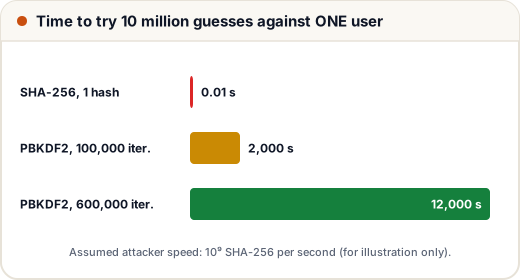
PBKDF2 repeats a keyed hash (HMAC-SHA256) many times. Each HMAC uses two SHA-256 computations, so one PBKDF2 guess with 600,000 iterations costs about 1.2 million SHA-256 computations instead of one. The numbers below use an assumed attacker speed, chosen only to show the ratio; real speeds depend on the hardware.
ASSUMED_SHA256_PER_SECOND = 10 ** 9      # an assumption for illustration, not a measured figure
WORDLIST = 10 ** 7                       # ten million candidate passwords

for name, cost in [("SHA-256 (1 hash)", 1), ("PBKDF2 100,000 iterations", 2 * 100_000),
                   ("PBKDF2 600,000 iterations", 2 * 600_000)]:
    seconds = WORDLIST * cost / ASSUMED_SHA256_PER_SECOND
    print(f"{name:27} {seconds:>12,.2f} seconds per user ({seconds / 86400:,.2f} days)")
SHA-256 (1 hash)                    0.01 seconds per user (0.00 days)
PBKDF2 100,000 iterations       2,000.00 seconds per user (0.02 days)
PBKDF2 600,000 iterations      12,000.00 seconds per user (0.14 days)
With a fast hash the whole list is tried in a fraction of a second per user. With 600,000 iterations the same work takes days per user — and because every user has a different salt, the attacker must repeat it for every account. 600,000 iterations for PBKDF2-HMAC-SHA256 is the figure the OWASP Password Storage Cheat Sheet recommends at the time of writing; check the current guidance when you build a real system, because recommended costs rise as hardware gets faster.
2. Salt and cost change the output
A hash depends on four inputs: the algorithm, the password, the salt and the cost. Change any one and the output changes completely. Here the salt is fixed so the output is repeatable; in real code the salt comes from os.urandom(16) or secrets.token_bytes(16).
import hashlib

pw = "Monsoon@Jaipur7".encode()
for salt, iterations in [(b"salt-AAAAAAAAAAA", 600_000), (b"salt-BBBBBBBBBBB", 600_000), (b"salt-AAAAAAAAAAA", 600_001)]:
    digest = hashlib.pbkdf2_hmac("sha256", pw, salt, iterations)
    print(salt.decode(), f"{iterations:>7}", digest.hex()[:24], "...")
salt-AAAAAAAAAAA  600000 7a90b363ffd513d057ade7f2 ...
salt-BBBBBBBBBBB  600000 78c39f2474d857ee7b06c8f2 ...
salt-AAAAAAAAAAA  600001 442a4748d3ee44052700cf26 ...
This is why the salt and the iteration count must be stored with the hash. Without them you cannot verify the password later.
3. A self-describing storage format
Store everything needed to verify in one string, like pbkdf2_sha256$600000$<salt hex>$<hash hex>. Django, Werkzeug and many other frameworks use the same idea. The format lets you change settings later without breaking old accounts.
import hashlib, hmac, os

ALGO, ITERATIONS = "pbkdf2_sha256", 600_000

def hash_password(password):
    salt = os.urandom(16)
    digest = hashlib.pbkdf2_hmac("sha256", password.encode(), salt, ITERATIONS)
    return f"{ALGO}${ITERATIONS}${salt.hex()}${digest.hex()}"

def verify(password, stored):
    algo, iterations, salt_hex, digest_hex = stored.split("$")
    if algo != ALGO:
        return False
    digest = hashlib.pbkdf2_hmac("sha256", password.encode(), bytes.fromhex(salt_hex), int(iterations))
    return hmac.compare_digest(digest.hex(), digest_hex)

def needs_rehash(stored):
    algo, iterations, *_ = stored.split("$")
    return algo != ALGO or int(iterations) < ITERATIONS

stored = hash_password("Monsoon@Jaipur7")
print("fields:", len(stored.split("$")), "| starts with:", stored[:21])
print("right password:", verify("Monsoon@Jaipur7", stored))
print("wrong password:", verify("monsoon@jaipur7", stored))
print("needs rehash:  ", needs_rehash(stored))
print("old 100k hash needs rehash:", needs_rehash("pbkdf2_sha256$100000$00$00"))
fields: 4 | starts with: pbkdf2_sha256$600000$
right password: True
wrong password: False
needs rehash:   False
old 100k hash needs rehash: True
4. Upgrading old hashes when users log in
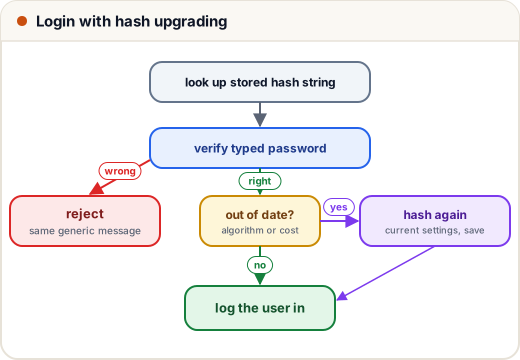
Real systems often inherit weak hashes: an old site that used plain sha256(password), or PBKDF2 with too few iterations. You cannot convert these directly, because you do not know the passwords. But at the moment a user logs in successfully, you briefly have the real password — so you can hash it again with current settings.
import hashlib, hmac, os

ALGO, ITERATIONS = "pbkdf2_sha256", 600_000

def pbkdf2(password, salt, iterations):
    return hashlib.pbkdf2_hmac("sha256", password.encode(), salt, iterations).hex()

def hash_password(password):
    salt = os.urandom(16)
    return f"{ALGO}${ITERATIONS}${salt.hex()}${pbkdf2(password, salt, ITERATIONS)}"

def verify(password, stored):
    algo, rest = stored.split("$", 1)
    if algo == "sha256":                                   # legacy: unsalted fast hash
        return hmac.compare_digest(hashlib.sha256(password.encode()).hexdigest(), rest)
    if algo == ALGO:
        iterations, salt_hex, digest_hex = rest.split("$")
        return hmac.compare_digest(pbkdf2(password, bytes.fromhex(salt_hex), int(iterations)), digest_hex)
    return False

def needs_rehash(stored):
    parts = stored.split("$")
    return parts[0] != ALGO or int(parts[1]) < ITERATIONS

users = {
    "asha": "sha256$" + hashlib.sha256(b"chai-and-code-42").hexdigest(),       # from the old site
    "ravi": f"{ALGO}$100000$" + "ab" * 16 + "$" + pbkdf2("Ravi#Placement26", bytes.fromhex("ab" * 16), 100_000),
}

def login(username, password):
    stored = users.get(username)
    if stored is None or not verify(password, stored):
        return "Incorrect username or password"
    if needs_rehash(stored):
        users[username] = hash_password(password)           # upgrade now, while we know the password
        return f"welcome {username} (hash upgraded)"
    return f"welcome {username}"

print(login("asha", "wrong"))
print(login("asha", "chai-and-code-42"))
print(login("asha", "chai-and-code-42"))
print(login("ravi", "Ravi#Placement26"))
print("stored formats now:", {u: h.split("$")[:2] for u, h in users.items()})
Incorrect username or password
welcome asha (hash upgraded)
welcome asha
welcome ravi (hash upgraded)
stored formats now: {'asha': ['pbkdf2_sha256', '600000'], 'ravi': ['pbkdf2_sha256', '600000']}
Notice three details:
- The failure message is the same for an unknown user and a wrong password, so attackers cannot use it to find which accounts exist.
- The upgrade happens only after a successful verification.
- Users who never log in again keep their old hashes. Common options are to wrap the old hash immediately (store
pbkdf2(sha256(password))and verify the same way) or to force a password reset after a deadline.
5. scrypt: also costly in memory
PBKDF2 makes each guess slow but uses almost no memory, which suits attackers with GPUs and custom chips. scrypt (and Argon2id, available through the argon2-cffi package) also require a large block of memory per guess, which is much harder to run in parallel. Python's hashlib.scrypt needs no extra install:
import hashlib

salt = b"fixed-demo-salt!"           # real code: os.urandom(16)
n, r, p = 2 ** 17, 8, 1               # memory needed is about 128 * n * r bytes
memory_mb = 128 * n * r / 2 ** 20
key = hashlib.scrypt(b"Monsoon@Jaipur7", salt=salt, n=n, r=r, p=p, maxmem=256 * 2 ** 20, dklen=32)
print(f"memory per guess: about {memory_mb:.0f} MB")
print("scrypt key:", key.hex()[:32], "...")
memory per guess: about 128 MB
scrypt key: a5c398d857697899a425dd6ca1135836 ...
The parameters n = 2¹⁷, r = 8, p = 1 match the OWASP cheat sheet's scrypt example. Store them in the hash string, just like the iteration count.
6. Pepper and Unicode: two extra layers
Pepper. A pepper is a secret key kept outside the database (an environment variable or a secrets manager), mixed in with HMAC before hashing. If only the database leaks, the attacker cannot even start guessing. It is an extra layer, not a replacement for salts, and you must plan how to rotate it.
Unicode normalisation. "é" can be stored as one character or as "e" plus an accent mark. They look identical but are different bytes, so a user who types the same password on another device might fail to log in. Normalising (NFKC is the common choice) before hashing avoids this.
import hashlib, hmac, unicodedata

PEPPER = b"from-env-or-secrets-manager"          # never stored in the database
salt = b"fixed-demo-salt!"

def prepare(password):
    normalised = unicodedata.normalize("NFKC", password)
    return hmac.new(PEPPER, normalised.encode(), hashlib.sha256).digest()

def store(password):
    return hashlib.pbkdf2_hmac("sha256", prepare(password), salt, 600_000).hex()

composed, decomposed = "Café-2026", "Café-2026"
print("same text on screen:", composed, decomposed)
print("same bytes:", composed.encode() == decomposed.encode())
print("same hash after NFKC:", store(composed) == store(decomposed))
same text on screen: Café-2026 Café-2026
same bytes: False
same hash after NFKC: True
7. Password reset tokens: a fast hash is fine here
A reset link contains a random token. Store only a hash of it, so a database leak does not give attackers working reset links. Here a single SHA-256 is enough, because the token is 256 random bits, not a human-chosen password — no wordlist can guess it.
import hashlib, hmac, secrets

def new_reset_token():
    token = secrets.token_urlsafe(32)                    # 32 random bytes, sent in the email link
    return token, hashlib.sha256(token.encode()).hexdigest()

def check_reset(token, stored_hash, expires_at, now):
    if now > expires_at:
        return "link expired"
    ok = hmac.compare_digest(hashlib.sha256(token.encode()).hexdigest(), stored_hash)
    return "ok: let the user set a new password" if ok else "invalid link"

token, stored_hash = new_reset_token()
print("token length:", len(token), "characters")
print(check_reset(token, stored_hash, expires_at=1000, now=400))
print(check_reset(token[:-1] + "x", stored_hash, expires_at=1000, now=400))
print(check_reset(token, stored_hash, expires_at=1000, now=1600))
token length: 43 characters
ok: let the user set a new password
invalid link
link expired
Also: make tokens single-use (delete the hash after use), expire them within minutes to an hour, and end the user's other sessions after the password changes.
8. Test it
Password code fails silently — a bug that accepts every password looks fine until someone notices. A few assertions catch the dangerous mistakes:
import hashlib, hmac, os

def hash_password(pw, iterations=600_000):
    salt = os.urandom(16)
    return f"pbkdf2_sha256${iterations}${salt.hex()}${hashlib.pbkdf2_hmac('sha256', pw.encode(), salt, iterations).hex()}"

def verify(pw, stored):
    algo, it, salt, digest = stored.split("$")
    return hmac.compare_digest(hashlib.pbkdf2_hmac("sha256", pw.encode(), bytes.fromhex(salt), int(it)).hex(), digest)

h1, h2 = hash_password("Secret#123"), hash_password("Secret#123")
assert verify("Secret#123", h1), "right password must pass"
assert not verify("secret#123", h1), "case matters"
assert not verify("", h1), "empty password must fail"
assert h1 != h2, "same password must give different hashes (random salt)"
assert "Secret#123" not in h1, "the password must never appear in storage"
print("all password tests passed")
all password tests passed
Common mistakes
- Writing your own scheme (
sha256(salt + password)repeated in a loop) instead of PBKDF2, scrypt, bcrypt or Argon2id from a trusted library. - Not storing the algorithm and cost, which makes upgrading impossible.
- Upgrading hashes before checking the password, or never upgrading at all.
- Using one global salt for everyone. Salts must be random and different per user.
- Keeping the pepper in the same database as the hashes.
- Storing reset tokens in plain text, or letting them work more than once.
- Using bcrypt without knowing that it only uses the first 72 bytes of the password.
Quick recap
- Cost per guess is your defence: PBKDF2 at 600,000 iterations makes each guess over a million times more expensive than one SHA-256.
- Store
algorithm$cost$salt$hash; verify withhmac.compare_digest. - Upgrade weak or legacy hashes right after a successful login; give the same error for unknown users and wrong passwords.
- scrypt and Argon2id add memory cost; a pepper and NFKC normalisation are useful extra layers.
- Reset tokens are random, so a SHA-256 of the token is fine — keep them single-use and short-lived.
- Test that wrong, empty and differently-cased passwords fail and that salts differ.