Web Security (OWASP Top 10) · Lesson 3 of 9 · Updated ·
SQL Injection — How Attackers Read Your Whole Database, and the One Fix That Stops It
Injection (A05 in the OWASP Top 10:2025) happens when user input is mixed into a command — SQL, a shell command, an LDAP query — so the input becomes part of the code. SQL injection is the classic example and still finds its way into student projects and real apps every year.
1. The bug in one picture
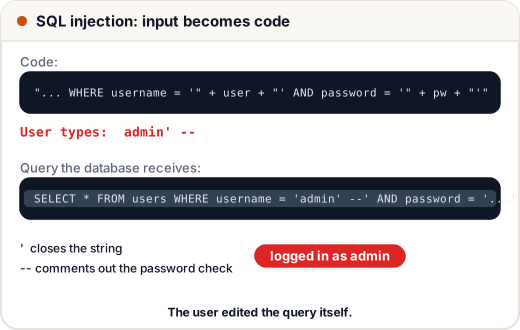
The developer meant: "find the user whose name is X and password is Y". By building the query with string concatenation, they let the user edit the query itself.
2. See it happen (on our own throwaway database)
We'll build a tiny in-memory database with Python's built-in sqlite3 and a deliberately vulnerable login.
import sqlite3

db = sqlite3.connect(":memory:")
db.executescript("""
CREATE TABLE users (id INTEGER, username TEXT, password TEXT, role TEXT);
INSERT INTO users VALUES (1, 'asha',  'asha@2024',  'student');
INSERT INTO users VALUES (2, 'admin', 'S3cret!Adm', 'admin');
""")

def login_unsafe(username, password):
    sql = f"SELECT username, role FROM users WHERE username = '{username}' AND password = '{password}'"
    print("SQL:", sql)
    return db.execute(sql).fetchall()

print(login_unsafe("asha", "wrong"))
print(login_unsafe("admin' --", "anything"))
SQL: SELECT username, role FROM users WHERE username = 'asha' AND password = 'wrong'
[]
SQL: SELECT username, role FROM users WHERE username = 'admin' --' AND password = 'anything'
[('admin', 'admin')]
The first login fails as expected. The second logs in as admin without the password: ' closes the string and -- turns the rest of the query (the password check) into a comment.
3. Worse: stealing data with UNION
A search box is just as dangerous. UNION lets the attacker glue the results of a second query onto yours:
import sqlite3

db = sqlite3.connect(":memory:")
db.executescript("""
CREATE TABLE courses (title TEXT, price INTEGER);
INSERT INTO courses VALUES ('DSA Bootcamp', 1999), ('Python Basics', 999);
CREATE TABLE users (username TEXT, password TEXT);
INSERT INTO users VALUES ('asha', 'asha@2024'), ('admin', 'S3cret!Adm');
""")

def search_unsafe(term):
    sql = f"SELECT title, price FROM courses WHERE title LIKE '%{term}%'"
    return db.execute(sql).fetchall()

print(search_unsafe("Python"))
print(search_unsafe("zzz' UNION SELECT username, password FROM users --"))
[('Python Basics', 999)]
[('admin', 'S3cret!Adm'), ('asha', 'asha@2024')]
The "search results" now contain every username and password. (This is also why passwords must be hashed — lesson 6.)
4. The fix: parameterised queries
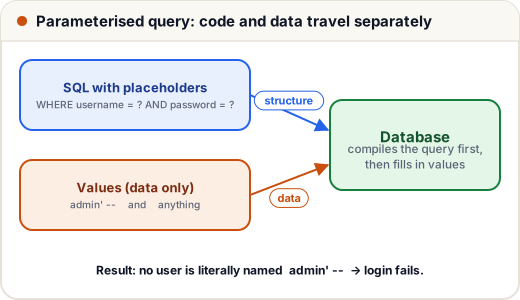
Never build SQL with +, f-strings or .format(). Use placeholders and pass the values separately. The database driver sends the query structure and the data on separate channels, so the data can never become SQL.
import sqlite3

db = sqlite3.connect(":memory:")
db.executescript("""
CREATE TABLE users (id INTEGER, username TEXT, password TEXT, role TEXT);
INSERT INTO users VALUES (1, 'asha', 'asha@2024', 'student');
INSERT INTO users VALUES (2, 'admin', 'S3cret!Adm', 'admin');
""")

def login_safe(username, password):
    sql = "SELECT username, role FROM users WHERE username = ? AND password = ?"
    return db.execute(sql, (username, password)).fetchall()

print(login_safe("admin' --", "anything"))
print(login_safe("asha", "asha@2024"))
[]
[('asha', 'student')]
The attack string is now just a weird username that doesn't exist. Same idea in every language:
| Language | Safe pattern |
|---|---|
| Python (sqlite3/psycopg) | cur.execute("... WHERE id = %s", (user_id,)) (? in sqlite3) |
| Java (JDBC) | PreparedStatement ps = conn.prepareStatement("... WHERE id = ?"); ps.setInt(1, id); |
| Node.js (pg) | client.query('... WHERE id = $1', [id]) |
| PHP (PDO) | $stmt = $pdo->prepare('... WHERE id = ?'); $stmt->execute([$id]); |
5. ORMs help — until you use the escape hatch
ORMs like Django ORM, Hibernate, Prisma and SQLAlchemy parameterise for you. But every ORM has a "raw SQL" feature, and that's where injection comes back:
# Django — SAFE: the ORM parameterises
User.objects.filter(username=name)

# Django — UNSAFE: string formatting inside raw SQL
User.objects.raw(f"SELECT * FROM auth_user WHERE username = '{name}'")

# Django — SAFE raw SQL: pass params separately
User.objects.raw("SELECT * FROM auth_user WHERE username = %s", [name])
Things you can't parameterise — table names, column names in ORDER BY, ASC/DESC — must be checked against an allow-list:
ALLOWED_SORT = {"price", "title", "created_at"}

def order_clause(column):
    if column not in ALLOWED_SORT:
        column = "title"          # fall back to a safe default
    return f"ORDER BY {column}"

print(order_clause("price"))
print(order_clause("price; DROP TABLE users"))
ORDER BY price
ORDER BY title
6. Extra layers (defence in depth)
- Least privilege: the website's database user should have only
SELECT/INSERT/UPDATEon its own tables — neverDROP, never access to other databases. - Don't show database errors to users (they help attackers map your tables). Log them instead.
- Input validation: an ID should be a number; a pincode 6 digits. Reject the rest early.
- Hash passwords, so even a successful dump doesn't reveal them.
7. Other injections, same idea
| Injection | Dangerous code | Safe approach |
|---|---|---|
| OS command | os.system("ping " + host) | subprocess.run(["ping", "-c", "1", host]) (list, no shell) + validate host |
| NoSQL (MongoDB) | passing {"$ne": ""} from JSON straight into a query | validate types; only accept strings where strings are expected |
| Template injection | rendering a user-supplied template string | never render user input as a template |
| XSS (HTML/JS injection) | inserting input into HTML unescaped | output encoding — next lesson |
Common mistakes
- "I escape quotes myself" — manual escaping misses cases (encodings, numeric contexts). Use placeholders.
- Parameterising
WHEREbut concatenatingORDER BYfrom the URL. - Thinking a dropdown or number field in the form protects you — the request can be edited.
Quick recap
- SQL injection = input becomes part of the SQL command.
- Attacks: login bypass (
' --), data theft (UNION SELECT), and worse. - Fix: parameterised queries / prepared statements, everywhere, every time.
- Allow-lists for identifiers; least-privilege DB users; no DB errors shown to users.