Web Security (OWASP Top 10) · Lesson 7 of 9 · Updated ·
Broken Access Control — IDOR, Privilege Escalation and SSRF (OWASP #1)
A01:2025 Broken Access Control has been the top web risk in two editions running. It's rarely clever: the app simply forgets to check whether this user may do this thing to this record.
1. Authentication vs authorization
- Authentication: who are you? (login)
- Authorization / access control: what may you do, to which data?
A perfectly built login doesn't help if every logged-in user can open every record.
2. IDOR: change the number, see someone else's data
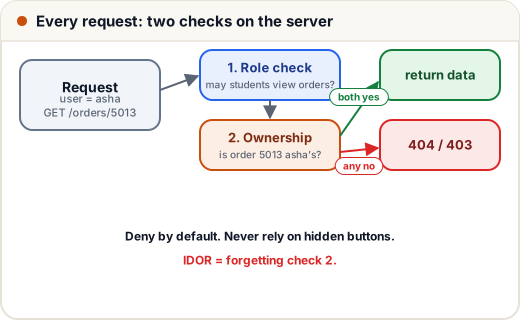
Insecure Direct Object Reference — the app uses an ID from the request without checking ownership:
GET /api/orders/5012      ← my order
GET /api/orders/5013      ← someone else's order, name, phone and address
ORDERS = {
    5012: {"owner": "asha", "course": "DSA Bootcamp", "phone": "98xxxxxx01"},
    5013: {"owner": "ravi", "course": "Python Basics", "phone": "97xxxxxx22"},
}

def get_order_unsafe(current_user, order_id):
    return ORDERS.get(order_id, "404 Not Found")

def get_order_safe(current_user, order_id):
    order = ORDERS.get(order_id)
    if order is None or order["owner"] != current_user:
        return "404 Not Found"          # same answer as "doesn't exist" — don't confirm it exists
    return order

print(get_order_unsafe("asha", 5013))
print(get_order_safe("asha", 5013))
print(get_order_safe("asha", 5012))
{'owner': 'ravi', 'course': 'Python Basics', 'phone': '97xxxxxx22'}
404 Not Found
{'owner': 'asha', 'course': 'DSA Bootcamp', 'phone': '98xxxxxx01'}
Even better: query with the owner in the condition so the database does the filtering — SELECT * FROM orders WHERE id = ? AND user_id = ?.
Random, unguessable IDs (UUIDs) make IDOR harder to find, but they are not access control — IDs leak through logs, shared links and screenshots. Always check.
3. Privilege escalation
| Type | Meaning | Example |
|---|---|---|
| Horizontal | same role, someone else's data | student A reads student B's marks (IDOR) |
| Vertical | gaining a higher role | a student calling /admin/api/users/delete |
Vertical escalation usually happens when the admin button is hidden in the UI but the API endpoint doesn't check the role. Attackers find endpoints in JavaScript files and just call them.
Centralise checks, and deny by default:
PERMISSIONS = {
    "student": {"course:view", "quiz:attempt"},
    "manager": {"course:view", "course:edit", "project:review"},
    "admin":   {"course:view", "course:edit", "project:review", "user:delete", "payment:refund"},
}

def can(user_role, permission):
    return permission in PERMISSIONS.get(user_role, set())     # unknown role -> nothing

def delete_user(current, target_id):
    if not can(current["role"], "user:delete"):
        return "403 Forbidden"
    return f"user {target_id} deleted by {current['name']}"

print(delete_user({"name": "asha", "role": "student"}, 7))
print(delete_user({"name": "meera", "role": "manager"}, 7))
print(delete_user({"name": "pankaj", "role": "admin"}, 7))
print(delete_user({"name": "x", "role": "superuser"}, 7))
403 Forbidden
403 Forbidden
user 7 deleted by pankaj
403 Forbidden
This is the pattern Skills101's own admin uses: managers get only the areas they're given, every page and every action checks again, and owner-only settings can't be reached by managers at all.
4. Mass assignment
Frameworks can bind all JSON fields to a model automatically. If the profile-update endpoint accepts the whole body:
{ "name": "Asha", "college": "JECRC", "role": "admin", "xp": 999999 }
…the attacker just promoted themselves. Fix: an allow-list of editable fields.
EDITABLE = {"name", "college", "bio"}

def update_profile(user, body):
    for key, value in body.items():
        if key in EDITABLE:
            user[key] = value
    return user

asha = {"name": "Asha", "role": "student", "xp": 120}
print(update_profile(asha, {"name": "Asha S", "role": "admin", "xp": 999999}))
{'name': 'Asha S', 'role': 'student', 'xp': 120}
5. SSRF: making your server fetch things for the attacker
Server-Side Request Forgery (now part of A01 in 2025): a feature fetches a URL the user supplies — "import profile picture from URL", "preview this link", webhooks. The attacker supplies an internal address:
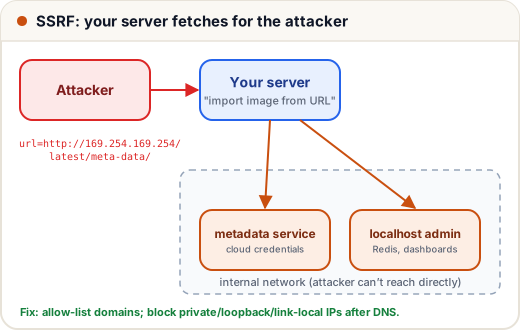
http://localhost:6379/— internal Redis or admin panelshttp://169.254.169.254/latest/meta-data/— the cloud metadata service, which can hand out credentials on AWS/GCP/Azurehttp://10.0.0.5/— internal company services
Defences:
- Allow-list the domains you really need (e.g. only
images.unsplash.com). - If any URL must be allowed, resolve the hostname and block private, loopback, link-local and metadata ranges — check after DNS resolution and on every redirect.
- Use the cloud's hardened metadata settings (e.g. AWS IMDSv2) and run the fetcher with no credentials.
import ipaddress

def is_internal(ip):
    addr = ipaddress.ip_address(ip)
    return addr.is_private or addr.is_loopback or addr.is_link_local or addr.is_reserved

for ip in ["8.8.8.8", "127.0.0.1", "10.0.0.5", "192.168.1.10", "169.254.169.254"]:
    print(ip, "-> BLOCK" if is_internal(ip) else "-> allow")
8.8.8.8 -> allow
127.0.0.1 -> BLOCK
10.0.0.5 -> BLOCK
192.168.1.10 -> BLOCK
169.254.169.254 -> BLOCK
(In real code, resolve the host with the same resolver your HTTP client uses and re-check after redirects — attackers use DNS tricks.)
6. Case study: "certificate verification" leak
An institute's verify page /verify?cert=1001 showed the student name, phone and email. Certificate numbers were sequential. A scraper downloaded 40,000 records in an evening.
Fixes: show only what verification needs (name, course, date — no phone/email); long random certificate IDs; rate limiting; and a threat-modelling question for every public page: "what if someone requests all of them?"
Common mistakes
- Checking permissions in the UI only (hidden buttons, disabled links).
- Checking the role but not ownership of the record.
- Returning
403for others' records — it confirms the record exists;404is often better. - Forgetting non-obvious endpoints: exports, file downloads, GraphQL, mobile APIs.
Quick recap
- Access control = role check + ownership check, on the server, on every request, deny by default.
- IDOR: never trust an ID from the request without an ownership check.
- Use allow-lists for editable fields (mass assignment) and for URLs the server fetches (SSRF).
- Centralise permissions so every page and action uses the same rules.