Web Security (OWASP Top 10) · Lesson 1 of 9 · Updated ·
Web Security Basics — CIA Triad, Threat Modelling and the OWASP Top 10:2025
Every app you build for a client, a college project or your first job will be attacked — usually by automated bots within minutes of going online. You don't need to be a "hacker" to build safe software. You need to know what can go wrong and the standard defences. This track teaches exactly that.
Ethics first. Everything here is for protecting systems. Testing a website you don't own without written permission is illegal in India (IT Act 2000, sections 43 and 66) and almost everywhere else. Practise on your own apps or on legal practice labs.
1. What does "secure" mean? The CIA triad
Security has three goals. Every attack breaks at least one of them.
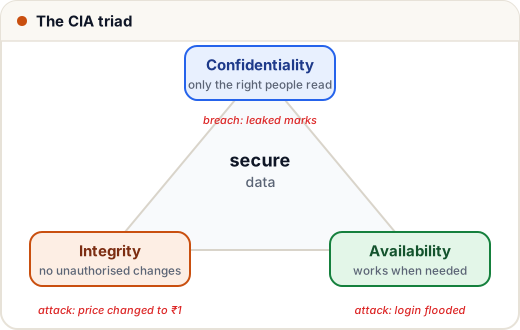
| Goal | Meaning | Example attack | Example defence |
|---|---|---|---|
| Confidentiality | only allowed people can read the data | leaked database of student marks | access control, encryption |
| Integrity | data can't be changed without permission | changing the price of a course to ₹1 in the request | server-side validation, signatures |
| Availability | the service works when users need it | flooding the login page so nobody can log in | rate limits, autoscaling, CDN |
Two more words you'll hear: authentication (who are you?) and authorization (what are you allowed to do?). Mixing these up causes a huge share of real breaches.
2. Think like an attacker: the attack surface
The attack surface is every place an attacker can send data into your system:
- every URL and form (login, search, comments, file upload)
- every API endpoint, including the ones "only the mobile app uses"
- headers and cookies (attackers can edit all of them)
- third-party code you install (npm/pip packages)
- admin panels, servers, cloud storage buckets
The single most important rule in web security:
Never trust anything that comes from the client. The browser, the mobile app and every request can be modified by the user. Hidden fields, disabled buttons and JavaScript checks are for convenience — real checks happen on the server.
3. Threat modelling in 10 minutes (STRIDE)
Before writing code, ask "what could go wrong?" for each feature. STRIDE is a simple checklist made popular by Microsoft:
| Letter | Threat | Breaks | Question to ask |
|---|---|---|---|
| S | Spoofing | authentication | Can someone pretend to be another user? |
| T | Tampering | integrity | Can someone change data they shouldn't? |
| R | Repudiation | accountability | Could someone deny doing an action? (do we log it?) |
| I | Information disclosure | confidentiality | Can someone see data they shouldn't? |
| D | Denial of service | availability | Can someone make it unusable? |
| E | Elevation of privilege | authorization | Can a student become an admin? |
Mini case study — a "download certificate" feature. URL: /certificate?id=1042.
- I (disclosure): if I change
id=1042toid=1043, do I see someone else's certificate with their name and email? → check ownership on the server, or use long random IDs. - T (tampering): can I edit the name on the certificate before it's generated? → generate it from the database, never from the request.
- D (DoS): can a bot request 100,000 PDFs per minute? → rate-limit and cache.
Ten minutes of this thinking prevents most of the bugs in the rest of this track.
4. The OWASP Top 10:2025
OWASP (the Open Worldwide Application Security Project) is a non-profit that publishes the Top 10 most critical web app risks, based on data from hundreds of thousands of real applications. Interviewers, auditors and security tools all use it. The current edition is 2025:
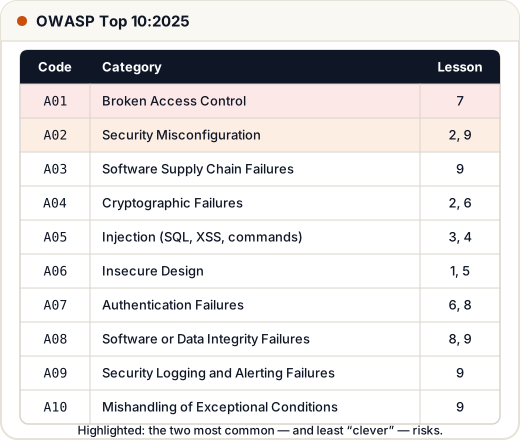
| Code | Category | In plain words | Lesson |
|---|---|---|---|
| A01 | Broken Access Control | users can do or see things they shouldn't (incl. SSRF) | 7 |
| A02 | Security Misconfiguration | default passwords, debug mode on, missing headers | 2, 9 |
| A03 | Software Supply Chain Failures | vulnerable or malicious packages and build tools | 9 |
| A04 | Cryptographic Failures | no HTTPS, weak hashing, leaked keys | 2, 6 |
| A05 | Injection | SQL injection, XSS, command injection | 3, 4 |
| A06 | Insecure Design | the feature itself is unsafe, no matter how well coded | 1, 5 |
| A07 | Authentication Failures | weak login, no rate limit, bad sessions | 6, 8 |
| A08 | Software or Data Integrity Failures | trusting unsigned updates or data | 8, 9 |
| A09 | Security Logging and Alerting Failures | attacks happen and nobody notices | 9 |
| A10 | Mishandling of Exceptional Conditions | errors that leak details or "fail open" | 9 |
Notice that #1 is not a clever hacking trick — it's missing permission checks. Most real breaches come from simple mistakes, which is good news: they're preventable.
5. Defence in depth
No single defence is perfect, so we stack them like the walls of a fort:
- Validate input (reject what doesn't make sense).
- Use safe APIs (parameterised SQL, auto-escaping templates).
- Check permissions on every request, on the server.
- Least privilege — the database user for the website can't drop tables; staff accounts only get the areas they need.
- Encrypt in transit (HTTPS) and protect secrets.
- Log and alert so attacks are noticed.
- Keep things updated and remove what you don't use.
If one layer fails, the next one still protects you.
6. A quick Python taste: "never trust the client"
Here's a checkout function that trusts the price sent by the browser, and a fixed version that looks it up on the server.
COURSES = {"dsa": 1999, "python": 999}   # the real prices live on the server

def checkout_unsafe(request):
    # BAD: the price comes from the browser, which the user controls
    return f"Charged ₹{request['price']} for {request['course']}"

def checkout_safe(request):
    course = request["course"]
    if course not in COURSES:
        return "Error: unknown course"
    return f"Charged ₹{COURSES[course]} for {course}"

attack = {"course": "dsa", "price": 1}    # user edited the request in DevTools
print(checkout_unsafe(attack))
print(checkout_safe(attack))
print(checkout_safe({"course": "free-iphone"}))
Charged ₹1 for dsa
Charged ₹1999 for dsa
Error: unknown course
The unsafe version lost ₹1,998 in one request. The fix is one idea: the server decides.
Common mistakes
- Thinking "nobody will find this URL" — bots scan every URL, and URLs leak through browser history and logs.
- Doing validation only in JavaScript.
- Treating security as a final step instead of thinking about it while designing.
- Confusing authentication (login) with authorization (permissions).
Quick recap
- Security = Confidentiality, Integrity, Availability.
- The attack surface is every input: URLs, forms, APIs, headers, cookies, packages.
- Use STRIDE to ask "what could go wrong?" for each feature.
- OWASP Top 10:2025 starts with Broken Access Control and Security Misconfiguration.
- Never trust the client; stack defences (defence in depth).