Web Security (OWASP Top 10) · Lesson 6 of 9 · Updated ·
Storing Passwords and Building Safe Login — Hashing, Salts, Rate Limits, MFA and Sessions
Login is the front door. A07 Authentication Failures and A04 Cryptographic Failures in the OWASP Top 10:2025 cover the classic mistakes: storing passwords badly, allowing unlimited guesses, and weak session handling.
1. Never store passwords — store a slow, salted hash
| Method | What happens if the database leaks | Verdict |
|---|---|---|
| Plain text | everyone's password is readable | never |
| Encrypted (AES) | whoever has the key (or steals it) can decrypt all | no — you never need to decrypt a password |
| Fast hash (MD5, SHA-256) | attackers try billions of guesses per second on a GPU | no |
| Salted slow hash (bcrypt, scrypt, Argon2id, PBKDF2) | each guess is deliberately expensive and unique per user | yes |
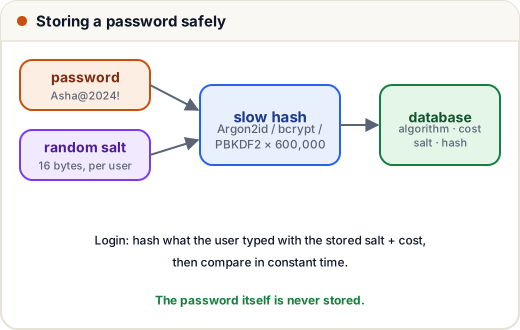
A hash is a one-way function: easy to compute, practically impossible to reverse. At login you hash what the user typed and compare it with the stored hash.
2. Why "salt"?
Without a salt, everyone with the password password123 has the same hash, and attackers use precomputed tables (rainbow tables) of common passwords.
A salt is a random value generated per user and stored next to the hash. Same password → different hash for every user.
import hashlib

def fast_hash(pw):
    return hashlib.sha256(pw.encode()).hexdigest()[:16]

print("asha :", fast_hash("password123"))
print("ravi :", fast_hash("password123"))        # identical -> one guess cracks both

def salted(pw, salt):
    return hashlib.sha256((salt + pw).encode()).hexdigest()[:16]

print("asha :", salted("password123", "9f2c"))
print("ravi :", salted("password123", "a71e"))  # different hashes for the same password
asha : ef92b778bafe771e
ravi : ef92b778bafe771e
asha : e315bdaa54f3c4b0
ravi : e5a89109f28f14d0
3. Why "slow"?
SHA-256 is designed to be fast — great for files, terrible for passwords. Password hashes are designed to be slow and tunable: they repeat work many times (and Argon2/scrypt also use lots of memory) so each guess costs the attacker real time.
Python's standard library includes PBKDF2 and scrypt. A complete, correct pattern:
import hashlib, hmac, os

ITERATIONS = 600_000          # tune so one hash takes ~0.1–0.5 s on your server

def hash_password(password, salt=None):
    salt = salt or os.urandom(16)                     # random 16-byte salt per user
    digest = hashlib.pbkdf2_hmac("sha256", password.encode(), salt, ITERATIONS)
    return f"pbkdf2_sha256${ITERATIONS}${salt.hex()}${digest.hex()}"

def verify_password(password, stored):
    algo, iterations, salt_hex, digest_hex = stored.split("$")
    digest = hashlib.pbkdf2_hmac("sha256", password.encode(), bytes.fromhex(salt_hex), int(iterations))
    return hmac.compare_digest(digest.hex(), digest_hex)

stored = hash_password("Asha@2024!")
print(stored.split("$")[0], stored.split("$")[1], "salt length:", len(stored.split("$")[2]) // 2, "bytes")
print("correct password:", verify_password("Asha@2024!", stored))
print("wrong password:  ", verify_password("asha@2024!", stored))
print("same password, new salt -> different hash:", hash_password("Asha@2024!") != stored)
pbkdf2_sha256 600000 salt length: 16 bytes
correct password: True
wrong password:   False
same password, new salt -> different hash: True
Notice we store the algorithm and iteration count with the hash. That lets you raise the cost later and upgrade old hashes when users log in (Skills101 did exactly this when moving students from WordPress's old hash format).
In real projects, use your framework's built-in or a maintained library: Argon2id (argon2-cffi) or bcrypt are the usual recommendations; Django, Spring Security and Laravel ship good defaults.
4. Stop guessing attacks
| Attack | What it is | Defence |
|---|---|---|
| Brute force | many passwords against one account | rate limit per account + per IP, slowing down after failures |
| Credential stuffing | email/password pairs leaked from other sites tried on yours | rate limits, MFA, check passwords against breach lists, bot detection |
| Password spraying | one common password against many accounts | rate limit per IP, block very common passwords |
| Account enumeration | "user not found" vs "wrong password" tells attackers which emails exist | same message for both: "Incorrect email or password" |
A simple sliding-window rate limiter:
from collections import defaultdict, deque

attempts = defaultdict(deque)

def allow_login(key, now, limit=5, window=300):
    q = attempts[key]
    while q and now - q[0] > window:     # forget attempts older than 5 minutes
        q.popleft()
    if len(q) >= limit:
        return False
    q.append(now)
    return True

results = [allow_login("asha@example.com", t) for t in range(0, 70, 10)]
print(results)
print("after 6 minutes:", allow_login("asha@example.com", 400))
[True, True, True, True, True, False, False]
after 6 minutes: True
Password rules that actually help (current NIST guidance): minimum 8 characters (allow long passphrases up to 64+), block common and breached passwords, no forced special-character rules or forced periodic changes (they make people choose predictable passwords like Summer@2025!).
5. Multi-factor authentication (MFA)
Something you know (password) + something you have (phone app, security key) or are (fingerprint).
| Factor | Strength | Note |
|---|---|---|
| SMS OTP | okay | SIM-swap and phishing risk, but far better than nothing |
| Authenticator app (TOTP) | good | 6-digit code that changes every 30 s |
| Passkeys / security keys (WebAuthn) | best | phishing-resistant; the key only works on the real domain |
Offer MFA to everyone; require it for admins and staff.
6. Sessions after login
- Generate a new random session ID after login (prevents session fixation).
- Cookie flags:
HttpOnly; Secure; SameSite=Lax. - Expire idle sessions; let users log out of all devices; kill sessions after a password change.
- Store a hash of the session token in the database, so a DB leak doesn't reveal live sessions.
- Password reset links: random, single-use, expire in minutes to an hour, and don't reveal whether the email exists.
7. Case study: the 2-line fix
A college fest site stored passwords as md5(password). A SQL injection bug leaked the table; within an hour most hashes were cracked with a public wordlist, and many students reused those passwords on email.
Fixes: parameterised queries (lesson 3), and Argon2id/bcrypt hashes with per-user salts — upgrading each old hash on the user's next login. Combined with rate limits and MFA for organisers.
Common mistakes
- "Encrypting" passwords so they can be emailed back on "forgot password". Never send a password; send a reset link.
- Using a single global salt (that's a "pepper"; useful extra, but not a replacement for per-user salts).
- Comparing hashes with
==in high-risk code instead of a constant-time compare. - Different error messages for "no such user" and "wrong password".
Quick recap
- Store salted, slow hashes (Argon2id, bcrypt, scrypt, PBKDF2) — never plain, encrypted or fast hashes.
- Defend logins with rate limits, generic error messages, breached-password checks and MFA.
- Sessions: new random ID at login, secure cookie flags, expiry, logout everywhere.