Web Security (OWASP Top 10) · Lesson 9 of 9 · Updated ·
Secure Development in Practice — Supply Chain, Secrets, Logging, Error Handling and Security Careers
Fixing individual bugs is half the job. The other half is a process that stops them reaching production. This lesson covers the OWASP Top 10:2025 risks that live in your pipeline and operations, and how to build a career from these skills.
1. Software supply chain (A03:2025)
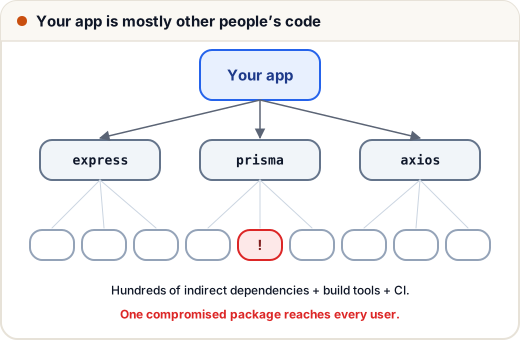
A typical Node.js project pulls in hundreds of packages, most of them dependencies of dependencies. Each is code that runs with your app's permissions.
| Threat | Real-world pattern | Defence |
|---|---|---|
| Known-vulnerable package | an old library with a published CVE | npm audit, pip-audit, Dependabot/Renovate alerts; update regularly |
| Typosquatting | reqeusts instead of requests | check names carefully; prefer well-known packages |
| Compromised maintainer | a popular package publishes a malicious version | lockfiles, pinned versions, review diffs of updates |
| Malicious install scripts | postinstall runs code on your machine | npm ci --ignore-scripts where possible; CI isolation |
| Compromised build/CI | secrets stolen from the pipeline | least-privilege CI tokens, pin CI actions to versions, protect main branch |
Habits: commit your lockfile (package-lock.json, poetry.lock); install with npm ci in CI; remove unused packages; keep an inventory (an SBOM, software bill of materials) for production apps.
2. Software and data integrity (A08:2025)
Don't trust code or data whose origin you haven't verified:
- auto-updates and plugins should be signed and checked;
- don't deserialize untrusted data with formats that can execute code — Python
pickle, Java native serialization. Use JSON plus validation instead; - webhooks: verify the provider's signature (e.g. Razorpay and Stripe sign every webhook with HMAC — exactly the technique from the CSRF and JWT lessons).
3. Secrets management
import os

# BAD: secret in code -> it ends up in Git history, screenshots and every copy of the repo
# RAZORPAY_SECRET = "rzp_live_4fG..."

# GOOD: read from the environment (set on the server, never committed)
secret = os.environ.get("RAZORPAY_SECRET")
print("configured" if secret else "missing RAZORPAY_SECRET - refusing to start payments")
missing RAZORPAY_SECRET - refusing to start payments
.envfiles go in.gitignore; commit a.env.examplewith empty values.- If a secret is ever committed: rotate it immediately (deleting the commit isn't enough — it's in clones and forks), then clean history.
- Use a secret scanner (
gitleaks, GitHub secret scanning) in CI. - Different keys for test and production; least-privilege API keys.
4. Logging and alerting (A09:2025)
Breaches often go unnoticed for months. Log security events and alert on unusual patterns:
| Log this | Never log this |
|---|---|
| logins (success/failure), password and email changes | passwords, OTPs, full card numbers |
| permission denials (403s), admin actions | session tokens, API keys |
| payment events, data exports | full personal data unless required |
| rate-limit hits, validation failures spikes |
import json
from datetime import datetime, timezone

def security_log(event, user, ip, **details):
    entry = {"ts": datetime(2026, 11, 10, 9, 30, tzinfo=timezone.utc).isoformat(),
             "event": event, "user": user, "ip": ip, **details}
    return json.dumps(entry)

print(security_log("login_failed", "asha@example.com", "203.0.113.7", reason="bad_password", attempt=4))
print(security_log("admin_action", "meera", "198.51.100.2", action="publish_project", target="p_91"))
{"ts": "2026-11-10T09:30:00+00:00", "event": "login_failed", "user": "asha@example.com", "ip": "203.0.113.7", "reason": "bad_password", "attempt": 4}
{"ts": "2026-11-10T09:30:00+00:00", "event": "admin_action", "user": "meera", "ip": "198.51.100.2", "action": "publish_project", "target": "p_91"}
Structured (JSON) logs are easy to search and alert on: "more than 50 failed logins from one IP in 5 minutes", "admin login from a new country". An activity log of admin actions (like Skills101's) also answers "who changed this?" — the R (repudiation) in STRIDE.
5. Mishandling exceptional conditions (A10:2025)
New in 2025: what your app does when things go wrong.
def is_allowed_unsafe(user, permissions_service):
    try:
        return permissions_service(user)
    except Exception:
        return True                      # "fail open": an outage gives everyone access

def is_allowed_safe(user, permissions_service):
    try:
        return permissions_service(user)
    except Exception:
        return False                     # "fail closed": deny when unsure, log the error

def broken_service(user):
    raise TimeoutError("permissions DB down")

print("unsafe:", is_allowed_unsafe("asha", broken_service))
print("safe:  ", is_allowed_safe("asha", broken_service))
unsafe: True
safe:   False
Rules: fail closed for security decisions; show users a generic error with a reference ID; send details to logs; don't leave half-finished transactions (use database transactions); handle timeouts and unexpected input sizes explicitly.
6. Security testing in your workflow
| Technique | What it does | Free tools |
|---|---|---|
| SAST (static analysis) | scans source code for risky patterns | Semgrep, CodeQL (GitHub), SonarQube Community |
| SCA (dependency scanning) | finds vulnerable packages | npm audit, pip-audit, OWASP Dependency-Check, Dependabot |
| Secret scanning | finds committed keys | gitleaks, GitHub secret scanning |
| DAST (dynamic) | attacks a running test copy of the app | OWASP ZAP |
| Manual testing | logic flaws tools miss (IDOR, business logic) | Burp Suite Community, browser DevTools |
| Code review | a second pair of eyes with a checklist | — |
Run SAST, SCA and secret scanning automatically on every pull request; run DAST against staging.
7. Pre-deploy security checklist
- HTTPS + HSTS; secure cookie flags; security headers incl. CSP.
- Debug off; default accounts removed; generic error pages.
- All SQL parameterised; templates auto-escaping; no unsafe
innerHTML. - Every endpoint checks auth and ownership; admin actions logged.
- Passwords hashed with Argon2id/bcrypt; login rate-limited; MFA for staff.
- CSRF protection on; CORS allow-list only.
- Dependencies audited; lockfile committed; no secrets in the repo.
- Backups tested; alerts on suspicious activity.
8. Careers in application security
India has strong demand for security skills across IT services, product companies, banks and fintech, and the government sector.
| Role | What you do | Start with |
|---|---|---|
| Secure software developer | build features safely (every developer!) | this track + your main stack |
| Application security (AppSec) engineer | reviews, threat models, security tooling for dev teams | development experience + OWASP + tools above |
| Penetration tester | authorised testing of apps and networks | web fundamentals, Burp, practice labs |
| SOC analyst | monitoring alerts, investigating incidents | logs, networking, SIEM basics |
| Bug bounty hunter | finding bugs in programmes that invite testing | strong web skills + patience |
How to practise legally: deliberately vulnerable apps you run yourself (OWASP Juice Shop, DVWA), PortSwigger Web Security Academy's free labs, CTF competitions, and bug bounty platforms (HackerOne, Bugcrowd, Intigriti) — only within each programme's published scope. Certifications such as CompTIA Security+, CEH, eJPT or OSCP can help with HR filters; projects and write-ups show real skill.
Portfolio idea: take one of your own projects, threat-model it, run Semgrep + ZAP, fix what you find, and write a short "security review" README. That single document stands out in interviews.
Quick recap
- Supply chain: lockfiles, audits, few and well-known dependencies, protected CI.
- Integrity: verify signatures; never deserialize untrusted data with pickle/Java serialization.
- Secrets in environment/secret managers; rotate if leaked.
- Log security events (not secrets) and alert; fail closed on errors.
- Automate SAST, SCA, secret scanning; DAST on staging; use a pre-deploy checklist.