Web Security (OWASP Top 10) · Lesson 2 of 9 · Updated ·
HTTPS, Secure Cookies and Security Headers — The Free Protection Every Site Should Turn On
Some of the strongest protections on the web cost nothing — a certificate and a few lines of server config. They fall under A04 Cryptographic Failures and A02 Security Misconfiguration in the OWASP Top 10:2025, two of the most common findings in real audits.
1. Why HTTPS matters
With plain HTTP, everything travels as readable text. Anyone on the same café Wi-Fi, a compromised router or a dishonest network can read (passwords, cookies) and even change (inject ads or malware) the page.
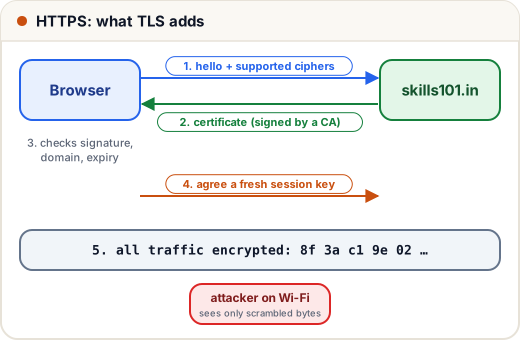
HTTPS = HTTP inside TLS (Transport Layer Security). TLS gives three things:
| TLS gives | Meaning |
|---|---|
| Encryption | eavesdroppers see random bytes |
| Integrity | any change in transit is detected |
| Authentication | the certificate proves you're really talking to skills101.in, not an impostor |
How it works, simplified:
- The browser says hello and lists the encryption methods it supports.
- The server sends its certificate (signed by a trusted Certificate Authority, e.g. Let's Encrypt).
- The browser checks the signature, the domain name and the expiry date.
- Both sides agree on a fresh session key (using public-key cryptography), and from then on use fast symmetric encryption.
Today certificates are free (Let's Encrypt) and renew automatically with tools like certbot. There is no excuse for a login page on HTTP.
What HTTPS does not do: it doesn't make your app secure. A site with a green padlock can still have SQL injection. HTTPS only protects data on the way.
2. Cookies: the keys to your users' accounts
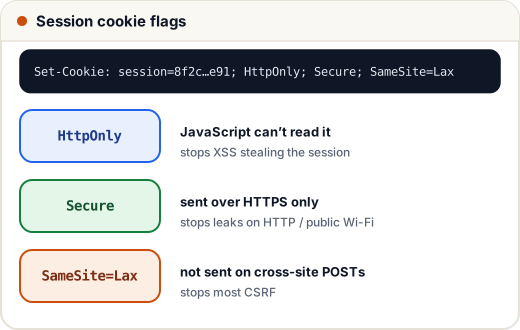
After login, the server usually sets a session cookie. Whoever holds that cookie is the user. So cookies need protection flags:
Set-Cookie: session=8f2c...e91; Path=/; HttpOnly; Secure; SameSite=Lax; Max-Age=2592000
| Flag | What it does | Stops |
|---|---|---|
| HttpOnly | JavaScript can't read the cookie (document.cookie won't show it) | stealing the session through XSS |
| Secure | only sent over HTTPS | leaking it on HTTP / public Wi-Fi |
| SameSite=Lax | not sent on most requests started by other sites (still sent when the user clicks a normal link to you) | most CSRF attacks |
| SameSite=Strict | never sent from other sites, even on links | CSRF (but users appear logged-out when arriving from links) |
| Max-Age / Expires | when it expires | long-lived stolen sessions |
Also: make session IDs long and random (at least 128 bits), create a new one after login, and delete it on the server at logout.
3. Security headers
Headers are instructions from your server to the browser. A handful of them switch on powerful browser protections:
| Header | Example value | Protects against |
|---|---|---|
| Strict-Transport-Security (HSTS) | max-age=31536000; includeSubDomains | the browser always uses HTTPS for your domain, even if someone types http:// |
| Content-Security-Policy (CSP) | default-src 'self'; script-src 'self'; frame-ancestors 'none' | XSS (blocks scripts from unknown sources) and clickjacking |
| X-Content-Type-Options | nosniff | browser guessing a file type and running an uploaded "image" as script |
| Referrer-Policy | strict-origin-when-cross-origin | leaking full URLs (with tokens) to other sites |
| Permissions-Policy | camera=(), microphone=() | pages using device features you never need |
frame-ancestors 'none' (or the older X-Frame-Options: DENY) prevents clickjacking — an attacker showing your page invisibly inside theirs and tricking users into clicking "Delete account".
4. Build a header checker in Python
Security teams run tools that check these headers automatically. Here's the core idea, working on a dictionary of headers (like the ones you see in DevTools → Network):
REQUIRED = {
    "strict-transport-security": "forces HTTPS (HSTS)",
    "content-security-policy": "limits scripts (XSS, clickjacking)",
    "x-content-type-options": "stops MIME sniffing",
    "referrer-policy": "limits URL leaks",
}

def audit(headers):
    h = {k.lower(): v for k, v in headers.items()}
    score = 0
    for name, why in REQUIRED.items():
        if name in h:
            score += 1
            print(f"OK       {name}")
        else:
            print(f"MISSING  {name} -> {why}")
    cookie = h.get("set-cookie", "")
    for flag in ("HttpOnly", "Secure", "SameSite"):
        if flag.lower() not in cookie.lower():
            print(f"COOKIE   missing {flag}")
    print(f"Score: {score}/{len(REQUIRED)}")

site = {
    "Content-Type": "text/html",
    "Strict-Transport-Security": "max-age=31536000",
    "X-Content-Type-Options": "nosniff",
    "Set-Cookie": "session=abc123; Path=/; Secure",
}
audit(site)
OK       strict-transport-security
MISSING  content-security-policy -> limits scripts (XSS, clickjacking)
OK       x-content-type-options
MISSING  referrer-policy -> limits URL leaks
COOKIE   missing HttpOnly
COOKIE   missing SameSite
Score: 2/4
This site has HSTS, but no CSP, and its session cookie can be read by JavaScript and sent cross-site. Two config lines would fix both.
5. Case study: the "debug mode" leak (A02)
A startup deployed its Django app with DEBUG = True. When an error happened, the page showed the full error with settings, file paths and parts of the environment, including a database password. A bot found it within a day.
Fixes: debug off in production, generic error pages, secrets in environment variables (never in code), and a pre-deploy checklist. Misconfiguration is #2 in the OWASP Top 10:2025 precisely because it's this easy.
Common mistakes
- HTTPS on the login page only — the session cookie then leaks on other HTTP pages. Use HTTPS everywhere plus HSTS.
- Session cookies without
HttpOnlyandSecure. Access-Control-Allow-Origin: *together with cookies (we'll see why in the CSRF & CORS lesson).- Leaving default admin passwords, sample pages and directory listing on.
Quick recap
- HTTPS (TLS) = encryption + integrity + server authentication, for data in transit.
- Session cookies: HttpOnly, Secure, SameSite, long random IDs, new ID after login.
- Turn on HSTS, CSP, X-Content-Type-Options, Referrer-Policy; block framing with
frame-ancestors. - Debug off, generic errors, no secrets in code.