Web Security (OWASP Top 10) · Lesson 5 of 9 · Updated ·
CSRF and CORS — Forged Requests, SameSite Cookies, CSRF Tokens and What CORS Really Protects
Browsers automatically attach your cookies to requests sent to your site — even when another site starts the request. That convenience is the root of Cross-Site Request Forgery (CSRF). And CORS, which many developers think is a security shield, is actually a controlled way to relax a browser rule. Let's untangle both.
1. CSRF: making the victim's browser act for you
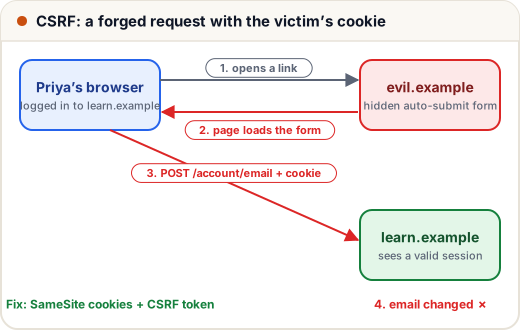
- Priya is logged in to
learn.example(her session cookie is in the browser). - She opens a link to
evil.example. - That page contains a hidden form that auto-submits:
<form action="https://learn.example/account/email" method="POST">
  <input type="hidden" name="email" value="attacker@evil.example">
</form>
<script>document.forms[0].submit()</script>
- The browser sends the POST with Priya's cookie. The server sees a valid session and changes her email. The attacker then uses "forgot password" and owns the account.
The attacker never saw the cookie — they just borrowed the browser. CSRF targets state-changing actions: change email/password, transfer, delete, enrol, post.
2. Defence 1: SameSite cookies
SameSite=Lax (Chrome and Edge treat cookies with no SameSite attribute as Lax, but not every browser does — so always set it explicitly) means the cookie is not sent on cross-site POSTs, iframes or background requests — only on top-level links (GET). This alone stops the attack above.
Rule that makes Lax work: GET requests must never change data. If
/delete?id=5deletes something, a simple link or<img src>can trigger it.
3. Defence 2: CSRF tokens
For defence in depth (older browsers, subdomain attacks, Strict requirements), add a CSRF token: a secret value the server puts in each form and checks on submit. The attacker's page can't read your pages (same-origin policy), so it can't know the token.
A common design binds the token to the session using an HMAC (a keyed hash):
import hmac, hashlib

SERVER_SECRET = b"keep-this-in-an-env-variable"

def make_token(session_id):
    return hmac.new(SERVER_SECRET, session_id.encode(), hashlib.sha256).hexdigest()[:32]

def check_token(session_id, token):
    expected = make_token(session_id)
    return hmac.compare_digest(expected, token)      # constant-time comparison

priya_session = "sess-7f3a9c"
form_token = make_token(priya_session)               # put into <input type="hidden" name="csrf">

print("valid form:      ", check_token(priya_session, form_token))
print("attacker guess:  ", check_token(priya_session, "0" * 32))
print("token from other session:", check_token(priya_session, make_token("sess-other")))
valid form:       True
attacker guess:   False
token from other session: False
hmac.compare_digest compares in constant time so attackers can't guess the token byte by byte from response timings. Frameworks do all of this for you — turn it on rather than writing your own: Django {% csrf_token %}, Spring Security (on by default), Laravel @csrf, Rails protect_from_forgery. Next.js Server Actions check the request's origin automatically.
4. Defence 3: check Origin / Referer
Browsers send an Origin header on cross-site POSTs. The server can reject state-changing requests whose Origin isn't its own domain. Cheap and effective as an extra layer.
| Defence | Stops CSRF? | Notes |
|---|---|---|
| SameSite=Lax/Strict cookies | yes, most cases | set explicitly; keep GET read-only |
| CSRF tokens | yes | framework built-ins |
| Origin header check | yes | extra layer for APIs and forms |
| Re-authentication for critical actions | yes | e.g. ask for password before changing email |
| "We use POST" | no | forms can POST cross-site |
| HTTPS | no | CSRF works over HTTPS too |
5. The same-origin policy and CORS
Origin = scheme + host + port. https://skills101.in and https://api.skills101.in are different origins.
The browser's same-origin policy (SOP): JavaScript on one origin can send requests to another, but can't read the responses — unless the other server allows it with CORS (Cross-Origin Resource Sharing) headers.
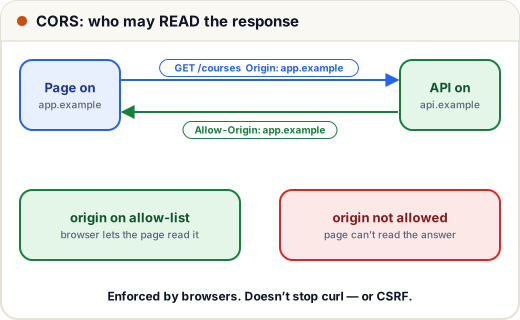
GET /courses HTTP/1.1
Origin: https://app.example

HTTP/1.1 200 OK
Access-Control-Allow-Origin: https://app.example
Access-Control-Allow-Credentials: true
Vary: Origin
For "non-simple" requests (e.g. PUT, JSON bodies, custom headers) the browser first sends a preflight OPTIONS request asking permission.
Key insight: CORS is enforced by browsers, to protect users. It does not stop curl, Postman or a script — and it does not stop CSRF (the forged form above doesn't need to read the response).
6. The dangerous CORS mistake
Reflecting any origin while allowing credentials:
def cors_headers_bad(request_origin):
    return {"Access-Control-Allow-Origin": request_origin,      # echoes whatever site asked
            "Access-Control-Allow-Credentials": "true"}

ALLOWED_ORIGINS = {"https://skills101.in", "https://app.skills101.in"}

def cors_headers_good(request_origin):
    if request_origin in ALLOWED_ORIGINS:
        return {"Access-Control-Allow-Origin": request_origin,
                "Access-Control-Allow-Credentials": "true", "Vary": "Origin"}
    return {}                                                   # browser will block the read

print(cors_headers_bad("https://evil.example"))
print(cors_headers_good("https://evil.example"))
print(cors_headers_good("https://app.skills101.in"))
{'Access-Control-Allow-Origin': 'https://evil.example', 'Access-Control-Allow-Credentials': 'true'}
{}
{'Access-Control-Allow-Origin': 'https://app.skills101.in', 'Access-Control-Allow-Credentials': 'true', 'Vary': 'Origin'}
With the bad version, evil.example can call your API with the victim's cookies and read the answers — their profile, orders, everything. Always use an allow-list. (Browsers refuse Access-Control-Allow-Origin: * together with credentials, which is why people "fix" the error by reflecting the origin — the worst possible fix.)
Common mistakes
- Changing data on GET requests.
- Disabling the framework's CSRF protection "because the form stopped working".
- Thinking CORS protects the API from attackers (it protects browser users; servers must still authenticate and authorise).
- Reflecting the
Originheader with credentials allowed.
Quick recap
- CSRF = another site makes the user's browser perform an action with their cookies.
- Defences: SameSite cookies, CSRF tokens, Origin checks, re-auth for critical actions; GET must be read-only.
- SOP blocks reading cross-origin responses; CORS selectively allows it.
- CORS: allow-list origins; never reflect any origin with credentials.