AdvancedWeb Security (OWASP Top 10) · Lesson 10 of 13 · Updated ·
Command Injection and Path Traversal — When User Input Reaches the Shell or the File System
SQL injection happens when user input is mixed into a database query. The same mistake has two close cousins on the server:
- Command injection — user input is mixed into an operating-system command, so the attacker runs their own programs on your server.
- Path traversal (also called directory traversal) — user input is used as a file path, so the attacker reads files outside the folder you meant.
Both are part of the OWASP Top 10:2025: command injection under A05 Injection, and path traversal under A01 Broken Access Control (the user reaches files they should not). Both have simple, reliable fixes.
1. Command injection: how it happens
Imagine a college lab dashboard with a "check if a server is up" box. The developer runs the system ping program with whatever the user typed:
# DANGEROUS — do not copy
import subprocess
host = request_form["host"]
subprocess.run("ping -c 1 " + host, shell=True)
shell=True hands the whole string to a shell (the command interpreter, such as sh on Linux or cmd.exe on Windows). A shell does much more than start one program. It understands special characters:
| Characters | Meaning to a shell |
|---|---|
; | end this command, start the next one |
&&, || | run the next command if this one succeeded / failed |
| | send output into another program |
$(…) or backticks | run a command and paste its output here |
> | write output to a file |
So an attacker types 8.8.8.8; cat /etc/passwd:
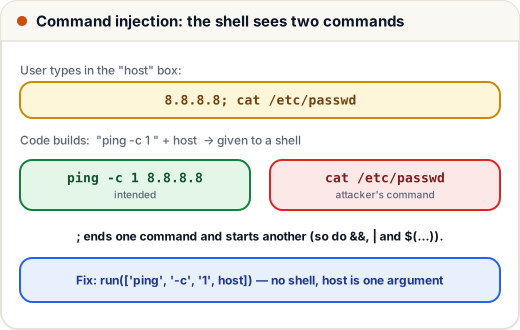
The server pings, then prints a system file. With a different command the attacker could download malware, delete data or open a connection back to their own computer. The command runs with all the permissions of your web application.
2. The fix: no shell, arguments as a list
The safe pattern is to not use a shell at all. Pass the program and each argument as separate items in a list. The operating system then starts ping directly, and the user's text is one argument, whatever characters it contains.
def build_unsafe(host):
    return "ping -c 1 " + host          # one string, given to a shell

def build_safe(host):
    return ["ping", "-c", "1", host]    # a list: no shell, host is ONE argument

attack = "8.8.8.8; cat /etc/passwd"
print(build_unsafe(attack))
print(build_safe(attack))
ping -c 1 8.8.8.8; cat /etc/passwd
['ping', '-c', '1', '8.8.8.8; cat /etc/passwd']
With the list, ping simply receives the odd host name 8.8.8.8; cat /etc/passwd, fails to find it, and nothing else runs. In real code that is subprocess.run(["ping", "-c", "1", host]) with no shell=True.
The same rule in other languages:
| Language | Dangerous | Safer |
|---|---|---|
| Python | os.system(cmd), subprocess.run(cmd, shell=True) | subprocess.run([prog, arg1, arg2]) |
| Java | Runtime.getRuntime().exec("sh -c " + …) | new ProcessBuilder(prog, arg1, arg2) |
| Node.js | child_process.exec(cmd) | child_process.execFile(prog, [args]) |
Still validate the input
A list stops shell tricks, but the argument can still be harmful to the program itself. For example, a value starting with - may be read as an option (this is called argument injection). So also validate the input with an allowlist — a rule that says exactly what is allowed:
import ipaddress

def valid_host(value):
    try:
        ipaddress.ip_address(value)
        return True
    except ValueError:
        return False

for value in ["8.8.8.8", "2001:4860:4860::8888", "8.8.8.8; rm -rf /", "$(whoami)"]:
    print(f"{value!r:28} -> {valid_host(value)}")
'8.8.8.8'                    -> True
'2001:4860:4860::8888'       -> True
'8.8.8.8; rm -rf /'          -> False
'$(whoami)'                  -> False
Allowlists ("only IP addresses") are much stronger than blocklists ("remove ;"), because attackers know many characters and encodings you might forget.
Best of all: no command
Ask whether you need an external program at all. Python can resize images with a library, check a port with a socket, and zip files with zipfile. Code that never starts a process cannot suffer command injection.
3. Path traversal: how it happens
A placement portal lets students download their offer letter:
GET /download?file=offer-1001.pdf
The server joins the name to its documents folder and returns the file. Now the attacker asks for:
GET /download?file=../../../etc/passwd
In a path, .. means "the parent folder". Each ../ climbs one level, until the path leaves the documents folder entirely:
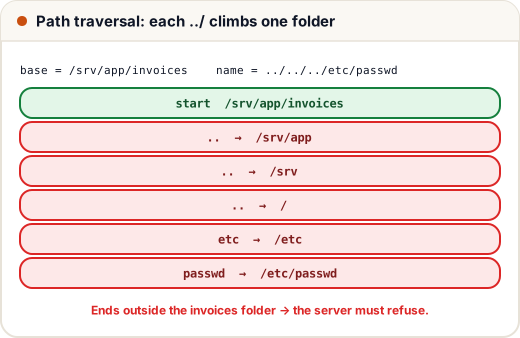
Attackers use this to read configuration files, source code, .env files with database passwords and private keys. If the feature writes files (uploads, exports), traversal can also overwrite files.
4. The fix: resolve the path, then check it
The safe pattern has three steps:
- Join the user's name to the base folder.
- Normalise it: work out the real path after applying every
..and.. - Check that the result is still inside the base folder. If not, refuse.
import posixpath

BASE = "/srv/app/invoices"

def path_safe(name):
    full = posixpath.normpath(posixpath.join(BASE, name))
    if posixpath.commonpath([BASE, full]) != BASE:
        return "403 Forbidden"
    return full

for name in ["inv-1001.pdf", "../../../etc/passwd", "/etc/passwd", "2026/../inv-1002.pdf"]:
    print(name)
    print("   ", path_safe(name))
inv-1001.pdf
    /srv/app/invoices/inv-1001.pdf
../../../etc/passwd
    403 Forbidden
/etc/passwd
    403 Forbidden
2026/../inv-1002.pdf
    /srv/app/invoices/inv-1002.pdf
Notice the third case. join(BASE, "/etc/passwd") throws away BASE, because joining an absolute path replaces everything before it. Checking the final result catches this too. (We use posixpath so the output is the same on every computer; real code uses os.path or pathlib, and Path.resolve() also follows symbolic links.)
Why not just remove ../ from the input? Because attackers have many variants: ....// becomes ../ after one removal, and %2e%2e%2f is ../ after URL decoding. Checking the final resolved path works no matter how the input was written.
Even better: do not use file names from users
The strongest design stores files under random ids and keeps the real path in the database:
GET /offers/7f3c9a2e      →   look up id 7f3c9a2e for the logged-in student
                          →   read the stored path, check the owner, send the file
The user never controls a path, and the ownership check stops IDOR at the same time.
5. Defence in depth
Even with correct code, limit the damage if something slips through:
- Run the application as a low-privilege user, not root or Administrator.
- Give the app read access only to the folders it needs.
- Run it in a container with a read-only file system where possible.
- Log and alert on suspicious input such as
../or;in fields that should never contain them.
Common mistakes
- Using
shell=Trueoros.systemwith any user input, "because it is only an IP address". - Blocklisting characters like
;instead of allowlisting valid values. - Removing
../from the input instead of checking the final path. - Forgetting that an absolute path in
joindiscards the base folder. - Running the web app as root, so one bug gives full control of the server.
Quick recap
- Command injection: user input becomes part of a shell command;
;,&&,|,$(…)let attackers add commands. - Fix: no shell — pass a list of arguments (
subprocess.run([...]),ProcessBuilder,execFile); validate with an allowlist; avoid external commands when a library can do the job. - Path traversal:
../in a file name climbs out of the intended folder. - Fix: join, normalise, then check the result is inside the base folder; better, use random ids instead of user file names.
- Defence in depth: least privilege, limited folders, containers, logging.