Python for Data Science & Machine Learning · Lesson 4 of 12 · Updated ·
Data Cleaning with pandas — Missing Values, Duplicates, Types, Text and Dates
In real projects most of your time goes here. Bad data silently ruins every chart and model built on it, so cleaning is not boring housework — it's where analysts earn trust.
Case study: a messy sign-up export
The marketing team exports website sign-ups to find the best cities for a campus event. The file looks like this:
import io
import pandas as pd

csv = """email,city,cgpa,signup_date,course
asha@x.in, Jaipur ,8.9,2026-01-05,Data Science
RAVI@X.IN,pune,7.2,2026-01-07,data science
ASHA@x.in,jaipur,8.9,2026-01-05,data science
neha@x.in,Pune,,2026-01-09,Web Dev
arjun@x.in,JAIPUR,six,2026-02-11,Data Science
sara@x.in,Bengaluru,9.1,not known,Web Dev"""
raw = pd.read_csv(io.StringIO(csv))
print(raw)
print(raw.dtypes)
        email       city cgpa signup_date        course
0   asha@x.in    Jaipur   8.9  2026-01-05  Data Science
1   RAVI@X.IN       pune  7.2  2026-01-07  data science
2   ASHA@x.in     jaipur  8.9  2026-01-05  data science
3   neha@x.in       Pune  NaN  2026-01-09       Web Dev
4  arjun@x.in     JAIPUR  six  2026-02-11  Data Science
5   sara@x.in  Bengaluru  9.1   not known       Web Dev
email          str
city           str
cgpa           str
signup_date    str
course         str
dtype: object
Spot the problems: a duplicate (Asha signed up twice — same person, different capitals and spaces), inconsistent text (Jaipur, JAIPUR, pune), a missing CGPA, a CGPA written as "six" (so the whole column became text), and a bad date.
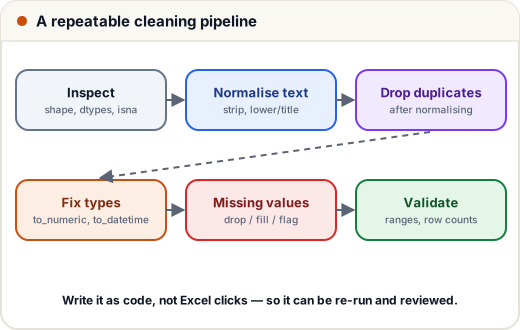
1. Clean it step by step
import io
import pandas as pd

csv = """email,city,cgpa,signup_date,course
asha@x.in, Jaipur ,8.9,2026-01-05,Data Science
RAVI@X.IN,pune,7.2,2026-01-07,data science
ASHA@x.in,jaipur,8.9,2026-01-05,data science
neha@x.in,Pune,,2026-01-09,Web Dev
arjun@x.in,JAIPUR,six,2026-02-11,Data Science
sara@x.in,Bengaluru,9.1,not known,Web Dev"""
df = pd.read_csv(io.StringIO(csv))

# 1. text: trim spaces, consistent case
df["email"] = df["email"].str.strip().str.lower()
df["city"] = df["city"].str.strip().str.title()
df["course"] = df["course"].str.strip().str.title()

# 2. duplicates (after normalising text, so " Jaipur " and "Jaipur" match)
print("duplicates:", df.duplicated().sum())
df = df.drop_duplicates()

# 3. numbers: anything that isn't a number becomes NaN instead of crashing
df["cgpa"] = pd.to_numeric(df["cgpa"], errors="coerce")

# 4. dates: invalid dates become NaT ("not a time")
df["signup_date"] = pd.to_datetime(df["signup_date"], errors="coerce")

print(df)
print(df.isna().sum())
duplicates: 1
        email       city  cgpa signup_date        course
0   asha@x.in     Jaipur   8.9  2026-01-05  Data Science
1   ravi@x.in       Pune   7.2  2026-01-07  Data Science
3   neha@x.in       Pune   NaN  2026-01-09       Web Dev
4  arjun@x.in     Jaipur   NaN  2026-02-11  Data Science
5   sara@x.in  Bengaluru   9.1         NaT       Web Dev
email          0
city           0
cgpa           2
signup_date    1
course         0
dtype: int64
Order matters: normalise text before removing duplicates, or near-duplicates survive.
2. Missing values: drop, fill or flag?
import numpy as np
import pandas as pd

df = pd.DataFrame({
    "city": ["Jaipur", "Pune", "Pune", "Jaipur", "Bengaluru"],
    "cgpa": [8.9, 7.2, np.nan, np.nan, 9.1],
})
print(df.dropna()["city"].tolist())                     # drop rows with any missing value
df["cgpa_missing"] = df["cgpa"].isna()                  # keep a flag — missingness can be information
df["cgpa_filled"] = df["cgpa"].fillna(df["cgpa"].median())
print(df)
['Jaipur', 'Pune', 'Bengaluru']
        city  cgpa  cgpa_missing  cgpa_filled
0     Jaipur   8.9         False          8.9
1       Pune   7.2         False          7.2
2       Pune   NaN          True          8.9
3     Jaipur   NaN          True          8.9
4  Bengaluru   9.1         False          9.1
| Option | When |
|---|---|
| drop rows | few rows missing, at random |
| fill with median/mode | numeric/categorical columns; median resists outliers |
| fill by group | e.g. the median CGPA of the same branch |
| flag + fill | when "missing" itself may mean something |
Never fill blindly: a missing salary may mean "not placed yet", not "average salary".
3. Copy-on-write (new default in pandas 3)
import pandas as pd

df = pd.DataFrame({"name": ["Asha", "Ravi"], "cgpa": [8.9, 7.2]})
toppers = df[df["cgpa"] > 8]
toppers["cgpa"] = 10            # changes ONLY toppers — df is never modified through a selection
print(df["cgpa"].tolist(), toppers["cgpa"].tolist())

df.loc[df["name"] == "Ravi", "cgpa"] = 7.5     # to change df itself, assign on df with .loc
print(df["cgpa"].tolist())
[8.9, 7.2] [10]
[8.9, 7.5]
In pandas 3 every selection behaves like a copy (copy-on-write). The old SettingWithCopyWarning and "chained assignment" tricks are gone: to change a DataFrame, assign to it directly with .loc.
4. A cleaning checklist
shape,dtypes,head(),describe(),isna().sum()- Trim and normalise text; fix categories (
Punevspune) - Convert types:
to_numeric,to_datetime,astype - Remove duplicates (decide what makes two rows "the same")
- Handle missing values deliberately
- Check ranges (CGPA between 0 and 10, dates not in the future)
- Count rows before and after every step — and write down what you removed
Common mistakes
astype(float)on a column with text like "six" → crash; useto_numeric(errors="coerce")and inspect what became NaN.- Dropping every row with any missing value and losing half the data.
- Removing duplicates before normalising text.
- Cleaning in Excel by hand — it can't be repeated or reviewed.
Quick recap
- Normalise text (
str.strip,str.lower,str.title), thendrop_duplicates. to_numeric/to_datetimewitherrors="coerce"turn bad values into NaN/NaT.- Missing values: drop, fill (median/mode/by group) or flag — decide per column.
- pandas 3 copy-on-write: change a DataFrame with
df.loc[...] = ....