Python for Data Science & Machine Learning · Lesson 2 of 12 · Updated ·
NumPy — Arrays, Vectorised Maths, Broadcasting and Boolean Filtering
Python lists are flexible but slow for maths on millions of numbers. NumPy stores numbers in compact, typed arrays and runs operations in optimised C code. pandas and scikit-learn are built on it.
1. Arrays
import numpy as np

marks = np.array([70, 85, 92, 64, 88])
print(marks)
print(marks.dtype, marks.shape, marks.ndim)

grid = np.array([[1, 2, 3], [4, 5, 6]])
print(grid.shape)            # (rows, columns)
print(np.zeros(3), np.ones((2, 2)).tolist())
print(np.arange(0, 10, 2), np.linspace(0, 1, 5))
[70 85 92 64 88]
int64 (5,) 1
(2, 3)
[0. 0. 0.] [[1.0, 1.0], [1.0, 1.0]]
[0 2 4 6 8] [0.   0.25 0.5  0.75 1.  ]
All elements share one dtype (here 64-bit integers), which is what makes arrays fast.
2. Vectorised maths: no loops
import numpy as np

marks = np.array([70, 85, 92, 64, 88])
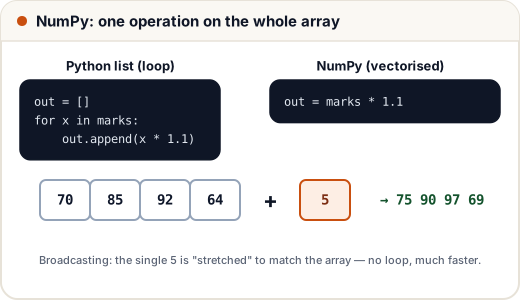
print(marks + 5)                 # grace marks for everyone
print(marks / 100)
print(marks >= 75)               # comparison gives True/False for each element
print(marks.mean(), marks.max(), marks.argmax(), marks.std().round(2))
[75 90 97 69 93]
[0.7  0.85 0.92 0.64 0.88]
[False  True  True False  True]
79.8 92 2 10.85
argmax() gives the position of the largest value (index 2 → 92). The + 5 is broadcasting: NumPy stretches the single number to the array's shape.
3. Broadcasting in two dimensions
Three students, three subjects; each subject has a different maximum mark:
import numpy as np

scores = np.array([[45, 80, 18],
                   [38, 92, 20],
                   [50, 75, 15]])
max_marks = np.array([50, 100, 20])      # one per column

percent = scores / max_marks * 100       # (3,3) ÷ (3,) → divides each column by its maximum
print(percent.round(1))
print(percent.mean(axis=1).round(1))     # axis=1: across each row → each student's average
print(percent.mean(axis=0).round(1))     # axis=0: down each column → each subject's average
[[ 90.  80.  90.]
 [ 76.  92. 100.]
 [100.  75.  75.]]
[86.7 89.3 83.3]
[88.7 82.3 88.3]
axis=0 goes down the rows (one answer per column); axis=1 goes across the columns (one answer per row). Getting the axis right is half of NumPy.
4. Indexing, slicing and boolean masks
import numpy as np

scores = np.array([[45, 80, 18],
                   [38, 92, 20],
                   [50, 75, 15]])
print(scores[1, 2])          # row 1, column 2
print(scores[:, 1])          # every row, column 1
print(scores[0:2, :2])       # first two rows, first two columns

maths = scores[:, 1]
print(maths[maths > 78])     # keep only values that pass the test
print(np.where(maths >= 80, "A", "B"))
20
[80 92 75]
[[45 80]
 [38 92]]
[80 92]
['A' 'A' 'B']
A boolean mask (maths > 78) selects elements without a loop — the same idea powers filtering in pandas.
5. Random numbers you can repeat
import numpy as np

rng = np.random.default_rng(42)              # the modern way; the seed makes results repeatable
print(rng.integers(1, 7, size=5))            # five dice rolls
print(rng.normal(loc=170, scale=8, size=3).round(1))   # heights ~ mean 170 cm, sd 8
[1 5 4 3 3]
[177.5 154.4 159.6]
Same seed → same numbers every run. That's how experiments and tests stay reproducible.
Common mistakes
- Using Python loops over arrays (slow and longer).
- Mixing up
axis=0andaxis=1. - Forgetting that slices are views: changing
a[0:2]changesa. Use.copy()when you need a separate array. - The old
np.random.seed()style — prefernp.random.default_rng(seed).
Quick recap
- Arrays hold one dtype; check
shape,dtype,ndim. - Vectorised maths and broadcasting replace loops.
axis=0= per column,axis=1= per row.- Slicing
a[rows, cols]; boolean masksa[a > x];np.wherefor if/else.