AdvancedSoftware Testing & Automation · Lesson 12 of 13 · Updated ·
Test Design Techniques — Decision Tables, State Transition and Pairwise Testing (with Java)
Automation makes tests fast to run. It does not tell you which tests to write. A team that automates 500 random checks can still miss the one case that breaks in production. Test design techniques are systematic ways to pick a small set of test cases that finds most bugs.
You may already know two basic techniques from software engineering: equivalence partitioning (one value from each group of inputs that behave the same) and boundary value analysis (test at the edges, like 17, 18, 60 and 61 for an age range of 18–60). This lesson covers three more that interviewers ask about and that fit automation perfectly: decision tables, state transition testing and pairwise testing.
1. Decision tables: for business rules
When the result depends on a combination of conditions, list every combination in a table. Each column (or row) is called a rule.
Example — a course site's placement-season discount:
- Students get 20% off.
- A coupon gives 10% off.
- A student with a coupon gets 30% off.
| Rule | Student? | Coupon? | Expected discount |
|---|---|---|---|
| R1 | Y | Y | 30% |
| R2 | Y | N | 20% |
| R3 | N | Y | 10% |
| R4 | N | N | 0% |
With 2 yes/no conditions there are 2 × 2 = 4 rules. With n conditions there are 2ⁿ rules: 3 conditions give 8, 4 give 16. Writing the table forces two useful questions: is every combination covered? and did the requirement say what happens in each one? Missing answers are often found here, before any code is tested.
Decision tables map naturally to data-driven tests: each rule becomes one row of a TestNG @DataProvider. Here is the same idea as a plain Java program:
public class Main {
    // Rule: placement-season course discount
    // student AND coupon -> 30%, student only -> 20%, coupon only -> 10%, neither -> 0%
    static int discount(boolean isStudent, boolean hasCoupon) {
        if (isStudent && hasCoupon) return 30;
        if (isStudent) return 20;
        if (hasCoupon) return 10;
        return 0;
    }

    public static void main(String[] args) {
        boolean[] values = {true, false};
        int[][] expected = {{30, 20}, {10, 0}};
        System.out.println("Rule  Student  Coupon  Expected  Actual  Result");
        int rule = 1;
        for (int i = 0; i < 2; i++) {
            for (int j = 0; j < 2; j++) {
                int actual = discount(values[i], values[j]);
                String result = actual == expected[i][j] ? "PASS" : "FAIL";
                System.out.printf("R%d    %-7s  %-6s  %-8d  %-6d  %s%n",
                        rule++, values[i] ? "Y" : "N", values[j] ? "Y" : "N", expected[i][j], actual, result);
            }
        }
    }
}
Rule  Student  Coupon  Expected  Actual  Result
R1    Y        Y       30        30      PASS
R2    Y        N       20        20      PASS
R3    N        Y       10        10      PASS
R4    N        N       0         0       PASS
A common bug this catches: a developer writes if (isStudent) return 20; first, so a student with a coupon gets 20% instead of 30%. Only rule R1 exposes it.
Collapsing rules
Sometimes one condition does not matter in some rules. For example, if a blocked account can never log in, then for "blocked = Y" the password does not matter. Testers mark it with - ("don't care") and merge those rules, which reduces the number of tests without losing coverage.
2. State transition testing: for flows
Some features behave differently depending on what happened before. An ATM gives you three attempts at the PIN, then locks the card. The same input — a correct PIN — has different results in different states.
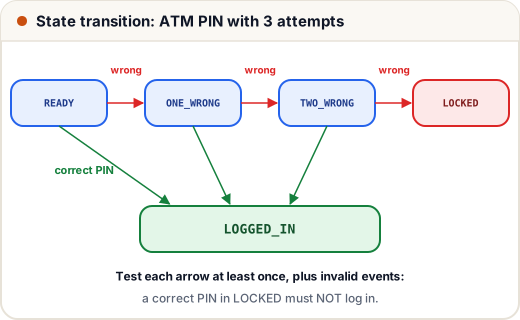
A state transition diagram shows:
- states (boxes): READY, ONE_WRONG, TWO_WRONG, LOCKED, LOGGED_IN
- events (labels on arrows): correct PIN, wrong PIN
- transitions (arrows): which event moves you from which state to which
Good test cases cover every transition at least once, and also invalid transitions — events that should do nothing, such as a correct PIN after the card is locked.
public class Main {
    enum State { READY, ONE_WRONG, TWO_WRONG, LOCKED, LOGGED_IN }

    static State next(State s, boolean pinCorrect) {
        switch (s) {
            case READY:     return pinCorrect ? State.LOGGED_IN : State.ONE_WRONG;
            case ONE_WRONG: return pinCorrect ? State.LOGGED_IN : State.TWO_WRONG;
            case TWO_WRONG: return pinCorrect ? State.LOGGED_IN : State.LOCKED;
            default:        return s;   // LOCKED and LOGGED_IN ignore further PINs
        }
    }

    static void run(String name, boolean... pins) {
        State s = State.READY;
        StringBuilder path = new StringBuilder(s.name());
        for (boolean pin : pins) {
            s = next(s, pin);
            path.append(pin ? " -ok-> " : " -x-> ").append(s.name());
        }
        System.out.println(name + ": " + path);
    }

    public static void main(String[] args) {
        run("T1", true);
        run("T2", false, true);
        run("T3", false, false, true);
        run("T4", false, false, false);
        run("T5", false, false, false, true);
    }
}
T1: READY -ok-> LOGGED_IN
T2: READY -x-> ONE_WRONG -ok-> LOGGED_IN
T3: READY -x-> ONE_WRONG -x-> TWO_WRONG -ok-> LOGGED_IN
T4: READY -x-> ONE_WRONG -x-> TWO_WRONG -x-> LOCKED
T5: READY -x-> ONE_WRONG -x-> TWO_WRONG -x-> LOCKED -ok-> LOCKED
Five tests cover all six valid transitions and the most important invalid one (T5). Other everyday examples: an order (placed → paid → shipped → delivered, or cancelled), an exam attempt (not started → in progress → submitted → result published), and an OTP that expires after 5 minutes.
A state table is the same information as a grid: one row per state, one column per event, and each cell gives the next state. Empty cells are exactly the invalid transitions you should test.
3. Pairwise testing: for many combinations
A web app must work on 3 browsers (Chrome, Firefox, Edge), 3 operating systems (Windows, macOS, Linux) and 2 languages (English, Hindi). Testing every combination needs 3 × 3 × 2 = 18 runs. With more options — screen sizes, user roles, payment methods — the number explodes.
Pairwise testing (also called all-pairs testing) is based on a practical observation: most defects are triggered by a single setting or by the interaction of two settings. So instead of every combination, choose a set where every pair of values appears together at least once: Chrome with Linux, macOS with Hindi, Edge with English, and so on.
This Java program builds such a set using a simple greedy method: repeatedly pick the combination that covers the most pairs not yet covered.
import java.util.*;

public class Main {
    public static void main(String[] args) {
        String[][] params = {
            {"Chrome", "Firefox", "Edge"},
            {"Windows", "macOS", "Linux"},
            {"English", "Hindi"}
        };
        // every full combination: 3 x 3 x 2 = 18
        List<String[]> all = new ArrayList<>();
        for (String b : params[0]) for (String o : params[1]) for (String l : params[2])
            all.add(new String[] {b, o, l});

        // every pair of values from two different parameters that must appear together at least once
        Set<String> uncovered = new HashSet<>();
        for (String[] row : all) uncovered.addAll(pairs(row));
        System.out.println("Full combinations: " + all.size() + ", pairs to cover: " + uncovered.size());

        // greedy: keep picking the combination that covers the most uncovered pairs
        List<String[]> chosen = new ArrayList<>();
        while (!uncovered.isEmpty()) {
            String[] best = null;
            int bestGain = -1;
            for (String[] row : all) {
                Set<String> gain = new HashSet<>(pairs(row));
                gain.retainAll(uncovered);
                if (gain.size() > bestGain) { bestGain = gain.size(); best = row; }
            }
            chosen.add(best);
            uncovered.removeAll(pairs(best));
        }
        for (String[] row : chosen) System.out.println(String.join(" + ", row));
        System.out.println("Pairwise tests: " + chosen.size());
    }

    static List<String> pairs(String[] row) {
        List<String> out = new ArrayList<>();
        for (int i = 0; i < row.length; i++)
            for (int j = i + 1; j < row.length; j++)
                out.add(i + "=" + row[i] + "," + j + "=" + row[j]);
        return out;
    }
}
Full combinations: 18, pairs to cover: 21
Chrome + Windows + English
Chrome + macOS + Hindi
Firefox + Windows + Hindi
Firefox + macOS + English
Edge + Linux + English
Chrome + Linux + Hindi
Edge + Windows + Hindi
Firefox + Linux + English
Edge + macOS + English
Pairwise tests: 9
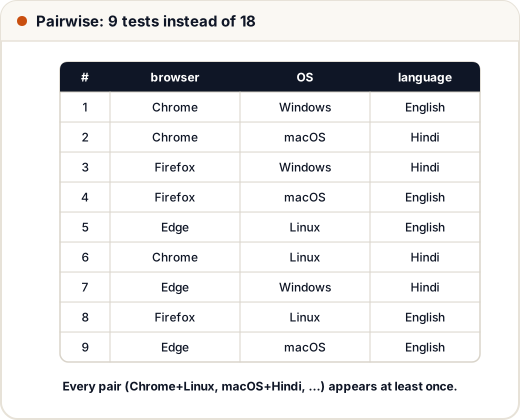
There are 21 pairs: 9 browser–OS pairs, 6 browser–language pairs and 6 OS–language pairs. Nine tests is the minimum here, because the 9 browser–OS pairs alone need 9 rows. The savings grow fast: for 10 settings with 3 values each, all combinations are 3¹⁰ = 59,049, while a pairwise set needs only a few dozen. Teams use tools such as Microsoft's PICT or the online "pairwise" generators rather than writing their own.
Limitation: pairwise testing can miss a bug that needs three specific values together. For high-risk features (payments, security), test important combinations in full as well.
4. Which technique when?
| Situation | Technique |
|---|---|
| Input ranges (age, marks, amount) | equivalence partitioning + boundary values |
| Rules with several yes/no conditions | decision table |
| Behaviour depends on history (attempts, order status) | state transition |
| Many settings that combine (browser, OS, role) | pairwise |
| "What could go wrong?" based on experience | error guessing / exploratory testing |
In practice you combine them. A login feature might use boundary values for password length, a decision table for "valid email × valid password × account blocked", and state transitions for the lock-out after wrong attempts.
Common mistakes
- Writing only "happy path" tests and calling it coverage.
- Forgetting rules in a decision table because the requirement did not mention them — ask instead of guessing.
- Testing every state but not every transition, or never testing invalid transitions.
- Assuming pairwise finds every interaction bug; it covers pairs, not triples.
- Hard-coding the expected result from the code under test instead of from the requirement.
Quick recap
- Test design picks a small, strong set of tests; automation then runs them.
- Decision table: list all 2ⁿ combinations of n conditions; each rule = one data-driven test.
- State transition: states, events, transitions; cover every arrow plus invalid events.
- Pairwise: every pair of values appears at least once; 18 combinations become 9 here.
- Combine techniques according to the feature and its risk.