Software Testing & Automation · Lesson 2 of 11 · Updated ·
Selenium WebDriver with Java — Setup and Your First Automated Test
Selenium WebDriver is the most used tool for browser automation. Your Java code tells a real browser — Chrome, Edge, Firefox — to open pages, type, click and read text, exactly like a user.
1. How it works
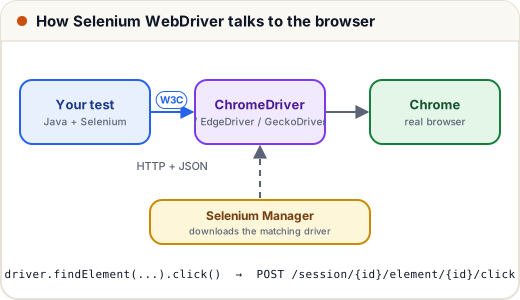
- Your test calls the Selenium Java library.
- Each call becomes an HTTP request in the W3C WebDriver standard, sent to a driver program (ChromeDriver, EdgeDriver, GeckoDriver for Firefox).
- The driver controls the browser and sends back the result.
Since Selenium 4.6, Selenium Manager finds or downloads the right driver for your browser version automatically — old tutorials that make you download chromedriver.exe by hand (or use WebDriverManager) are out of date.
2. Project setup
A Maven project with three test libraries:
<!-- File: pom.xml -->
<?xml version="1.0" encoding="UTF-8"?>
<project xmlns="http://maven.apache.org/POM/4.0.0" xmlns:xsi="http://www.w3.org/2001/XMLSchema-instance"
         xsi:schemaLocation="http://maven.apache.org/POM/4.0.0 https://maven.apache.org/xsd/maven-4.0.0.xsd">
    <modelVersion>4.0.0</modelVersion>

    <groupId>com.skills101</groupId>
    <artifactId>test-automation</artifactId>
    <version>1.0.0</version>

    <properties>
        <maven.compiler.release>17</maven.compiler.release>
        <project.build.sourceEncoding>UTF-8</project.build.sourceEncoding>
        <selenium.version>4.52.0</selenium.version>
        <testng.version>7.12.0</testng.version>
        <restassured.version>6.3.0</restassured.version>
    </properties>

    <dependencies>
        <dependency>
            <groupId>org.seleniumhq.selenium</groupId>
            <artifactId>selenium-java</artifactId>
            <version>${selenium.version}</version>
            <scope>test</scope>
        </dependency>
        <dependency>
            <groupId>org.testng</groupId>
            <artifactId>testng</artifactId>
            <version>${testng.version}</version>
            <scope>test</scope>
        </dependency>
        <dependency>
            <groupId>io.rest-assured</groupId>
            <artifactId>rest-assured</artifactId>
            <version>${restassured.version}</version>
            <scope>test</scope>
        </dependency>
    </dependencies>

    <build>
        <plugins>
            <plugin>
                <groupId>org.apache.maven.plugins</groupId>
                <artifactId>maven-surefire-plugin</artifactId>
                <version>3.5.4</version>
                <configuration>
                    <!-- run the suite described in testng.xml -->
                    <suiteXmlFiles>
                        <suiteXmlFile>testng.xml</suiteXmlFile>
                    </suiteXmlFiles>
                </configuration>
            </plugin>
        </plugins>
    </build>
</project>
<scope>test</scope>— these libraries are only for tests, not for the shipped app.- Surefire (Maven's test runner) runs the suite described in
testng.xml(lesson 6). - Java 17+, like the rest of our tracks.
3. Creating the browser
// File: src/test/java/com/skills101/qa/base/DriverFactory.java
package com.skills101.qa.base;

import java.time.Duration;
import org.openqa.selenium.WebDriver;
import org.openqa.selenium.chrome.ChromeDriver;
import org.openqa.selenium.chrome.ChromeOptions;
import org.openqa.selenium.edge.EdgeDriver;
import org.openqa.selenium.edge.EdgeOptions;
import org.openqa.selenium.firefox.FirefoxDriver;
import org.openqa.selenium.firefox.FirefoxOptions;

/**
 * Creates the browser chosen with -Dbrowser=chrome|edge|firefox (default chrome).
 * -Dheadless=false shows the browser window while you write tests.
 * Selenium Manager (built into Selenium 4) downloads the matching driver automatically.
 */
public final class DriverFactory {

    private DriverFactory() {
    }

    public static WebDriver create() {
        String browser = System.getProperty("browser", "chrome");
        boolean headless = Boolean.parseBoolean(System.getProperty("headless", "true"));
        WebDriver driver = switch (browser) {
            case "edge" -> {
                EdgeOptions options = new EdgeOptions();
                if (headless) options.addArguments("--headless=new");
                yield new EdgeDriver(options);
            }
            case "firefox" -> {
                FirefoxOptions options = new FirefoxOptions();
                if (headless) options.addArguments("-headless");
                yield new FirefoxDriver(options);
            }
            default -> {
                ChromeOptions options = new ChromeOptions();
                if (headless) options.addArguments("--headless=new");
                options.addArguments("--window-size=1280,900");
                yield new ChromeDriver(options);
            }
        };
        driver.manage().timeouts().pageLoadTimeout(Duration.ofSeconds(30));
        return driver;
    }
}
- Choose the browser with
-Dbrowser=edge(default Chrome) — the same tests run on every browser (cross-browser testing). - Headless mode runs the browser without a window — faster, and required on CI servers. Use
-Dheadless=falseto watch your test while writing it.
Every test needs a fresh browser and must close it afterwards, so we put that in a base class:
// File: src/test/java/com/skills101/qa/base/BaseUiTest.java
package com.skills101.qa.base;

import java.io.IOException;
import java.nio.file.Files;
import java.nio.file.Path;
import org.openqa.selenium.OutputType;
import org.openqa.selenium.TakesScreenshot;
import org.openqa.selenium.WebDriver;
import org.testng.ITestResult;
import org.testng.annotations.AfterMethod;
import org.testng.annotations.BeforeMethod;

/** Every UI test class extends this: a fresh browser before each test, a screenshot if it fails, then close. */
public abstract class BaseUiTest {

    protected WebDriver driver;
    protected String baseUrl;

    @BeforeMethod(alwaysRun = true)   // alwaysRun: also when running only some groups (-Dgroups=smoke)
    public void openBrowser() throws IOException {
        baseUrl = PracticeSite.start();
        driver = DriverFactory.create();
    }

    @AfterMethod(alwaysRun = true)
    public void closeBrowser(ITestResult result) throws IOException {
        if (driver == null) {
            return;
        }
        if (result.getStatus() == ITestResult.FAILURE) {
            Path folder = Files.createDirectories(Path.of("target", "screenshots"));
            byte[] png = ((TakesScreenshot) driver).getScreenshotAs(OutputType.BYTES);
            Files.write(folder.resolve(result.getName() + ".png"), png);
        }
        driver.quit();   // quit() closes every window and ends the driver process
    }
}
driver.quit() closes all windows and the driver process; driver.close() closes only the current window. Forgetting quit() leaves zombie browsers eating your RAM.
The practice pages (a login page, a dashboard and a page full of tricky elements) are served from the test resources by a tiny local web server, so the tests need no internet:
// File: src/test/java/com/skills101/qa/base/PracticeSite.java
package com.skills101.qa.base;

import com.sun.net.httpserver.HttpServer;
import java.io.IOException;
import java.io.InputStream;
import java.net.InetSocketAddress;

/** Serves the practice pages in src/test/resources/site/ on a free local port, so the UI tests need no internet. */
public final class PracticeSite {

    private static HttpServer server;

    private PracticeSite() {
    }

    public static synchronized String start() throws IOException {
        if (server == null) {
            server = HttpServer.create(new InetSocketAddress("localhost", 0), 0);
            server.createContext("/", exchange -> {
                String path = exchange.getRequestURI().getPath();
                try (InputStream page = PracticeSite.class.getResourceAsStream("/site" + path)) {
                    if (page == null) {
                        exchange.sendResponseHeaders(404, -1);
                    } else {
                        byte[] body = page.readAllBytes();
                        exchange.getResponseHeaders().add("Content-Type", "text/html; charset=utf-8");
                        exchange.sendResponseHeaders(200, body.length);
                        exchange.getResponseBody().write(body);
                    }
                }
                exchange.close();
            });
            server.start();
        }
        return "http://localhost:" + server.getAddress().getPort();
    }
}
4. The first test
// File: src/test/java/com/skills101/qa/ui/FirstSeleniumTest.java
package com.skills101.qa.ui;

import static org.testng.Assert.assertEquals;
import static org.testng.Assert.assertTrue;

import com.skills101.qa.base.BaseUiTest;
import org.openqa.selenium.By;
import org.testng.annotations.Test;

public class FirstSeleniumTest extends BaseUiTest {

    @Test
    public void loginWithValidDetailsOpensDashboard() {
        driver.get(baseUrl + "/login.html");                       // 1. open the page
        assertEquals(driver.getTitle(), "Skills101 Practice - Login");

        driver.findElement(By.id("email")).sendKeys("asha@skills101.in");   // 2. find elements and act
        driver.findElement(By.id("password")).sendKeys("asha123");
        driver.findElement(By.id("login-btn")).click();

        assertTrue(driver.getCurrentUrl().endsWith("dashboard.html?name=Asha"));   // 3. check the result
        assertEquals(driver.findElement(By.id("welcome")).getText(), "Welcome, Asha!");
    }
}
Every UI test follows the same three steps: open a page, find elements and act (type, click), check the result with assertions. assertEquals(actual, expected) — in TestNG, actual comes first.
Run all tests with ./mvnw test (Windows: mvnw.cmd test). In our build this test opens headless Chrome, logs in and lands on the dashboard — it passes.
5. Useful WebDriver methods
| Method | Does |
|---|---|
get(url) | open a page and wait for it to load |
getTitle(), getCurrentUrl() | read the page title / address |
findElement(By…) | find one element (throws if missing) |
findElements(By…) | find all matches (empty list if none) |
navigate().back() / .refresh() | browser buttons |
manage().window().maximize() | window size |
quit() | end the session |
Element methods: click(), sendKeys(text), clear(), getText(), getDomAttribute(name), isDisplayed(), isEnabled(), isSelected().
Common mistakes
- Downloading driver .exe files by hand — Selenium Manager does it.
- Forgetting
driver.quit()in an@AfterMethod(alwaysRun = true). - Sharing one browser across all tests — one test's state leaks into the next.
- Swapping actual/expected in TestNG's
assertEquals.
Quick recap
- Test code → W3C WebDriver over HTTP → driver → browser; Selenium Manager fetches drivers.
- Maven dependencies: selenium-java, testng (and rest-assured for APIs).
- Fresh browser per test in
@BeforeMethod,quit()in@AfterMethod. - Open → find and act → assert.