Software Testing & Automation · Lesson 4 of 11 · Updated ·
Selenium Waits — Implicit, Explicit and Fluent Waits (and Why Not Thread.sleep)
Modern pages load data in the background. If your test looks for an element before it appears, it fails — even though the app works. Waiting correctly is the number one skill that separates flaky test suites from reliable ones.
1. The problem
On our practice page, clicking Load results adds the result 2 seconds later:
<!-- File: src/test/resources/site/practice.html (excerpt) -->
document.getElementById('load').addEventListener('click', function () {
  setTimeout(function () {
    var p = document.createElement('p');
    p.id = 'result';
    p.textContent = 'Results loaded: 3 courses';
    document.getElementById('results').appendChild(p);
  }, 2000);
2. Waiting the right way
// File: src/test/java/com/skills101/qa/ui/WaitsTest.java
package com.skills101.qa.ui;

import static org.testng.Assert.assertEquals;
import static org.testng.Assert.expectThrows;

import com.skills101.qa.base.BaseUiTest;
import java.time.Duration;
import org.openqa.selenium.By;
import org.openqa.selenium.NoSuchElementException;
import org.openqa.selenium.WebElement;
import org.openqa.selenium.support.ui.ExpectedConditions;
import org.openqa.selenium.support.ui.WebDriverWait;
import org.testng.annotations.Test;

public class WaitsTest extends BaseUiTest {

    @Test
    public void withoutAWaitTheElementIsNotThereYet() {
        driver.get(baseUrl + "/practice.html");
        driver.findElement(By.id("load")).click();
        // the page adds #result after 2 seconds — looking immediately fails
        expectThrows(NoSuchElementException.class, () -> driver.findElement(By.id("result")));
    }

    @Test
    public void explicitWaitWaitsOnlyAsLongAsNeeded() {
        driver.get(baseUrl + "/practice.html");
        driver.findElement(By.id("load")).click();

        WebDriverWait wait = new WebDriverWait(driver, Duration.ofSeconds(10));   // up to 10 s, checks every 500 ms
        WebElement result = wait.until(ExpectedConditions.visibilityOfElementLocated(By.id("result")));

        assertEquals(result.getText(), "Results loaded: 3 courses");
    }
}
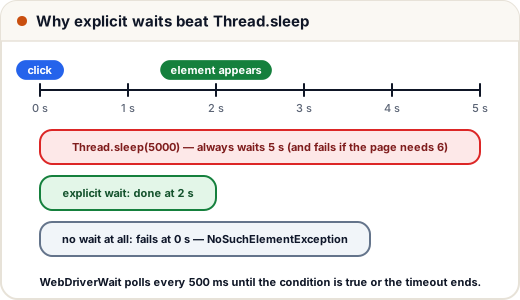
- The first test proves the problem: looking immediately throws
NoSuchElementException. - The second uses an explicit wait:
WebDriverWaitchecks the condition every 500 ms and continues as soon as it's true (here after about 2 s), or fails after 10 s.
3. Useful ExpectedConditions
| Condition | Waits until |
|---|---|
visibilityOfElementLocated(by) | the element exists and is visible |
elementToBeClickable(by) | visible and enabled |
presenceOfElementLocated(by) | it exists in the HTML (maybe hidden) |
invisibilityOfElementLocated(by) | a spinner disappears |
textToBePresentInElementLocated(by, text) | the text appears |
urlContains(text) / titleIs(text) | navigation finished |
alertIsPresent() | a JavaScript alert is open |
4. The three kinds of waits
| Wait | How | Use? |
|---|---|---|
| Implicit | driver.manage().timeouts().implicitlyWait(Duration.ofSeconds(10)) — every findElement retries for up to 10 s | simple, but slows down "is it absent?" checks; don't mix with explicit waits |
| Explicit | new WebDriverWait(driver, timeout).until(condition) | recommended — wait for exactly what you need |
| Fluent | new FluentWait<>(driver).withTimeout(…).pollingEvery(…).ignoring(…) | custom polling and ignored exceptions |
Thread.sleep(5000) is not a wait strategy: it always wastes 5 seconds, and still fails the day the server needs 6. A suite with 200 sleeps can take hours.
5. StaleElementReferenceException
If the page re-renders after you found an element, your WebElement points to an element that no longer exists → StaleElementReferenceException. Fix: find the element again (page objects that store By locators, not WebElements, avoid this — lesson 7).
Common mistakes
Thread.sleepeverywhere.- Mixing implicit and explicit waits (unpredictable timeouts).
- Waiting for presence when you need clickable.
- Keeping
WebElementreferences across page reloads.
Quick recap
- Dynamic pages need waits; explicit waits (
WebDriverWait+ExpectedConditions) are the default choice. - Explicit waits finish as soon as the condition is true; sleeps always wait the full time.
- Don't mix implicit and explicit waits; re-find elements after the page changes.