Software Testing & Automation · Lesson 6 of 11 · Updated ·
TestNG for Automation — Annotations, Assertions, DataProvider, Groups, testng.xml and Listeners
TestNG is the test framework most Indian automation teams use with Selenium. It runs your tests, decides the order, feeds them data, groups them, and produces reports.
1. Annotations and their order
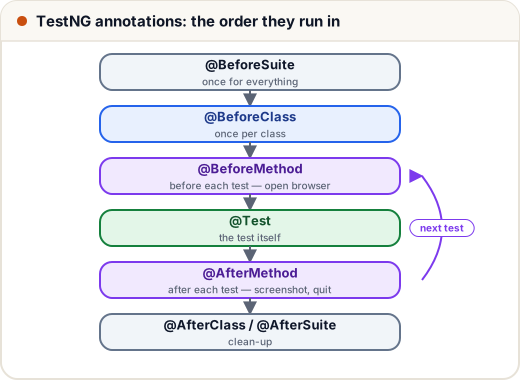
| Annotation | Runs | We use it for |
|---|---|---|
@BeforeSuite / @AfterSuite | once for the whole run | start/stop shared services |
@BeforeClass / @AfterClass | once per class | API base URL (see CourseApiTest) |
@BeforeMethod / @AfterMethod | around every test | open the browser / screenshot + quit (see BaseUiTest) |
@Test | the test | @Test(groups = "smoke"), dataProvider, priority, enabled = false, expectedExceptions |
@AfterMethod(alwaysRun = true) runs even if setup failed — important so browsers always close.
2. Assertions
- Hard assertions (
Assert.assertEquals,assertTrue…) stop the test at the first failure. - Soft assertions collect failures and report them together:
// Not compiled: a short sketch of TestNG's SoftAssert
SoftAssert soft = new SoftAssert();
soft.assertEquals(page.title(), "Dashboard");
soft.assertTrue(page.hasLogoutLink());
soft.assertAll();   // without this line, failures are silently ignored!
3. Data-driven tests with @DataProvider
One test method, many rows of data — each row runs as a separate test:
// File: src/test/java/com/skills101/qa/ui/LoginPageTest.java (excerpt)
@DataProvider(name = "badLogins")
public Object[][] badLogins() {
    return new Object[][] {
        {"asha@skills101.in", "wrong-password"},
        {"nobody@skills101.in", "asha123"},
        {"", ""},
    };
}

// runs once per row of the data provider
@Test(dataProvider = "badLogins")
public void invalidLoginShowsError(String email, String password) {
    LoginPage page = new LoginPage(driver).open(baseUrl).loginExpectingError(email, password);

    assertEquals(page.errorMessage(), "Wrong email or password");
In our run this produces three passing tests (wrong password, unknown user, empty fields). Data can also come from Excel (Apache POI), CSV or JSON files.
4. Groups
@Test(groups = "smoke") tags quick, critical tests (we tagged validLoginShowsDashboard and listCourses). Run only them before a release: ./mvnw test -Dgroups=smoke. Typical groups: smoke, regression, sanity.
Gotcha we hit while testing this lesson: when you run only some groups, TestNG also skips
@BeforeMethod/@BeforeClassmethods that aren't in those groups — our first smoke run failed because no browser was opened. Mark setup and teardown methodsalwaysRun = true(asBaseUiTestandCourseApiTestnow do).
5. Suites in testng.xml
<!-- File: testng.xml -->
<!DOCTYPE suite SYSTEM "https://testng.org/testng-1.0.dtd">
<suite name="Skills101 regression" verbose="1">
    <listeners>
        <listener class-name="com.skills101.qa.base.TestLogger"/>
    </listeners>

    <test name="UI tests">
        <packages>
            <package name="com.skills101.qa.ui"/>
        </packages>
    </test>

    <test name="API tests">
        <packages>
            <package name="com.skills101.qa.api"/>
        </packages>
    </test>
</suite>
The suite file decides what runs (packages, classes, groups), listeners, and parallel execution, e.g. <suite parallel="methods" thread-count="4"> — each test then needs its own browser (ours already does: one per @BeforeMethod).
6. Listeners
A listener reacts to test events — logging, screenshots, sending results to a dashboard:
// File: src/test/java/com/skills101/qa/base/TestLogger.java
package com.skills101.qa.base;

import org.testng.ITestListener;
import org.testng.ITestResult;

/** A TestNG listener (registered in testng.xml): prints one line per test — handy in CI logs. */
public class TestLogger implements ITestListener {

    @Override
    public void onTestSuccess(ITestResult result) {
        System.out.println("PASS  " + name(result));
    }

    @Override
    public void onTestFailure(ITestResult result) {
        System.out.println("FAIL  " + name(result) + " — " + result.getThrowable().getMessage());
    }

    @Override
    public void onTestSkipped(ITestResult result) {
        System.out.println("SKIP  " + name(result));
    }

    private static String name(ITestResult result) {
        return result.getTestClass().getRealClass().getSimpleName() + "." + result.getMethod().getMethodName();
    }
}
Our real run prints lines like PASS LoginPageTest.validLoginShowsDashboard for all 18 tests. Other hooks: onStart, onFinish; IRetryAnalyzer re-runs failed tests (use sparingly — fix flaky tests instead).
Reports: TestNG writes HTML and JUnit-XML reports to target/surefire-reports/; CI servers and tools like Allure or ExtentReports turn them into dashboards.
Common mistakes
- Forgetting
soft.assertAll(). - Tests that depend on each other's order (
priority,dependsOnMethods) — every test should run alone. - Parallel runs with a shared static
WebDriver. - Hiding flaky tests behind automatic retries.
- Setup methods without
alwaysRun = true, so group runs skip them.
Quick recap
- Lifecycle: Suite → Class → Method around each
@Test. - Hard vs soft assertions;
@DataProviderfor data-driven tests;groupsfor smoke/regression. testng.xmldefines suites, listeners and parallelism; listeners react to results.