Software Testing & Automation · Lesson 1 of 11 · Updated ·
Test Automation for Beginners — Manual vs Automated, What to Automate, Tools and Careers
Every app you use is tested before release — logging in, paying, searching, on many browsers and phones, after every change. Doing that by hand each time is slow and boring. Test automation means writing code that does the checking for you, in minutes, every time someone changes the app.
Indian IT and product companies hire many freshers as QA / automation testers, and experienced ones grow into SDETs (Software Development Engineers in Test) with salaries close to developers'. This track teaches the skills those jobs ask for, using Java, the most common language for automation jobs in India.
1. Manual vs automated testing
| Manual | Automated | |
|---|---|---|
| Who runs it | a person clicking | code |
| Speed | slow | fast, runs at night or on every change |
| Good for | exploratory testing, usability, one-off checks | repeated regression checks |
| Cost | cheap to start, expensive to repeat | expensive to write, cheap to repeat |
| Finds | new, surprising bugs | bugs coming back (regressions) |
Automation does not replace manual testers — it frees them for exploratory testing, which still finds the most interesting bugs. (Revise testing basics in Software Engineering — Testing.)
2. The automation pyramid
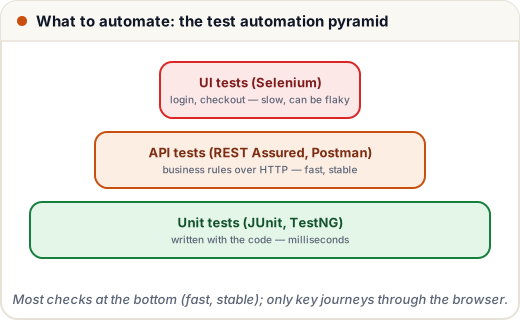
UI tests are slow and can break when the page changes, so automate only the key user journeys through the browser (login, search, checkout) and check most business rules through the API, which is faster and more stable.
3. What is worth automating?
Automate tests that are:
- Repeated often — regression and smoke tests run on every release.
- Stable — the feature doesn't change every week.
- Data-heavy — the same flow with 50 inputs.
- High-risk — payments, login, anything that loses money or trust.
Don't automate: one-time checks, things that need human judgement (does the layout look right?), or features still being designed.
4. The tools in this track
| Tool | Used for |
|---|---|
| Selenium WebDriver (Java) | controlling real browsers |
| TestNG | organising and running tests, data providers, reports |
| Page Object Model | keeping UI tests maintainable |
| REST Assured | API tests in Java |
| Postman + Newman | API testing by hand and in the command line |
| Maven | dependencies and running tests |
| GitHub Actions / Jenkins | running tests automatically on every change |
Also worth knowing: Playwright and Cypress (modern JavaScript/TypeScript UI tools), Appium (mobile apps), JMeter (performance), Cucumber (BDD, tests written as Given/When/Then sentences).
5. What you'll build
A real automation framework with UI tests against a practice website and API tests against the Course API from our Spring Boot track: 18 tests, all passing in headless Chrome.
Common mistakes
- Trying to automate everything through the UI.
- Automating a feature that changes daily.
- Treating automation as "record and play" — real frameworks are code, with design and reviews.
Quick recap
- Automation repeats regression checks fast; manual testing explores.
- Pyramid: many unit tests, a solid layer of API tests, few UI tests.
- Automate stable, repeated, data-heavy, high-risk flows.
- Toolkit: Java, Selenium, TestNG, POM, REST Assured, Postman, Maven, CI.