Software Testing & Automation · Lesson 10 of 11 · Updated ·
Running Tests in CI/CD — GitHub Actions, Jenkins, Reports and Flaky Tests
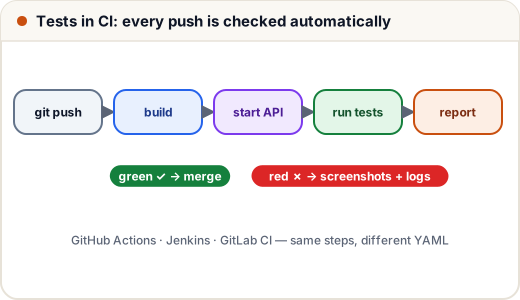
Tests that only run on your laptop protect nobody. In CI (continuous integration) every push or pull request starts a fresh machine that builds the app and runs the tests; a red result blocks the merge.
1. GitHub Actions
# File: ci/github-actions.yml
# Copy to .github/workflows/tests.yml in your repository.
# On every push and pull request: start the Course API, then run the UI + API test suite.
name: tests

on:
  push:
  pull_request:

jobs:
  test:
    runs-on: ubuntu-latest          # GitHub's Linux runners already have Chrome installed
    steps:
      - uses: actions/checkout@v4

      - uses: actions/setup-java@v4
        with:
          distribution: temurin
          java-version: 21
          cache: maven

      - name: Build and start the Course API
        working-directory: examples/spring-boot/course-api
        run: |
          ./mvnw -q -B package -DskipTests
          java -jar target/course-api-0.0.1-SNAPSHOT.jar --eureka.client.enabled=false &
          for i in $(seq 1 30); do curl -sf http://localhost:8081/actuator/health && break; sleep 2; done

      - name: Run UI and API tests
        working-directory: examples/test-automation
        run: ./mvnw -B test -Dbrowser=chrome -Dheadless=true

      - name: Keep screenshots of failed UI tests
        if: failure()
        uses: actions/upload-artifact@v4
        with:
          name: screenshots
          path: examples/test-automation/target/screenshots/
- Workflows live in
.github/workflows/*.ymlin your repository and run on GitHub's machines. setup-javainstalls a JDK and caches Maven downloads so later runs are fast.- The API under test is built and started in the background, and the step waits for
/actuator/healthbefore running tests. - Tests run headless (no screen on CI). GitHub's Ubuntu runners already have Chrome.
- On failure, the screenshots folder is uploaded as an artifact you can download from the run page.
2. Jenkins
Many Indian service companies use Jenkins. The same steps as a declarative pipeline:
// File: ci/Jenkinsfile
// Declarative Jenkins pipeline: the same steps as the GitHub Actions workflow.
pipeline {
    agent any
    tools { jdk 'jdk21' }                  // configured in Manage Jenkins → Tools

    stages {
        stage('Start Course API') {
            steps {
                dir('examples/spring-boot/course-api') {
                    sh './mvnw -q -B package -DskipTests'
                    sh 'nohup java -jar target/course-api-0.0.1-SNAPSHOT.jar --eureka.client.enabled=false > api.log 2>&1 &'
                    sh 'for i in $(seq 1 30); do curl -sf http://localhost:8081/actuator/health && break; sleep 2; done'
                }
            }
        }
        stage('Test') {
            steps {
                dir('examples/test-automation') {
                    sh './mvnw -B test -Dbrowser=chrome -Dheadless=true'
                }
            }
        }
    }

    post {
        always {
            junit 'examples/test-automation/target/surefire-reports/*.xml'                 // test report in Jenkins
            archiveArtifacts artifacts: 'examples/test-automation/target/screenshots/*.png', allowEmptyArchive: true
        }
    }
}
The junit step turns TestNG's XML reports into Jenkins' test-results page and trend charts.
How we checked this lesson: both files describe exactly the commands we ran locally (package and start the Course API, wait for health,
mvnw testheadless — 18 tests passing). The workflow file is valid YAML; we didn't run it on GitHub's or a Jenkins server from our build environment.
3. When should tests run?
| Trigger | What to run |
|---|---|
| every push / pull request | unit + API + smoke UI tests (fast feedback, < 10 min) |
| nightly | full UI regression on several browsers |
| before a release | smoke on the staging environment |
4. Flaky tests
A flaky test passes and fails without any code change. It destroys trust: people start ignoring red builds. Common causes and fixes:
| Cause | Fix |
|---|---|
Thread.sleep / missing waits | explicit waits on the right condition |
| tests depending on each other or shared data | independent tests, fresh data per test |
| shared browser or static driver in parallel runs | one driver per test |
| animations, slow test environment | wait for stable state; disable animations in test builds |
| real third-party services | stub them, or test that integration separately |
Quarantine a flaky test (move it out of the blocking suite) and fix it quickly — don't just add automatic retries.
Common mistakes
- Running the full slow UI suite on every push, so developers stop waiting for results.
- No artifacts — a red CI run without screenshots or logs is hard to debug.
- Secrets in the YAML file; use the CI tool's secret storage (
${{ secrets.API_PASSWORD }}).
Quick recap
- CI runs tests on every change; failures block merges.
- GitHub Actions: YAML in
.github/workflows; Jenkins: aJenkinsfilepipeline. - Start dependencies, wait for health, run headless, publish reports and screenshots.
- Fix flaky tests at the root (waits, independence, isolation).