Software Testing & Automation · Lesson 9 of 11 · Updated ·
API Testing with Postman — Collections, Tests, Variables, Environments and Newman
Postman is the tool every tester and developer opens first to explore an API: no code needed to send a request and see the response. With a little JavaScript it becomes an automated test suite too.
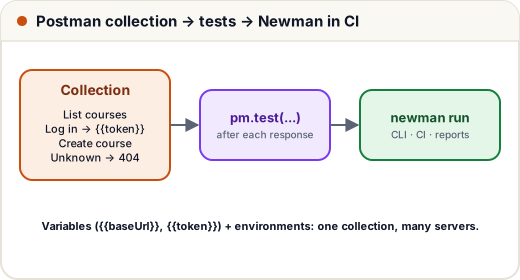
1. Requests and collections
- A request = method + URL + headers + body. Click Send and see the status, time, headers and JSON.
- A collection groups requests (e.g. everything for the Course API) so they can be shared with the team and run together.
- Variables like
{{baseUrl}}and{{token}}avoid copy-pasting values.
2. A collection with tests
This collection tests the same Course API as our REST Assured tests. Each request has a Tests script that runs after the response arrives:
// File: postman/course-api.postman_collection.json
{
  "info": {
    "name": "Skills101 Course API",
    "schema": "https://schema.getpostman.com/json/collection/v2.1.0/collection.json"
  },
  "variable": [
    { "key": "baseUrl", "value": "http://localhost:8081" },
    { "key": "token", "value": "" }
  ],
  "item": [
    {
      "name": "List courses",
      "request": { "method": "GET", "url": "{{baseUrl}}/api/courses" },
      "event": [{
        "listen": "test",
        "script": { "exec": [
          "pm.test('status is 200', () => pm.response.to.have.status(200));",
          "pm.test('has the Java course', () => {",
          "  const titles = pm.response.json().map(c => c.title);",
          "  pm.expect(titles).to.include('Java Full Stack');",
          "});"
        ] }
      }]
    },
    {
      "name": "Log in as admin",
      "request": {
        "method": "POST",
        "url": "{{baseUrl}}/auth/token",
        "header": [{ "key": "Content-Type", "value": "application/json" }],
        "body": { "mode": "raw", "raw": "{ \"email\": \"admin@skills101.in\", \"password\": \"admin123\" }" }
      },
      "event": [{
        "listen": "test",
        "script": { "exec": [
          "pm.test('status is 200', () => pm.response.to.have.status(200));",
          "pm.collectionVariables.set('token', pm.response.json().token);"
        ] }
      }]
    },
    {
      "name": "Create course (admin)",
      "request": {
        "method": "POST",
        "url": "{{baseUrl}}/api/courses",
        "header": [
          { "key": "Content-Type", "value": "application/json" },
          { "key": "Authorization", "value": "Bearer {{token}}" }
        ],
        "body": { "mode": "raw", "raw": "{ \"title\": \"Postman for Testers\", \"fee\": 799, \"seats\": 60 }" }
      },
      "event": [{
        "listen": "test",
        "script": { "exec": [
          "pm.test('status is 201', () => pm.response.to.have.status(201));",
          "pm.test('returns the new course', () => pm.expect(pm.response.json().title).to.eql('Postman for Testers'));"
        ] }
      }]
    },
    {
      "name": "Unknown course is 404",
      "request": { "method": "GET", "url": "{{baseUrl}}/api/courses/9999" },
      "event": [{
        "listen": "test",
        "script": { "exec": [
          "pm.test('status is 404', () => pm.response.to.have.status(404));",
          "pm.test('explains the problem', () => pm.expect(pm.response.json().detail).to.eql('Course 9999 not found'));"
        ] }
      }]
    }
  ]
}
pm.test(name, fn)defines a check;pm.expect(...)asserts,pm.response.to.have.status(201)checks the status.- The login request saves the token with
pm.collectionVariables.set('token', ...), and the next request sendsAuthorization: Bearer {{token}}— the same chaining we did in Java. - Order matters: the collection runner runs requests top to bottom.
In Postman: Import this file, start the Course API, then Run collection.
3. Environments
Create environments such as Local (baseUrl = http://localhost:8081) and Staging (baseUrl = https://staging.example.com) and switch with one click. Keep secrets (passwords, tokens) as secret values, and never commit real ones.
4. Newman: Postman in the command line and CI
npm install -g newman
newman run postman/course-api.postman_collection.json
newman run course-api.postman_collection.json -e staging.postman_environment.json --reporters cli,junit
Newman exits with an error code when a test fails, so CI pipelines (lesson 10) stop the build.
How we checked this lesson: the collection file is valid Postman v2.1 JSON, and every request in it — list, login, create with token, 404 — is covered by our passing REST Assured tests against the same API. We didn't run Newman itself in our build environment; run it yourself with the API started.
5. Postman or REST Assured?
| Postman | REST Assured |
|---|---|
| no code to start; great for exploring | full Java: loops, data providers, reuse |
| tests in JavaScript inside the collection | tests live in the same repo as UI tests |
| non-developers can use it | code review, refactoring, IDE support |
Most teams use both: Postman to explore and share, REST Assured (or Newman) in CI.
Common mistakes
- Saving real passwords or tokens in collections shared publicly.
- Requests that only work in one order without saying so.
- No tests — just "it returned something".
Quick recap
- Collections group requests; variables (
{{baseUrl}},{{token}}) and environments avoid hard-coding. pm.test+pm.expectturn requests into tests; save values withpm.collectionVariables.set.- Newman runs collections in the terminal and CI.