AdvancedSoftware Testing & Automation · Lesson 13 of 13 · Updated ·
Writing Test Cases and Bug Reports — STLC, Defect Life Cycle, Severity vs Priority
Selenium scripts and API tests are only half of a tester's job. The other half is communication: test cases that anyone can follow, and bug reports that a developer can act on without asking ten questions. These are also among the most common topics in QA and SDET interviews, often with a task like "write test cases for a login page".
1. The software testing life cycle (STLC)
Testing is not one activity at the end of a project. The software testing life cycle is a sequence of phases that runs alongside development:
| Phase | What happens | Output |
|---|---|---|
| 1. Requirement analysis | read requirements, find what is testable, ask questions | list of testable requirements, doubts |
| 2. Test planning | decide scope, approach, tools, people, schedule, risks | test plan |
| 3. Test case design | write test cases and prepare test data | test cases, test data |
| 4. Environment setup | prepare servers, browsers, accounts, data | ready test environment |
| 5. Test execution | run tests, compare actual vs expected, log defects | results, bug reports |
| 6. Test closure | summarise results, lessons learned | test summary report |
Each phase has entry criteria (what must be ready to start) and exit criteria (what must be true to finish). For example, the exit criteria for execution might be "all high-priority test cases run, and no open critical bugs".
In agile teams these phases happen in every sprint, in small pieces, but the same activities still take place.
2. What a good test case contains
A test case is a set of steps, data and an expected result that checks one specific behaviour. Teams use tools like Jira (with plugins), TestRail or simply a spreadsheet, but the fields are much the same:
| Field | Example |
|---|---|
| ID | TC_LOGIN_003 |
| Title | Login fails with a wrong password |
| Preconditions | user asha@example.com exists and is active |
| Test data | email = asha@example.com, password = Wrong@123 |
| Steps | 1. Open /login 2. Enter email 3. Enter password 4. Click Log in |
| Expected result | stays on /login; shows "Wrong email or password"; password field is cleared |
| Actual result / status | filled in during execution: Pass / Fail / Blocked |
| Priority | High |
Rules that make test cases useful:
- One behaviour per test case. "Login works" is too vague to pass or fail clearly.
- Expected results must be checkable. "Error is shown properly" is not checkable; the exact message is.
- Independent. A test case should not depend on another test case having run first.
- Anyone can run it. A new team member should get the same result by following the steps.
- Traceable. Link each test case to its requirement. A table of requirements against test cases is called a requirement traceability matrix (RTM); it shows at a glance which requirements have no tests.
Example: test cases for a login page
Interviewers like this question because it shows how you think. Cover several kinds of cases:
| Type | Examples |
|---|---|
| Positive | valid email and password logs in; "Remember me" keeps you logged in after closing the browser |
| Negative | wrong password; unregistered email; empty fields; email without @ |
| Boundary | password at minimum and maximum length, and one character beyond each |
| Security | password is masked; account locks after repeated failures; SQL like ' OR 1=1 -- in the email field is rejected safely |
| Usability / accessibility | Tab order is logical; Enter key submits; error is read by a screen reader |
| Compatibility | works on Chrome, Firefox and a mobile browser |
The techniques from the previous lesson (decision tables, state transition) help you find these systematically.
3. Writing a bug report developers love
A bug report (defect report) describes a failure so that someone else can reproduce it. If a developer cannot reproduce a bug, they usually cannot fix it.
Title:      Cart total ignores coupon when quantity is changed after applying it
ID:         BUG-1042
Environment: staging, build 2.5.0-rc1, Chrome 131 on Windows 11
Severity:   Major          Priority: High
Preconditions: logged in as a student; coupon SAVE10 is active

Steps to reproduce:
  1. Add "DSA Bootcamp" (Rs 999) to the cart
  2. Apply coupon SAVE10            -> total shows Rs 899.10 (correct)
  3. Change quantity from 1 to 2

Expected: total = Rs 1798.20 (10% off Rs 1998)
Actual:   total = Rs 1998.00 (coupon silently removed)

Reproducible: 5 out of 5 attempts
Attachments: screenshot, network log of the PUT /cart request
What makes this report good:
- The title says what is wrong and when, so it can be found by search later.
- Exact steps and data, starting from a known state.
- Expected vs actual side by side, with numbers.
- Environment and build, because many bugs depend on them.
- Evidence: screenshots, videos, logs or the failing API request.
- One bug per report. Two problems in one report get half-fixed.
- Neutral tone. Describe the behaviour, not the developer.
Before reporting, search the tracker for duplicates and try to find the smallest set of steps that still shows the bug.
4. The defect life cycle
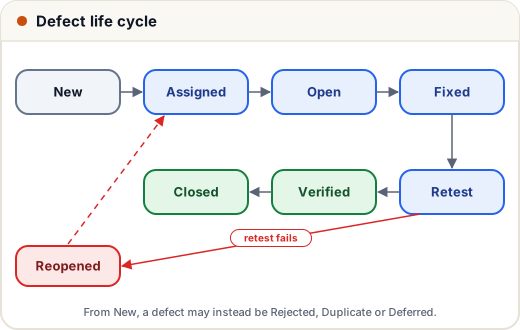
A defect moves through a series of statuses from the moment it is found until it is closed. Names vary slightly between companies and tools, but a typical cycle looks like this:
| Status | Meaning |
|---|---|
| New | tester has logged it |
| Assigned | lead has given it to a developer |
| Open | developer is working on it |
| Fixed | developer has changed the code |
| Retest | tester checks the fix on a new build |
| Verified | the fix works |
| Closed | no further action needed |
| Reopened | the retest failed; the bug goes back to the developer |
| Rejected / Duplicate / Deferred | not a bug, already reported, or postponed to a later release |
The key rule: only the tester closes a bug, after retesting it. A defect never jumps from Fixed straight to Closed. Tools like Jira enforce this with a workflow of allowed transitions — exactly the state transition idea from the previous lesson. Here is a small Java model of such a workflow:
import java.util.*;

public class Main {
    static final Map<String, List<String>> NEXT = new LinkedHashMap<>();
    static {
        NEXT.put("New", List.of("Assigned", "Rejected", "Duplicate", "Deferred"));
        NEXT.put("Assigned", List.of("Open"));
        NEXT.put("Open", List.of("Fixed", "Deferred"));
        NEXT.put("Fixed", List.of("Retest"));
        NEXT.put("Retest", List.of("Verified", "Reopened"));
        NEXT.put("Reopened", List.of("Assigned"));
        NEXT.put("Verified", List.of("Closed"));
    }

    static boolean allowed(String from, String to) {
        return NEXT.getOrDefault(from, List.of()).contains(to);
    }

    public static void main(String[] args) {
        String[] history = {"New", "Assigned", "Open", "Fixed", "Retest", "Reopened",
                            "Assigned", "Open", "Fixed", "Retest", "Verified", "Closed"};
        for (int i = 1; i < history.length; i++) {
            if (!allowed(history[i - 1], history[i])) {
                System.out.println("Invalid: " + history[i - 1] + " -> " + history[i]);
                return;
            }
        }
        System.out.println("Valid history with " + (history.length - 1) + " transitions");
        System.out.println("Fixed -> Closed allowed? " + allowed("Fixed", "Closed"));
        System.out.println("Retest -> Reopened allowed? " + allowed("Retest", "Reopened"));
    }
}
Valid history with 11 transitions
Fixed -> Closed allowed? false
Retest -> Reopened allowed? true
This bug was fixed, failed its retest, was reopened, fixed again and finally verified.
5. Severity vs priority
Two fields that every interviewer asks about:
- Severity — how much damage the bug does to the system or the user (technical impact). Usually set by the tester.
- Priority — how soon it must be fixed (business urgency). Usually set by the product owner, lead or manager.
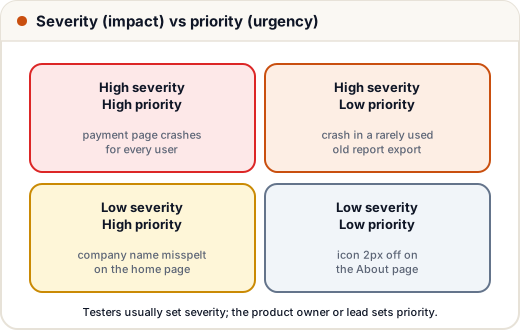
Typical severity levels are Critical (blocker), Major, Minor and Trivial; priority is often P1 to P4 or High/Medium/Low. The interesting cases are the mixed ones: a spelling mistake in the company name hurts nothing technically but embarrasses the business, so it is fixed first; a crash in a report nobody uses is serious but can wait.
Common mistakes
- Test cases with vague expected results ("should work fine").
- Bug reports without steps, build or environment ("checkout is broken").
- Reporting several problems in one bug.
- Closing a bug without retesting it on the new build.
- Confusing severity (impact) with priority (urgency).
- Arguing in bug comments instead of adding facts: logs, data, screenshots.
Quick recap
- STLC: requirement analysis → planning → test case design → environment → execution → closure, each with entry and exit criteria.
- A test case: ID, title, preconditions, data, steps, checkable expected result, status; one behaviour each; traceable via an RTM.
- A bug report: clear title, environment, exact steps, expected vs actual, evidence; one bug per report.
- Defect life cycle: New → Assigned → Open → Fixed → Retest → Verified → Closed, with Reopened, Rejected, Duplicate and Deferred.
- Severity = impact; priority = urgency; they are set independently.