AdvancedAdvanced Java & Spring Boot · Lesson 20 of 20 · Updated ·
Scheduled Jobs and @Async in Spring Boot — fixedRate, fixedDelay, Cron and Background Tasks
Not all backend work starts with an HTTP request. A course platform may need to send class reminders every morning at 9, close unpaid orders every 15 minutes, or send a welcome email after sign-up without making the user wait. Spring Boot handles both needs with two annotations: @Scheduled runs a method on a timer, and @Async runs a method in the background on another thread.
1. Switching it on
Both features are off until you enable them, usually on a configuration class or the main application class:
// Not compiled: a short sketch — the course projects do not run scheduled jobs
@SpringBootApplication
@EnableScheduling
@EnableAsync
public class CourseApiApplication { /* main method as usual */ }
Neither needs an extra dependency; both come with the core Spring framework that every Spring Boot starter brings in.
2. @Scheduled: fixedRate and fixedDelay
A scheduled method takes no parameters and normally returns void (any return value is ignored). The two simplest timers:
// Not compiled: a short sketch of scheduled jobs
@Component
public class Jobs {

    @Scheduled(fixedRate = 10, timeUnit = TimeUnit.SECONDS)
    public void refreshSeatCounts() { ... }          // aims to START every 10 s

    @Scheduled(fixedDelay = 10, initialDelay = 30, timeUnit = TimeUnit.SECONDS)
    public void closeUnpaidOrders() { ... }          // waits 10 s after each run ENDS; first run 30 s after startup
}
The difference matters when a run is slow. This plain-Java program replays a schedule with a 10-second period, where the second run takes 12 seconds:
// Not compiled: not part of the course projects — a plain-Java demo you can run as Main.java
public class Main {
    public static void main(String[] args) {
        int period = 10;
        int[] durations = {3, 12, 3, 3};

        System.out.print("fixedRate  starts:");
        int end = 0;
        for (int i = 0; i < durations.length; i++) {
            int start = Math.max(i * period, end);     // planned time, or right after a late run
            System.out.print(" " + start);
            end = start + durations[i];
        }
        System.out.println();

        System.out.print("fixedDelay starts:");
        end = 0;
        for (int i = 0; i < durations.length; i++) {
            int start = (i == 0) ? 0 : end + period;   // always a full gap after the previous end
            System.out.print(" " + start);
            end = start + durations[i];
        }
        System.out.println();
    }
}
fixedRate  starts: 0 10 22 30
fixedDelay starts: 0 13 35 48
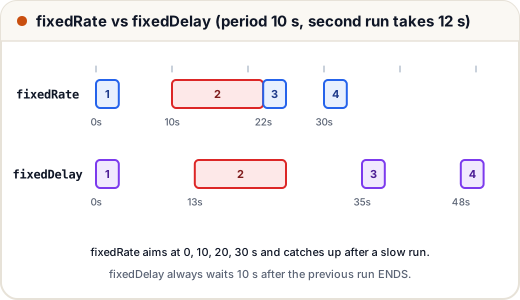
- fixedRate keeps to the clock (0, 10, 20, 30…). If a run is late, the next one starts as soon as the previous finishes (22), then it is back on plan (30). Runs of the same job never overlap.
- fixedDelay guarantees a rest gap between runs, so the start times drift. Use it when each run must see the effects of the previous one, or to avoid hammering another system.
3. Cron expressions
For "every weekday at 9 AM", use a cron expression. Spring's cron format has six fields — one more than the classic Unix cron, because it starts with seconds:
| Position | Field | Allowed values | Example |
|---|---|---|---|
| 1 | second | 0–59 | 0 |
| 2 | minute | 0–59 | 0 |
| 3 | hour | 0–23 | 9 |
| 4 | day of month | 1–31 | * (any) |
| 5 | month | 1–12 or JAN–DEC | * |
| 6 | day of week | 0–7 (0 and 7 are Sunday) or MON–SUN | MON-FRI |
// Not compiled: a short sketch of cron-based jobs
@Scheduled(cron = "0 0 9 * * MON-FRI", zone = "Asia/Kolkata")
public void sendClassReminders() { ... }      // 9:00:00 AM IST, Monday to Friday

@Scheduled(cron = "0 */15 * * * *")
public void closeUnpaidOrders() { ... }       // every 15 minutes, at second 0
Always set zone for business times. A server in a cloud data centre often runs in UTC, and a reminder meant for 9 AM in India would otherwise go out at 2:30 PM IST. Keep the expression in application.properties (cron = "${jobs.reminder.cron}") so it can change without a code change.
4. @Async: background work
Registering a student should not wait 2–3 seconds for an email server. Mark the slow method @Async and Spring runs it on a task executor (a thread pool) while the caller continues:
// Not compiled: a short sketch of an @Async service
@Service
public class EmailService {

    @Async
    public void sendWelcome(String email) { ... }                 // fire and forget

    @Async
    public CompletableFuture<Integer> countUnreadMessages(Long studentId) {
        int count = ...;
        return CompletableFuture.completedFuture(count);           // caller can wait for it later
    }
}
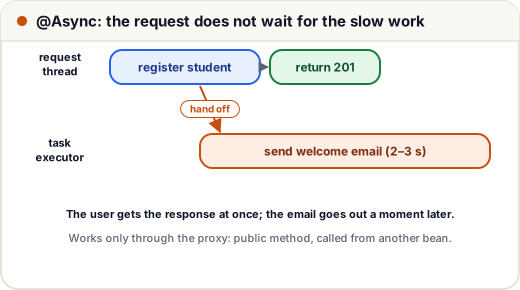
@Async methods return void or a CompletableFuture<T>. The second form lets you start several slow calls at once and combine the results. Here is the same idea in plain Java with CompletableFuture:
// Not compiled: not part of the course projects — a plain-Java demo you can run as Main.java
import java.util.concurrent.*;

public class Main {
    public static void main(String[] args) {
        ExecutorService pool = Executors.newFixedThreadPool(2);
        Thread mainThread = Thread.currentThread();

        CompletableFuture<Integer> fee = CompletableFuture.supplyAsync(() -> 4999, pool);
        CompletableFuture<Boolean> otherThread =
                CompletableFuture.supplyAsync(() -> Thread.currentThread() != mainThread, pool);
        CompletableFuture<String> summary = fee.thenCombine(CompletableFuture.supplyAsync(() -> 40, pool),
                (f, seats) -> "fee " + f + ", seats " + seats);

        System.out.println(summary.join());
        System.out.println("ran on another thread: " + otherThread.join());
        pool.shutdown();
    }
}
fee 4999, seats 40
ran on another thread: true
join() waits for the result. Both lookups were running at the same time on pool threads, so waiting for both takes about as long as the slower one, not the sum.
Like @Transactional, @Async works through a proxy (lesson 17): it is ignored on private methods and on calls from the same class. Two more things to know:
- Spring Boot auto-configures a thread pool for
@Async(a bean namedapplicationTaskExecutor). Its size can be tuned withspring.task.execution.pool.*properties. - An exception thrown inside a
void@Asyncmethod never reaches the caller — by default it is only logged. Return aCompletableFutureif the caller must know about failures.
5. Two production traps
One scheduler thread. By default Spring Boot's scheduler has a pool of one thread (spring.task.scheduling.pool.size=1). A job that hangs for 10 minutes delays every other scheduled job. Keep jobs short, hand long work to @Async, or raise the pool size.
Several servers. If the app runs on three instances, every @Scheduled job runs three times — three reminder emails per student. Common fixes:
| Fix | How it works |
|---|---|
| A lock in the database (for example the ShedLock library) | Only the instance that gets the lock runs the job this time |
| A separate worker service with one instance | Web instances do not schedule anything |
| A platform scheduler (Kubernetes CronJob, cloud scheduler) | Something outside the app calls it once |
Also make jobs idempotent where possible — running "close orders unpaid for 30 minutes" twice should do no harm, because the second run finds nothing left to close.
Common mistakes
- Forgetting
@EnableSchedulingor@EnableAsync; the annotations then do nothing, without any error. - Writing a 5-field Unix cron such as
0 9 * * *. Spring expects 6 fields and fails at startup. - Leaving out
zone, so jobs run at the right time in UTC and the wrong time in India. - Calling an
@Asyncmethod from the same class, or making it private, and wondering why it is not asynchronous. - Assuming a
void@Asyncmethod will report its exceptions to the caller. - Running scheduled jobs on every instance of a scaled-out app.
Quick recap
@EnableScheduling+@Scheduled(fixedRate | fixedDelay | cron)runs methods on a timer.- fixedRate keeps to the clock; fixedDelay waits a full gap after each run ends.
- Spring cron has 6 fields (seconds first); always set
zonefor business times. @EnableAsync+@Asyncruns work on a thread pool; returnCompletableFuturefor results and errors.- Default scheduler has one thread; on several instances, jobs run once per instance unless you add a lock.