Advanced Java & Spring Boot · Lesson 15 of 16 · Updated ·
Docker for Spring Boot — Dockerfile, Multi-stage Builds and Docker Compose
"It works on my machine" is not a deployment strategy. Docker packages your app with exactly the Java version and files it needs into an image; a running image is a container. The same image runs on your laptop, a test server and the cloud.
1. Words to know
| Term | Meaning |
|---|---|
| Image | a read-only template: OS files + JRE + your jar |
| Container | a running instance of an image (isolated process) |
| Dockerfile | the recipe to build an image |
| Registry | where images are stored and shared (Docker Hub, AWS ECR, GitHub) |
| Volume | storage that survives container restarts (databases!) |
| Compose | start several containers together from one YAML file |
Containers share the host's kernel, so they start in seconds and use far less memory than virtual machines.
2. A multi-stage Dockerfile
# File: course-api/Dockerfile
# ---- Stage 1: build the jar with Maven (needs the full JDK) ----
FROM eclipse-temurin:21-jdk AS build
WORKDIR /app
COPY .mvn .mvn
COPY mvnw pom.xml ./
RUN chmod +x mvnw
RUN ./mvnw -q -B dependency:go-offline     # cached layer: re-runs only when pom.xml changes
COPY src src
RUN ./mvnw -q -B package -DskipTests

# ---- Stage 2: run it on a small image with just the JRE ----
FROM eclipse-temurin:21-jre
WORKDIR /app
# don't run as root
RUN useradd --system app
USER app
COPY --from=build /app/target/course-api-0.0.1-SNAPSHOT.jar app.jar
EXPOSE 8081
ENTRYPOINT ["java", "-jar", "app.jar"]
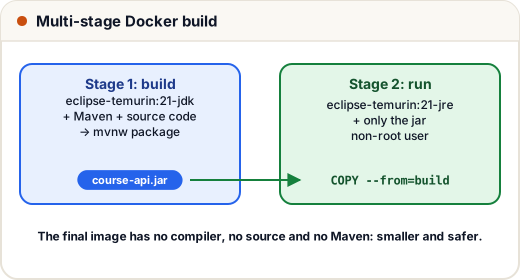
- Stage 1 has the JDK and Maven to build; stage 2 has only a JRE and the jar — no source code or compilers ship to production, so the image is smaller and safer.
- Copying
pom.xmland downloading dependencies before copyingsrcmeans Docker re-uses that cached layer when only your code changes — rebuilds take seconds. USER app— never run your app as root inside the container.EXPOSE 8081documents the port; publish it with-p 8081:8081.
docker build -t course-api ./course-api
docker run -p 8081:8081 -e APP_JWT_SECRET=... course-api
(Spring Boot can also build images without a Dockerfile: ./mvnw spring-boot:build-image, using Cloud Native Buildpacks.)
3. The whole system with Docker Compose
# File: docker-compose.yml
# The whole system on one machine: docker compose up --build
services:
  kafka:
    image: apache/kafka:4.1.0               # single-node Kafka in KRaft mode (no ZooKeeper)
    environment:
      KAFKA_NODE_ID: 1
      KAFKA_PROCESS_ROLES: broker,controller
      KAFKA_LISTENERS: PLAINTEXT://:9092,CONTROLLER://:9093
      KAFKA_ADVERTISED_LISTENERS: PLAINTEXT://kafka:9092
      KAFKA_CONTROLLER_LISTENER_NAMES: CONTROLLER
      KAFKA_CONTROLLER_QUORUM_VOTERS: 1@kafka:9093
      KAFKA_OFFSETS_TOPIC_REPLICATION_FACTOR: 1

  discovery-server:
    build: ./discovery-server
    ports: ["8761:8761"]

  course-api:
    build: ./course-api
    environment:
      EUREKA_CLIENT_SERVICEURL_DEFAULTZONE: http://discovery-server:8761/eureka
    depends_on: [discovery-server]

  order-service:
    build: ./order-service
    environment:
      EUREKA_CLIENT_SERVICEURL_DEFAULTZONE: http://discovery-server:8761/eureka
      SPRING_KAFKA_BOOTSTRAP_SERVERS: kafka:9092
    depends_on: [discovery-server, kafka]

  api-gateway:
    build: ./api-gateway
    ports: ["8080:8080"]                     # the only door into the system
    environment:
      EUREKA_CLIENT_SERVICEURL_DEFAULTZONE: http://discovery-server:8761/eureka
    depends_on: [discovery-server, course-api, order-service]
- Containers on the same Compose network reach each other by service name (
kafka:9092,discovery-server:8761). - Environment variables override
application.properties(relaxed binding):SPRING_KAFKA_BOOTSTRAP_SERVERSreplacesspring.kafka.bootstrap-servers=localhost:9092. - Only the gateway (8080) and the Eureka dashboard (8761) are published to your machine; everything else stays internal.
depends_ononly controls start order, not readiness — services must retry until their dependencies are up (Eureka clients and Kafka clients do).
docker compose up --build     # build all images and start everything
docker compose logs -f order-service
docker compose down
How we checked this lesson: every service's tests pass, and we built the course-api jar and ran it with
java -jarexactly as the Dockerfile does (health UP, login, create course, Swagger UI all worked). Docker itself wasn't available on our build machine, so rundocker compose up --buildyourself as the final step — if a port is busy, change the left-hand number inports.
4. Where it goes next
- Push images to a registry; deploy to a VPS with Compose, or to Kubernetes (Deployments, Services, ConfigMaps, Secrets) or a managed platform (AWS ECS, Google Cloud Run).
- CI/CD (GitHub Actions, Jenkins): on every push, run
./mvnw test, build the image, push it, deploy.
Common mistakes
- One huge single-stage image with the JDK, Maven and source code inside.
- Running as root; baking secrets into the image (pass them as environment variables or secrets).
- Using
localhostto reach another container — inside Compose, use the service name. - Storing database data inside a container without a volume (it disappears with the container).
Quick recap
- Image = template; container = running image; Dockerfile = recipe.
- Multi-stage builds: build with the JDK, run with a JRE; cache dependencies; non-root user.
- Compose starts the whole system; services talk by name; env vars override properties.