Advanced Java & Spring Boot · Lesson 1 of 16 · Updated ·
Advanced Java Roadmap, Maven and Your First Spring Boot Project
Core Java teaches you the language. Advanced Java is what companies actually pay freshers for: building the backend — the server that stores data, applies business rules and answers the mobile app or website with JSON.
In this track we build one real project step by step: a Course API for an online academy (courses, students, enrolments, login), then split it into microservices. Every piece of code you see here comes from projects that are compiled and tested with Spring Boot 4.1 and Java 17+.
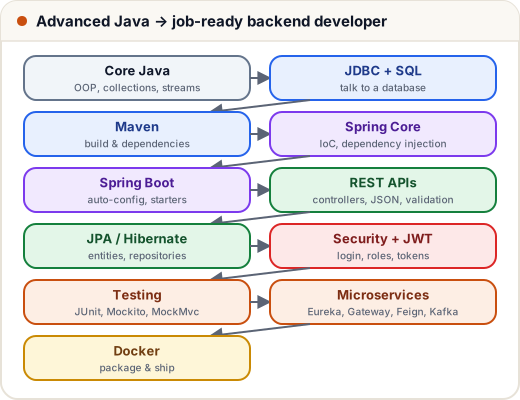
1. What you need first
- Core Java: classes, interfaces, collections, exceptions, lambdas and streams, records. (Our Java tutorial covers all of it.)
- SQL basics: SELECT, JOIN, GROUP BY. (See DBMS & SQL.)
- A JDK 17 or newer (21 or 25 is best) and an IDE: IntelliJ IDEA Community or VS Code with the Java extensions.
2. Maven: the build tool
A real project uses dozens of libraries (Spring, Hibernate, a database driver, JSON, testing). Maven downloads them for you, with the right versions, and builds your app with one command.
Everything is described in pom.xml (Project Object Model). The most important part of a Spring Boot pom.xml is its parent:
<!-- File: course-api/pom.xml (excerpt) -->
<parent>
	<groupId>org.springframework.boot</groupId>
	<artifactId>spring-boot-starter-parent</artifactId>
	<version>4.1.2</version>
	<relativePath/> <!-- lookup parent from repository -->
</parent>
The parent fixes compatible versions of hundreds of libraries, so in the <dependencies> section you write only the name of each starter — no version numbers:
| Starter | Gives you |
|---|---|
spring-boot-starter-webmvc | REST controllers + an embedded Tomcat server |
spring-boot-starter-data-jpa | JPA / Hibernate database access |
spring-boot-starter-validation | @NotBlank, @Min… on request data |
spring-boot-starter-security | login, roles, protection of URLs |
spring-boot-starter-actuator | health checks and metrics |
h2 | a small in-memory database for learning and tests |
Spring Boot 4 split the old
spring-boot-starter-webinto smaller modules — the web starter is nowspring-boot-starter-webmvc. Older tutorials still show the Boot 3 names.
The Java version is set in the properties:
<!-- File: course-api/pom.xml (excerpt) -->
<properties>
	<java.version>17</java.version>
	<spring-cloud.version>2025.1.4</spring-cloud.version>
</properties>
3. Project layout
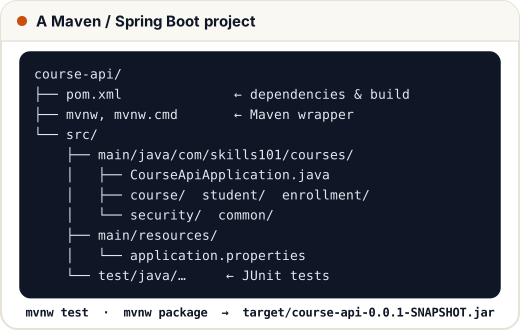
Maven expects this exact layout ("convention over configuration"). Create a new project at start.spring.io (Spring Initializr): choose Maven, Java, the Boot version, your package name and the starters, then download the zip.
4. The main class
// File: course-api/src/main/java/com/skills101/courses/CourseApiApplication.java
package com.skills101.courses;

import org.springframework.boot.SpringApplication;
import org.springframework.boot.autoconfigure.SpringBootApplication;

@SpringBootApplication
public class CourseApiApplication {

	public static void main(String[] args) {
		SpringApplication.run(CourseApiApplication.class, args);
	}

}
@SpringBootApplication switches on three things: component scanning (find your @Controller, @Service… classes in this package and below), auto-configuration (set up Tomcat, JPA, JSON… based on the starters you added) and configuration (@Bean methods).
5. Commands you will use daily
The project includes the Maven wrapper (mvnw / mvnw.cmd), so you don't even need Maven installed:
Command (Windows: mvnw.cmd) | What it does |
|---|---|
./mvnw spring-boot:run | start the app (Tomcat on the configured port) |
./mvnw test | compile and run all tests |
./mvnw package | build target/course-api-0.0.1-SNAPSHOT.jar |
java -jar target/course-api-0.0.1-SNAPSHOT.jar | run the built app anywhere Java is installed |
Maven lifecycle phases run in order: validate → compile → test → package → verify → install → deploy. Running package first compiles and tests.
Common mistakes
- Adding version numbers to Spring Boot starters (the parent already manages them).
- Putting classes outside the main class's package — component scanning won't find them.
- Using a JDK older than 17: Spring Boot 3 and 4 need Java 17+.
Quick recap
- Advanced Java for jobs = backend: JDBC, Spring, Spring Boot, REST, JPA, security, testing, microservices.
- Maven manages dependencies and builds;
pom.xmldescribes the project; starters bring compatible libraries. @SpringBootApplication= component scan + auto-configuration + configuration../mvnw spring-boot:run,test,package;java -jarruns the result.